251205 TIL
2025. 12. 5. 19:12ㆍCourses/아이티윌 오라클 DBA 과정
문제
create tablespace dw_tbs
datafile '/home/oracle/userdata/dw_tbs01.dbf' size 5m autoextend on
extent management local uniform size 1m
segment space management auto; 

alter tablespace dw_tbs add datafile '/home/oracle/userdata/dw_tbs02.dbf' size 5m autoextend off;
3. /home/oracle/userdata/dw_tbs02.dbf 데이터 파일을 자동 확장 기능으로 수정하세요.
alter database datafile '/home/oracle/userdata/dw_tbs02.dbf' autoextend on;
4. hr.employees 테이블을 hr.emp_dw 복제하세요. hr.emp_dw 테이블은 dw_tbs 테이블스페이스에 생성하세요.
create table hr.emp_dw
tablespace dw_tbs
as
select * from hr.employees;


# tablespace offline normal
alter tablespace dw_tbs offline;

select * from dba_data_files;

# 대상 데이터 파일 이동
[oracle@ora19c ~]$ mv -v '/home/oracle/userdata/dw_tbs01.dbf' '/u01/app/oracle/oradata/ORA19C/'
‘/home/oracle/userdata/dw_tbs01.dbf’ -> ‘/u01/app/oracle/oradata/ORA19C/dw_tbs01.dbf’
[oracle@ora19c ~]$ mv -v '/home/oracle/userdata/dw_tbs02.dbf' '/u01/app/oracle/oradata/ORA19C/'
‘/home/oracle/userdata/dw_tbs02.dbf’ -> ‘/u01/app/oracle/oradata/ORA19C/dw_tbs02.dbf’
[oracle@ora19c ~]$ ls /u01/app/oracle/oradata/ORA19C/
control01.ctl  dw_tbs02.dbf  redo02.log  sysaux01.dbf  temp01.dbf     users01.dbf
dw_tbs01.dbf   redo01.log    redo03.log  system01.dbf  undotbs01.dbf

# 기존 데이터 파일 위치를 새로운 데이터 파일 위치로 변경
alter tablespace dw_tbs rename datafile '/home/oracle/userdata/dw_tbs01.dbf' to '/u01/app/oracle/oradata/ORA19C/dw_tbs01.dbf';
alter tablespace dw_tbs rename datafile '/home/oracle/userdata/dw_tbs02.dbf' to '/u01/app/oracle/oradata/ORA19C/dw_tbs02.dbf';

select * from dba_data_files;

# tablespace online
alter tablespace dw_tbs online;


6. dw_tbs 테이블스페이스 삭제
drop tablespace dw_tbs including contents and datafiles;

Data Buffer Cache
Standard Block
SYS@ora19c> show parameter db_block_size

NAME                                 TYPE        VALUE
------------------------------------ ----------- ------------------------------
db_block_size integer 8192- db_block_size는 db 생성 시에 결정됨
- 기본적으로 8K
select owner, table_name, buffer_pool from dba_tables where owner = 'HR' and table_name = 'EMPLOYEES';
- 기본 테이블스페이스 사용 시 데이터 블록들은 data buffer cache의 default pool에서 관리됨
Nonstandard Block
SYS@ora19c> show parameter cache_size

NAME                                 TYPE        VALUE
------------------------------------ ----------- ------------------------------
client_result_cache_size             big integer 0
data_transfer_cache_size             big integer 0
db_16k_cache_size                    big integer 0
db_2k_cache_size                     big integer 0
db_32k_cache_size                    big integer 0
db_4k_cache_size                     big integer 0
db_8k_cache_size                     big integer 0
db_cache_size                        big integer 0
db_flash_cache_size                  big integer 0
db_keep_cache_size                   big integer 0
db_recycle_cache_size big integer 0- 기본 블록 크기가 아닌 다른 블록 크기를 사용할 경우 각 블록 크기 별 전용 cache pool에서 관리됨
- 2K block → 2K pool
- 4K block → 4K pool
- 8k block → 8k pool
- 16K block → 16K pool
- 32K block → 32K pool
- 다른 블록 크기의 테이블스페이스를 생성하려면 먼저 해당 블록 크기를 관리하는 cache pool을 먼저 할당 받아야 함
4K 블록 크기 테이블 스페이스 생성
1. 4K 블록을 관리하는 메모리 확보
SYS@ora19c> show parameter db_4k_cache_size

NAME                                 TYPE        VALUE
------------------------------------ ----------- ------------------------------
db_4k_cache_size                     big integer 0

# free 공간이 있는지 확인
SYS@ora19c> select * from v$sgastat where name = 'free memory';

POOL           NAME                                BYTES     CON_ID
-------------- ------------------------------ ---------- ----------
shared pool    free memory                      19286208          0
large pool     free memory                       3702784          0
java pool      free memory                       4194304          0

SYS@ora19c> select sum(bytes)/1024/1024 free_mb from v$sgastat where name = 'free memory';

   FREE_MB
----------
25.8677292

# 4K 블록을 관리하는 메모리 확보
SYS@ora19c> alter system set db_4k_cache_size = 12m;

System altered.

SYS@ora19c> show parameter db_4k_cache_size

NAME                                 TYPE        VALUE
------------------------------------ ----------- ------------------------------
db_4k_cache_size                     big integer 12M
2. 4k block 크기의 테이블스페이스 생성
create tablespace oltp_tbs
datafile '/home/oracle/userdata/oltp_tbs01.dbf' size 5m autoextend on
blocksize 4k
extent management local uniform size 1m
segment space management auto;

select * from dba_tablespaces;
UNDO
- DML 작업 시에 이전 값을 저장하는 공간
- 트랜잭션이 종료(commit, rollback)될 때 까지는 이전 값을 보존해야 함
- 목적
- rollback
- read consistent(읽기 일관성)
- flashback query
- 실패한 트랜잭션에 recovery
select tablespace_name, contents from dba_tablespaces;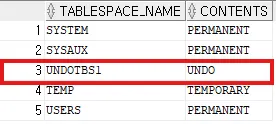
- contents 컬럼이 UNDO로 되어있는 테이블스페이스
- 시스템 UNDO 세그먼트는 SYSTEM 테이블스페이스에 존재
Undo Monitoring
- undo space가 부족한 경우
ORA-01650 - 읽기 일관성이 어긋난 경우
ORA-01555 : snapshot too old- 커밋된 데이터의 경우 undo 공간이 부족하면 제거됨
- 제거된 undo 데이터가 필요한 경우 발생
enq:US-contention대기 이벤트
SYS@ora19c> show parameter undo

NAME                                 TYPE        VALUE
------------------------------------ ----------- ------------------------------
temp_undo_enabled                    boolean     FALSE
undo_management                      string      AUTO
undo_retention                       integer     900
undo_tablespace string UNDOTBS1- undo_management = AUTO : undo 관리를 자동화
-- undo segment 조회
select n.usn, n.name, s.extents, s.rssize, s.xacts, s.status
from v$rollname n, v$rollstat s
where n.usn = s.usn;
- SYSTEM : System Undo, 딕셔너리 테이블
- 나머지는 Undo 테이블스페이스
-- 현재 접속 중인 세션
select * from v$session where username = 'HR';
-- hr 세션에서 DML 수행 후
-- undo segment 조회
select n.usn, n.name, s.extents, s.rssize, s.xacts, s.status
from v$rollname n, v$rollstat s
where n.usn = s.usn;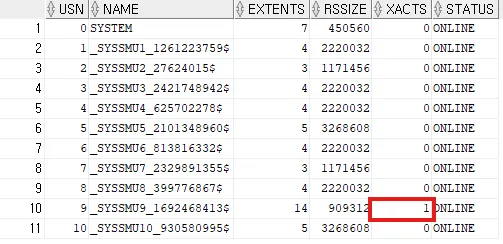
- usn : Undo Segment Number, Undo 세그먼트를 식별하는 번호
- xacts : Undo 세그먼트를 사용 중인 트랜잭션 수
-- 현재 트랜잭션을 수행 중인 세션
select s.username, t.xidusn, t.ubafil, t.ubablk, t.used_ublk
from v$session s, v$transaction t
where s.saddr = t.ses_addr;
- XIDUSN : 트랜잭션이 사용 중인 Undo Segment Number
- UBAFIL : Undo Block Address를 구성하는 파일 번호
- UBABLK : Undo Block Address를 구성하는 블록 번호
- USED_UBLK : 현재 트랜잭션이 사용한 Undo 블록
기존 undo tablespace에 새로운 데이터 파일 추가
alter tablespace UNDOTBS1 add datafile '/u01/app/oracle/oradata/ORA19C/undotbs02.dbf' size 10m autoextend on;
select * from dba_data_files;
기존 undo tablespace에 새로운 데이터 파일 삭제
alter tablespace UNDOTBS1 drop datafile '/u01/app/oracle/oradata/ORA19C/undotbs02.dbf';새로운 undo tablespace 생성
create undo tablespace undo1
datafile '/u01/app/oracle/oradata/ORA19C/undo01.dbf' size 10m autoextend on;
- undo_tablespace에 지정된 테이블스페이스만 undo로 사용 가능
select * from v$parameter where name like 'undo%';
select * from dba_rollback_segs;
- 새로 만든 undo1 테이블스페이스를 기본 undo 테이블스페이스로 설정
alter system set undo_tablespace = undo1 scope = both;
select * from v$parameter where name like 'undo%';
select * from dba_rollback_segs;
select n.usn, n.name, s.extents, s.rssize, s.xacts, s.status
from v$rollname n, v$rollstat s
where n.usn = s.usn;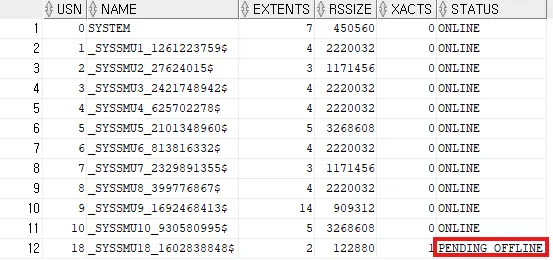
- 기본 undo 테이블스페이스 변경 전에 Undo 세그먼트를 사용 중이던 트랜잭션 존재 → PENDING OFFLINE 상태
- 트랜잭션이 종료되면 OFFLINE으로 변경됨
undo_retention
SYS@ora19c> show parameter undo_retention

NAME                                 TYPE        VALUE
------------------------------------ ----------- ------------------------------
undo_retention integer 900- 트랜잭션이 종료(commit) 되었더라도 이전 값을 undo_retention 파라미터로 설정되어 있는 초 시간까지는 보존
- read consistent(읽기 일관성)
- flashback query
- 필수 보장되는 것이 아님 → 공간의 여유가 있을 경우에만 보장
retention guarantee 활성화
- undo_retention 값을 보장하기 위해 retention guarantee 설정
alter tablespace undotbs1 retention guarantee;
retention guarantee 비활성화
alter tablespace undotbs1 retention noguarantee;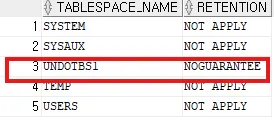
undo tablespace 삭제
drop tablespace undo1 including contents and datafiles;USER 관리
create user ora1 identified by oracle;
grant create session, create table to ora1;
ORA1@ora19c> select * from session_privs;
PRIVILEGE
----------------------------------------
CREATE TABLE
CREATE SESSION- 유저 생성 시 default tablespace 절을 생략하면 system tablespcae가 default tablespace가 됨
- system tablespace는 딕셔너리 테이블을 관리하는 공간이기 때문에 일반 테이블을 저장할 경우 경합이 발생할 수 있어 안좋음
- 이런 문제 때문에 10g버전부터 데이터베이스 생성 시에 데이터베이스 레벨에서 default tablespace가 지정됨
# 데이터베이스 레벨에서 기본값으로 설정된 정보 확인
select * from database_properties;
create table test(id number, name varchar2(30));- 테이블 생성 시에 테이블스페이스를 지정하지 않으면 user의 default tablespcae에 저장
ORA1@ora19c> select default_tablespace from user_users;

DEFAULT_TABLESPACE
------------------------------
USERS- 유저의 default tablespace는 유저 생성 시 결정
create user ora2
identified by oracle
default tablespace oltp_tbs
temporary tablespace oltp_temp
quota 1m on oltp_tbs;
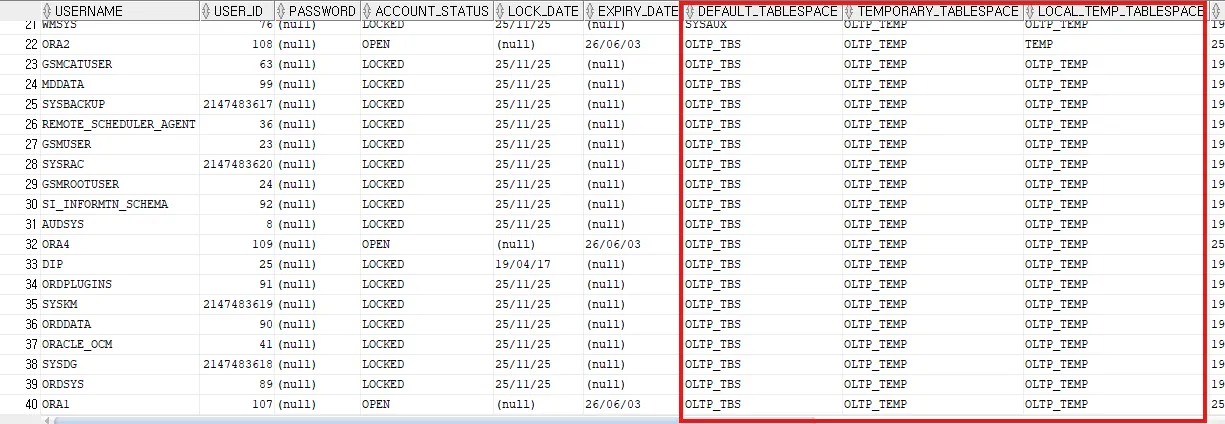
database level default tablespace 변경
alter database default tablespace oltp_tbs;
alter database default temporary tablespace oltp_temp;
database level default tablespace 삭제 불가
drop tablespace users including contents and datafiles;

ORA-12919: 기본 영구 테이블스페이스를 삭제할 수 없습니다.

drop tablespace temp including contents and datafiles;

ORA-12906: 기본 임시 테이블스페이스를 삭제할 수 없음'Courses > 아이티윌 오라클 DBA 과정' 카테고리의 다른 글
| 251203 TIL (0) | 2025.12.05 |
|---|---|
| 251202 TIL (0) | 2025.12.02 |
| 251201 TIL (0) | 2025.12.01 |
| 251128 TIL (0) | 2025.11.28 |
| 251127 TIL (0) | 2025.11.27 |