251223 TIL
2025. 12. 24. 09:41ㆍCourses/아이티윌 오라클 DBA 과정
Archivelog mode
Noarchivelog mode
- 기본적으로 데이터베이스는 noarchivelog mode로 생성됨
- log switch가 발생 시 checkpoint가 끝난 redo log group에 대해서는 재사용 가능(Inactive 상태 그룹)
- redo log 가 겹쳐 쓰여지면 마지막 백업에 대해서만 복구 작업 가능(불완전한 복구 방식)
- 백업 정책은 데이터베이스를 정상적으로 종료 후에 백업을 받아야 함
shutdown [ normal | transactional | immediate ]
- 일관성 있는 whole database backup을 받자(control file(필수), data file(필수), redo log file(선택), 초기 파라미터 파일(선택), 패스워드 파일(선택))
Archivelog mode
- log switch가 발생 시 checkpoint가 발생하고 arc 백그라운드 프로세스가 현재 (current 상태 그룹) redo log file을 물리적으로 다른 위치에 복사한 후 inactive 상태가 되면 redo log file은 재사용 가능
- control file에 archive된 redo log file 정보를 기록
- 백업 정책
- 데이터베이스를 정상적인 종료 후에 백업을 수행할 수 있고(close | cold | offline backup), 운영 중에 백업을 수행할 수 있음(open | hot | online backup)
- 복구는 현재 문제가 발생한 시점까지 복구가 가능(리두가 있을 경우)
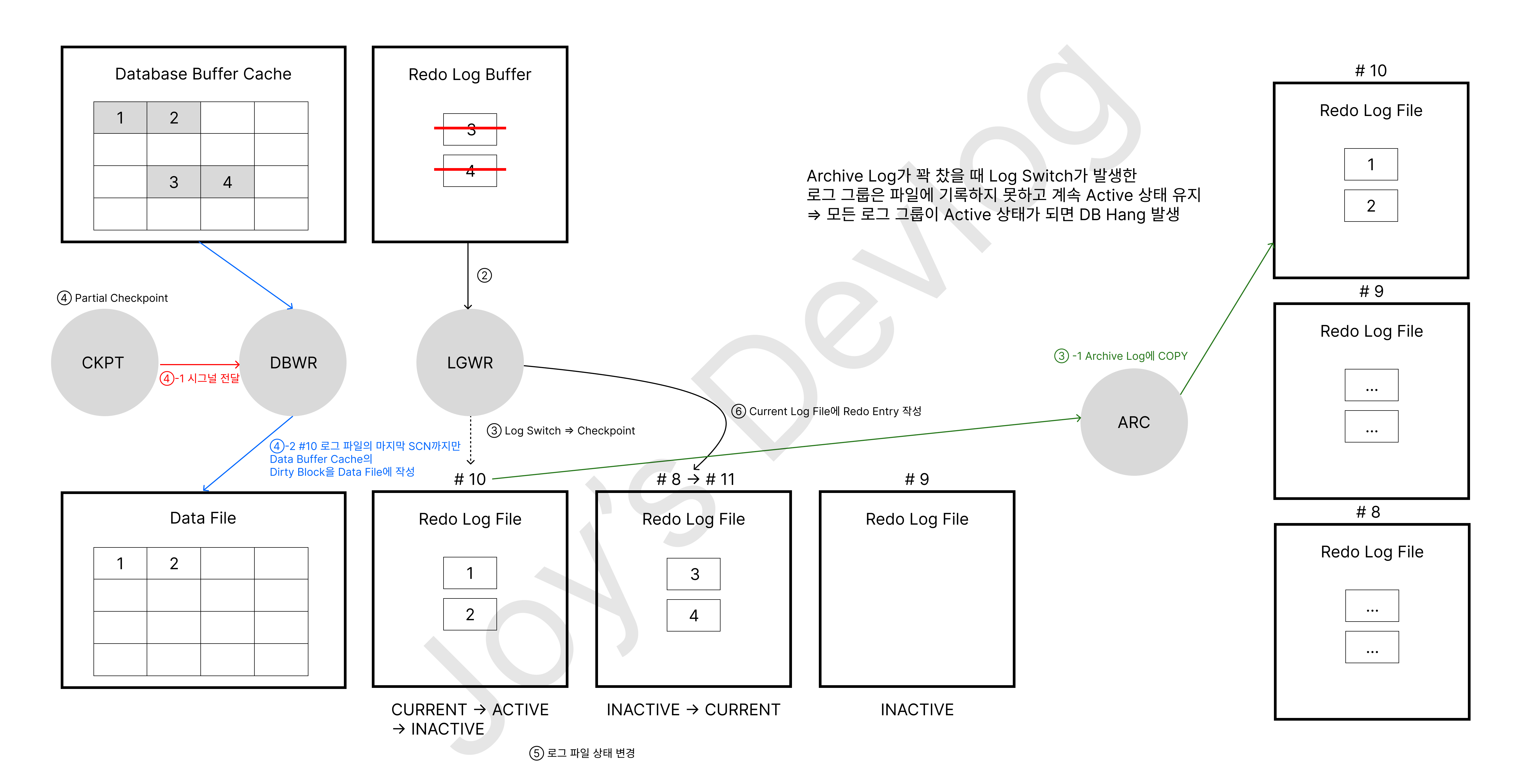
Archivelog mode 조회
SYS@ora19c> select name, log_mode from v$database;

NAME                                               LOG_MODE
-------------------------------------------------- ------------
ORA19C                                             NOARCHIVELOG

SYS@ora19c> archive log list
Database log mode              No Archive Mode
Automatic archival             Disabled
Archive destination            USE_DB_RECOVERY_FILE_DEST
Oldest online log sequence     27
Current log sequence           29
SYS@ora19c> show parameter db_recovery_file_dest
NAME TYPE VALUE
------------------------------------ ----------- ------------------------------
db_recovery_file_dest string /u01/app/oracle/fast_recovery_
area
db_recovery_file_dest_size big integer 8256M[oracle@ora19c ~]$ cd $ORACLE_BASE/fast_recovery_area/ORA19C/
[oracle@ora19c ORA19C]$ pwd
/u01/app/oracle/fast_recovery_area/ORA19C
[oracle@ora19c ORA19C]$ ls
archivelog onlinelog
[oracle@ora19c ORA19C]$ cd archivelog
[oracle@ora19c archivelog]$ pwd
/u01/app/oracle/fast_recovery_area/ORA19C/archivelogarchive log file이 생성될 디렉터리 생성
[oracle@ora19c ~]$ pwd
/home/oracle
[oracle@ora19c ~]$ mkdir arch1 arch2
[oracle@ora19c ~]$ ls
arch1  arch2  backup  create_controlfile.txt  LINUX.X64_193000_db_home.zip  oradata  spfileora19c.ora  userdata
[oracle@ora19c ~]$ cd arch1
[oracle@ora19c arch1]$ pwd
/home/oracle/arch1
[oracle@ora19c arch1]$ cd
[oracle@ora19c ~]$ cd arch2
[oracle@ora19c arch2]$ pwd
/home/oracle/arch2
archive log file이 생성되는 위치 설정
log_archive_dest 파라미터 조회
SYS@ora19c> show parameter log_archive_dest_1

NAME                                 TYPE        VALUE
------------------------------------ ----------- ------------------------------
log_archive_dest_1                   string
log_archive_dest_10                  string
log_archive_dest_11                  string
log_archive_dest_12                  string
log_archive_dest_13                  string
log_archive_dest_14                  string
log_archive_dest_15                  string
log_archive_dest_16                  string
log_archive_dest_17                  string
log_archive_dest_18                  string
log_archive_dest_19                  string

SYS@ora19c> show parameter log_archive_dest_2

NAME                                 TYPE        VALUE
------------------------------------ ----------- ------------------------------
log_archive_dest_2                   string
log_archive_dest_20                  string
log_archive_dest_21                  string
log_archive_dest_22                  string
log_archive_dest_23                  string
log_archive_dest_24                  string
log_archive_dest_25                  string
log_archive_dest_26                  string
log_archive_dest_27                  string
log_archive_dest_28                  string
log_archive_dest_29                  string

SYS@ora19c> show parameter log_archive_dest_3

NAME                                 TYPE        VALUE
------------------------------------ ----------- ------------------------------
log_archive_dest_3                   string
log_archive_dest_30                  string
log_archive_dest_31                  string
log_archive_dest 파라미터 변경
SYS@ora19c> alter system set log_archive_dest_1 = "location=/home/oracle/arch1 mandatory" scope = spfile;

System altered.

SYS@ora19c> alter system set log_archive_dest_2 = "location=/home/oracle/arch2 optional" scope = spfile;

System altered.- mandatory : archive 작업이 성공적으로 완료되어야 redo log file을 재사용 가능. 만약에 mandatory로 설정되어 있는 공간이 부족할 경우 대기해야 함
- optional : archive 작업이 성공적으로 완료되지 않은 경우에도 redo log file을 재사용 가능. 만약에 공간이 부족하면 archive log file이 생성되지 않음. 기본값
archive log file 이 생성될 때 이름 포맷
log_archive_format 파라미터 조회
SYS@ora19c> show parameter log_archive_format

NAME                                 TYPE        VALUE
------------------------------------ ----------- ------------------------------
log_archive_format string %t_%s_%r.dbf%t: thread number, instance number%s: log sequence number%r: resetlogs id
SYS@ora19c> select * from v$log;

    GROUP#    THREAD#  SEQUENCE#      BYTES  BLOCKSIZE    MEMBERS ARC STATUS           FIRST_CHANGE# FIRST_TIM NEXT_CHANGE# NEXT_TIME          CON_ID
---------- ---------- ---------- ---------- ---------- ---------- --- ---------------- ------------- --------- ------------ --------- ----------
         1          1         29   52428800        512          1 NO  CURRENT                2850110 23-DEC-25   1.8447E+19                 0
         2          1         27   52428800        512          1 NO  INACTIVE               2797846 12-DEC-25      2822872 12-DEC-25               0
         3          1         28   52428800        512          1 NO  INACTIVE               2822872 12-DEC-25      2850110 23-DEC-25               0
SYS@ora19c> select * from v$database_incarnation;
INCARNATION# RESETLOGS_CHANGE# RESETLOGS PRIOR_RESETLOGS_CHANGE# PRIOR_RES STATUS RESETLOGS_ID PRIOR_INCARNATION# FLASHBACK_DATABASE_ALLOWED CON_ID
------------ ----------------- --------- ----------------------- --------- ------- ------------ ------------------ -------------------------- ----------
1 1 17-APR-19 0 PARENT 1005785759 0 NO 0
2 1920977 25-NOV-25 1 17-APR-19 CURRENT 1218118200 1 NO 0log_archive_format 파라미터 변경
SYS@ora19c> alter system set log_archive_format = 'arch_%t_%s_%r.arc' scope=spfile;

System altered.
noarchivelog mode를 archivelog mode로 변경
데이터베이스 정상 종료
SYS@ora19c> shutdown immediate
Database closed.
Database dismounted.
ORACLE instance shut down.
startup mount
SYS@ora19c> startup mount
ORACLE instance started.

Total System Global Area  830469472 bytes
Fixed Size                  8901984 bytes
Variable Size             595591168 bytes
Database Buffers          218103808 bytes
Redo Buffers                7872512 bytes
Database mounted.
archivelog mode로 변경
SYS@ora19c> alter database archivelog;

Database altered.
2025-12-23T12:18:08.302708+09:00
alter database archivelog
Completed: alter database archivelog
2025-12-23T12:18:11.731193+09:00
TMON (PID:25883): STARTING ARCH PROCESSES
Starting background process ARC0
2025-12-23T12:18:11.761861+09:00
ARC0 started with pid=35, OS id=25969
Starting background process ARC1
2025-12-23T12:18:11.797747+09:00
ARC1 started with pid=38, OS id=25971
Starting background process ARC2
Starting background process ARC3
2025-12-23T12:18:11.844467+09:00
ARC2 started with pid=39, OS id=25973
2025-12-23T12:18:11.891577+09:00
ARC3 started with pid=40, OS id=25975
TMON (PID:25883): ARC0: Archival started
TMON (PID:25883): ARC1: Archival started
TMON (PID:25883): ARC2: Archival started
2025-12-23T12:18:11.893289+09:00
ARC0 (PID:25969): Becoming a 'no FAL' ARCH
ARC0 (PID:25969): Becoming the 'no SRL' ARCH
2025-12-23T12:18:11.903628+09:00
TMON (PID:25883): ARC3: Archival started
TMON (PID:25883): STARTING ARCH PROCESSES COMPLETE
2025-12-23T12:18:11.966559+09:00
TT00 (PID:25977): Gap Manager startingSYS@ora19c> alter database open;
Database altered.
SYS@ora19c> select name, log_mode from v$database;
NAME LOG_MODE
-------------------------------------------------- ------------
ORA19C ARCHIVELOG
SYS@ora19c> archive log list
Database log mode Archive Mode
Automatic archival Enabled
Archive destination /home/oracle/arch2
Oldest online log sequence 27
Next log sequence to archive 29
Current log sequence 29
SYS@ora19c> ! ps -ef | grep arc
oracle 25969 1 0 12:18 ? 00:00:00 ora_arc0_ora19c
oracle 25971 1 0 12:18 ? 00:00:00 ora_arc1_ora19c
oracle 25973 1 0 12:18 ? 00:00:00 ora_arc2_ora19c
oracle 25975 1 0 12:18 ? 00:00:00 ora_arc3_ora19c- 데이터베이스 시작 시 archive process를 기본적으로 생성하는 개수(최대 30)
SYS@ora19c> show parameter log_archive_max_process

NAME                                 TYPE        VALUE
------------------------------------ ----------- ------------------------------
log_archive_max_processes            integer     4
archivelog mode를 noarchivelog mode로 변경
SYS@ora19c> shutdown immediate
Database closed.
Database dismounted.
ORACLE instance shut down.
SYS@ora19c> startup mount
ORACLE instance started.

Total System Global Area  830469472 bytes
Fixed Size                  8901984 bytes
Variable Size             595591168 bytes
Database Buffers          218103808 bytes
Redo Buffers                7872512 bytes
Database mounted.
SYS@ora19c> alter database noarchivelog;

Database altered.

SYS@ora19c> alter database open;

Database altered.

SYS@ora19c> select name, log_mode from v$database;

NAME                                               LOG_MODE
-------------------------------------------------- ------------
ORA19C                                             NOARCHIVELOG

SYS@ora19c> archive log list
Database log mode              No Archive Mode
Automatic archival             Disabled
Archive destination            /home/oracle/arch2
Oldest online log sequence     27
Current log sequence           29

SYS@ora19c> ! ps -ef | grep arc
archivelog mode backup
SYS@ora19c> select systimestamp, checkpoint_change#, scn_to_timestamp(checkpoint_change#) from v$database;

SYSTIMESTAMP                           CHECKPOINT_CHANGE# SCN_TO_TIMESTAMP(CHECKPOINT_CHANGE#)
-------------------------------------- ------------------ --------------------------------------
23-DEC-25 01.59.08.162047 PM +09:00               2861356 23-DEC-25 01.51.39.000000000 PM

SYS@ora19c> select a.file#, b.name tbs_name, a.name file_name, a.checkpoint_change#, a.status
from v$datafile a, v$tablespace b
where a.ts# = b.ts#;  2    3

     FILE# TBS_NAME                       FILE_NAME                                          CHECKPOINT_CHANGE# STATUS
---------- ------------------------------ -------------------------------------------------- ------------------ -------
         3 SYSAUX                         /u01/app/oracle/oradata/ORA19C/sysaux01.dbf                   2861356 ONLINE
         1 SYSTEM                         /u01/app/oracle/oradata/ORA19C/system01.dbf                   2861356 SYSTEM
         4 UNDOTBS1                       /u01/app/oracle/oradata/ORA19C/undotbs01.dbf                  2861356 ONLINE
         7 USERS                          /u01/app/oracle/oradata/ORA19C/users01.dbf                    2861356 ONLINE

SYS@ora19c> select a.group#, a.sequence#, b.member, a.bytes/1024/1024 mb, a.status, a.first_change#, a.next_change#
from v$log a, v$logfile b
where a.group# = b.group#;  2    3

    GROUP#  SEQUENCE# MEMBER                                                     MB STATUS           FIRST_CHANGE# NEXT_CHANGE#
---------- ---------- -------------------------------------------------- ---------- ---------------- ------------- ------------
         3         28 /u01/app/oracle/oradata/ORA19C/redo03.log                  50 INACTIVE               2822872  2850110
         2         27 /u01/app/oracle/oradata/ORA19C/redo02.log                  50 INACTIVE               2797846  2822872
         1         29 /u01/app/oracle/oradata/ORA19C/redo01.log                  50 CURRENT                2850110   1.8447E+19
Offline(close, hot) 백업
- 일관성 있는 백업
- data file, control file, redo log file(선택)
- 데이터베이스를 정상적인 종료 후에 백업
[oracle@ora19c ~]$ cd backup
[oracle@ora19c backup]$ ls
noarch
[oracle@ora19c backup]$ mkdir -p arch/close
[oracle@ora19c backup]$ cd arch/close/
[oracle@ora19c close]$ pwd
/home/oracle/backup/arch/close
[oracle@ora19c close]$ cp -v /u01/app/oracle/oradata/ORA19C/* .
‘/u01/app/oracle/oradata/ORA19C/control01.ctl’ -> ‘./control01.ctl’
‘/u01/app/oracle/oradata/ORA19C/recover’ -> ‘./recover’
‘/u01/app/oracle/oradata/ORA19C/redo01.log’ -> ‘./redo01.log’
‘/u01/app/oracle/oradata/ORA19C/redo02.log’ -> ‘./redo02.log’
‘/u01/app/oracle/oradata/ORA19C/redo03.log’ -> ‘./redo03.log’
‘/u01/app/oracle/oradata/ORA19C/sysaux01.dbf’ -> ‘./sysaux01.dbf’
‘/u01/app/oracle/oradata/ORA19C/system01.dbf’ -> ‘./system01.dbf’
‘/u01/app/oracle/oradata/ORA19C/temp01.dbf’ -> ‘./temp01.dbf’
‘/u01/app/oracle/oradata/ORA19C/undotbs01.dbf’ -> ‘./undotbs01.dbf’
‘/u01/app/oracle/oradata/ORA19C/users01.dbf’ -> ‘./users01.dbf’
Online(open, hot) backup 수행
- 데이터베이스 운영 중에 백업 수행
[oracle@ora19c close]$ cd ..
[oracle@ora19c arch]$ pwd
/home/oracle/backup/arch
[oracle@ora19c arch]$ mkdir open
[oracle@ora19c arch]$ cd open
[oracle@ora19c open]$ pwd
/home/oracle/backup/arch/open
데이터 파일 백업
SYS@ora19c> select a.file#, a.name, a.checkpoint_change#, b.status, b.change#, b.time
from v$datafile a, v$backup b
where a.file# = b.file#;  2    3

     FILE# NAME                                               CHECKPOINT_CHANGE# STATUS                CHANGE# TIME
---------- -------------------------------------------------- ------------------ ------------------ ---------- ---------
         1 /u01/app/oracle/oradata/ORA19C/system01.dbf                   2862425 NOT ACTIVE                  0
         3 /u01/app/oracle/oradata/ORA19C/sysaux01.dbf                   2862425 NOT ACTIVE                  0
         4 /u01/app/oracle/oradata/ORA19C/undotbs01.dbf                  2862425 NOT ACTIVE                  0
         7 /u01/app/oracle/oradata/ORA19C/users01.dbf                    2862425 NOT ACTIVE                  0

SYS@ora19c> alter database begin backup;

Database altered.

SYS@ora19c> select a.file#, a.name, a.checkpoint_change#, b.status, b.change#, to_char(b.time, 'yyyy-mm-dd hh24:mi:ss')
from v$datafile a, v$backup b
where a.file# = b.file#;  2    3

     FILE# NAME                                               CHECKPOINT_CHANGE# STATUS                CHANGE# TO_CHAR(B.TIME,'YYY
---------- -------------------------------------------------- ------------------ ------------------ ---------- -------------------
         1 /u01/app/oracle/oradata/ORA19C/system01.dbf                   2864455 ACTIVE                2864455 2025-12-23 14:25:45
         3 /u01/app/oracle/oradata/ORA19C/sysaux01.dbf                   2864455 ACTIVE                2864455 2025-12-23 14:25:45
         4 /u01/app/oracle/oradata/ORA19C/undotbs01.dbf                  2864455 ACTIVE                2864455 2025-12-23 14:25:45
         7 /u01/app/oracle/oradata/ORA19C/users01.dbf                    2864455 ACTIVE                2864455 2025-12-23 14:25:45

SYS@ora19c> ! cp -v /u01/app/oracle/oradata/ORA19C/*.dbf /home/oracle/backup/arch/open
‘/u01/app/oracle/oradata/ORA19C/sysaux01.dbf’ -> ‘/home/oracle/backup/arch/open/sysaux01.dbf’
‘/u01/app/oracle/oradata/ORA19C/system01.dbf’ -> ‘/home/oracle/backup/arch/open/system01.dbf’
‘/u01/app/oracle/oradata/ORA19C/temp01.dbf’ -> ‘/home/oracle/backup/arch/open/temp01.dbf’
‘/u01/app/oracle/oradata/ORA19C/undotbs01.dbf’ -> ‘/home/oracle/backup/arch/open/undotbs01.dbf’
‘/u01/app/oracle/oradata/ORA19C/users01.dbf’ -> ‘/home/oracle/backup/arch/open/users01.dbf’

SYS@ora19c> alter database end backup;

Database altered.

SYS@ora19c> select a.file#, a.name, a.checkpoint_change#, b.status, b.change#, to_char(b.time, 'yyyy-mm-dd hh24:mi:ss')
from v$datafile a, v$backup b
where a.file# = b.file#;  2    3

     FILE# NAME                                               CHECKPOINT_CHANGE# STATUS                CHANGE# TO_CHAR(B.TIME,'YYY
---------- -------------------------------------------------- ------------------ ------------------ ---------- -------------------
         1 /u01/app/oracle/oradata/ORA19C/system01.dbf                   2864455 NOT ACTIVE            2864455 2025-12-23 14:25:45
         3 /u01/app/oracle/oradata/ORA19C/sysaux01.dbf                   2864455 NOT ACTIVE            2864455 2025-12-23 14:25:45
         4 /u01/app/oracle/oradata/ORA19C/undotbs01.dbf                  2864455 NOT ACTIVE            2864455 2025-12-23 14:25:45
         7 /u01/app/oracle/oradata/ORA19C/users01.dbf                    2864455 NOT ACTIVE            2864455 2025-12-23 14:25:45
alert log
2025-12-23T14:25:45.898632+09:00
alter database begin backup
Completed: alter database begin backup
2025-12-23T14:28:01.616796+09:00
alter database end backup
Completed: alter database end backup
online 중에 control file 백업
SYS@ora19c> select name from v$controlfile;

NAME
--------------------------------------------------
/u01/app/oracle/oradata/ORA19C/control01.ctl

# 컨트롤 파일을 binary file로 생성
SYS@ora19c> alter database backup controlfile to '/home/oracle/backup/arch/open/control01.ctl';

Database altered.

SYS@ora19c> ! ls /home/oracle/backup/arch/open/control01.ctl
/home/oracle/backup/arch/open/control01.ctl
# 컨트롤 파일을 trace file로 생성
SYS@ora19c> alter database backup controlfile to trace as '/home/oracle/backup/arch/open/create_control.txt';
Database altered.
SYS@ora19c> ! ls /home/oracle/backup/arch/open/create_control.txt
/home/oracle/backup/arch/open/create_control.txt
현재 current redo log를 archive 받기
SYS@ora19c> select a.group#, a.sequence#, b.member, a.bytes/1024/1024 mb, a.status, a.first_change#, a.next_change#
from v$log a, v$logfile b
where a.group# = b.group#;  2    3

    GROUP#  SEQUENCE# MEMBER                                                     MB STATUS           FIRST_CHANGE# NEXT_CHANGE#
---------- ---------- -------------------------------------------------- ---------- ---------------- ------------- ------------
         3         28 /u01/app/oracle/oradata/ORA19C/redo03.log                  50 INACTIVE               2822872  2850110
         2         27 /u01/app/oracle/oradata/ORA19C/redo02.log                  50 INACTIVE               2797846  2822872
         1         29 /u01/app/oracle/oradata/ORA19C/redo01.log                  50 CURRENT                2850110   1.8447E+19  <<- 2864455

SYS@ora19c> alter system archive log current; --> 로그 스위치 발생

System altered.

SYS@ora19c> select a.group#, a.sequence#, b.member, a.bytes/1024/1024 mb, a.archived, a.status, a.first_change#, a.next_change#
from v$log a, v$logfile b
where a.group# = b.group#;  2    3

    GROUP#  SEQUENCE# MEMBER                                                     MB ARC STATUS           FIRST_CHANGE# NEXT_CHANGE#
---------- ---------- -------------------------------------------------- ---------- --- ---------------- ------------- ------------
         3         28 /u01/app/oracle/oradata/ORA19C/redo03.log                  50 YES INACTIVE               2822872           2850110
         2         30 /u01/app/oracle/oradata/ORA19C/redo02.log                  50 NO  CURRENT                2864976        1.8447E+19
         1         29 /u01/app/oracle/oradata/ORA19C/redo01.log                  50 YES INACTIVE               2850110           2864976

SYS@ora19c> ! ls /home/oracle/arch*
/home/oracle/arch1:
arch_1_29_1218118200.arc

/home/oracle/arch2:
arch_1_29_1218118200.arc

SYS@ora19c> select sequence#, name, first_change#, next_change# from v$archived_log;

 SEQUENCE# NAME                                               FIRST_CHANGE# NEXT_CHANGE#
---------- -------------------------------------------------- ------------- ------------
        29 /home/oracle/arch1/arch_1_29_1218118200.arc              2850110      2864976
        29 /home/oracle/arch2/arch_1_29_1218118200.arc              2850110      2864976
SYS@ora19c> alter system switch logfile;
System altered.
SYS@ora19c> select sequence#, name, first_change#, next_change# from v$archived_log;
SEQUENCE# NAME FIRST_CHANGE# NEXT_CHANGE#
---------- -------------------------------------------------- ------------- ------------
29 /home/oracle/arch1/arch_1_29_1218118200.arc 2850110 2864976
29 /home/oracle/arch2/arch_1_29_1218118200.arc 2850110 2864976
30 /home/oracle/arch1/arch_1_30_1218118200.arc 2864976 2866763
30 /home/oracle/arch2/arch_1_30_1218118200.arc 2864976 2866763
SYS@ora19c> select a.group#, a.sequence#, b.member, a.bytes/1024/1024 mb, a.archived, a.status, a.first_change#, a.next_change#
from v$log a, v$logfile b
where a.group# = b.group#; 2 3
GROUP# SEQUENCE# MEMBER MB ARC STATUS FIRST_CHANGE# NEXT_CHANGE#
---------- ---------- -------------------------------------------------- ---------- --- ---------------- ------------- ------------
3 31 /u01/app/oracle/oradata/ORA19C/redo03.log 50 NO CURRENT 2866763 1.8447E+19
2 30 /u01/app/oracle/oradata/ORA19C/redo02.log 50 YES ACTIVE 2864976 2866763
1 29 /u01/app/oracle/oradata/ORA19C/redo01.log 50 YES INACTIVE 2850110 2864976
SYS@ora19c> alter system switch logfile;
System altered.
SYS@ora19c> select sequence#, name, first_change#, next_change# from v$archived_log;
SEQUENCE# NAME FIRST_CHANGE# NEXT_CHANGE#
---------- -------------------------------------------------- ------------- ------------
29 /home/oracle/arch1/arch_1_29_1218118200.arc 2850110 2864976
29 /home/oracle/arch2/arch_1_29_1218118200.arc 2850110 2864976
30 /home/oracle/arch1/arch_1_30_1218118200.arc 2864976 2866763 <<- online backup 받은 시점 scn 2864976
30 /home/oracle/arch2/arch_1_30_1218118200.arc 2864976 2866763
31 /home/oracle/arch1/arch_1_31_1218118200.arc 2866763 2866808
31 /home/oracle/arch2/arch_1_31_1218118200.arc 2866763 2866808
6 rows selected.
SYS@ora19c> select a.group#, a.sequence#, b.member, a.bytes/1024/1024 mb, a.archived, a.status, a.first_change#, a.next_change#
from v$log a, v$logfile b
where a.group# = b.group#; 2 3
GROUP# SEQUENCE# MEMBER MB ARC STATUS FIRST_CHANGE# NEXT_CHANGE#
---------- ---------- -------------------------------------------------- ---------- --- ---------------- ------------- ------------
3 31 /u01/app/oracle/oradata/ORA19C/redo03.log 50 YES ACTIVE 2866763 2866808
2 30 /u01/app/oracle/oradata/ORA19C/redo02.log 50 YES ACTIVE 2864976 2866763
1 32 /u01/app/oracle/oradata/ORA19C/redo01.log 50 NO CURRENT 2866808 1.8447E+19 SYS@ora19c> select a.file#, b.name tbs_name, a.name file_name, a.checkpoint_change#, a.status
from v$datafile a, v$tablespace b
where a.ts# = b.ts#; 2 3
FILE# TBS_NAME FILE_NAME CHECKPOINT_CHANGE# STATUS
---------- ------------------------------ -------------------------------------------------- ------------------ -------
3 SYSAUX /u01/app/oracle/oradata/ORA19C/sysaux01.dbf 2864976 ONLINE
1 SYSTEM /u01/app/oracle/oradata/ORA19C/system01.dbf 2864976 SYSTEM
4 UNDOTBS1 /u01/app/oracle/oradata/ORA19C/undotbs01.dbf 2864976 ONLINE
7 USERS /u01/app/oracle/oradata/ORA19C/users01.dbf 2864976 ONLINE시나리오 1 : 데이터베이스 운영 중에 non-system(일반) datafile 손상되었을 때 복구
백업 이후 작업 수행
SYS@ora19c> create table hr.test(id number) tablespace users;

Table created.

SYS@ora19c> insert into hr.test(id) values(1);

1 row created.

SYS@ora19c> commit;

Commit complete.

SYS@ora19c> select * from hr.test;

        ID
----------
         1

SYS@ora19c> select a.group#, a.sequence#, b.member, a.bytes/1024/1024 mb, a.archived, a.status, a.first_change#, a.next_change#
from v$log a, v$logfile b
where a.group# = b.group#;  2    3

    GROUP#  SEQUENCE# MEMBER                                                     MB ARC STATUS           FIRST_CHANGE# NEXT_CHANGE#
---------- ---------- -------------------------------------------------- ---------- --- ---------------- ------------- ------------
         3         31 /u01/app/oracle/oradata/ORA19C/redo03.log                  50 YES INACTIVE               2866763           2866808
         2         30 /u01/app/oracle/oradata/ORA19C/redo02.log                  50 YES INACTIVE               2864976           2866763
         1         32 /u01/app/oracle/oradata/ORA19C/redo01.log                  50 NO  CURRENT                2866808        1.8447E+19

SYS@ora19c> select f.file_name
from dba_extents e, dba_data_files f
where e.file_id = f.file_id
and e.segment_name = 'TEST'
and owner = 'HR';  2    3    4    5

FILE_NAME
--------------------------------------------------
/u01/app/oracle/oradata/ORA19C/users01.dbf
장애 유발
SYS@ora19c> ! ls /u01/app/oracle/oradata/ORA19C/users01.dbf
/u01/app/oracle/oradata/ORA19C/users01.dbf

SYS@ora19c> ! rm /u01/app/oracle/oradata/ORA19C/users01.dbf

SYS@ora19c> ! ls /u01/app/oracle/oradata/ORA19C/users01.dbf
ls: cannot access /u01/app/oracle/oradata/ORA19C/users01.dbf: No such file or directory

SYS@ora19c> create table hr.test_new tablespace users as select * from hr.employees;
create table hr.test_new tablespace users as select * from hr.employees
                                                              *
ERROR at line 1:
ORA-01110: data file 7: '/u01/app/oracle/oradata/ORA19C/users01.dbf'
ORA-01116: error in opening database file 7
ORA-01110: data file 7: '/u01/app/oracle/oradata/ORA19C/users01.dbf'
ORA-27041: unable to open file
Linux-x86_64 Error: 2: No such file or directory
Additional information: 3- ctas는 direct wirte 방식으로 바로 file에 쓰이기 때문에 바로 장애 발생
alert log
2025-12-23T15:22:51.715326+09:00
Errors in file /u01/app/oracle/diag/rdbms/ora19c/ora19c/trace/ora19c_mz00_6080.trc:
ORA-01110: data file 7: '/u01/app/oracle/oradata/ORA19C/users01.dbf'
ORA-01565: error in identifying file '/u01/app/oracle/oradata/ORA19C/users01.dbf'
ORA-27037: unable to obtain file status
Linux-x86_64 Error: 2: No such file or directory
Additional information: 7
복구 대상 테이블스페이스(데이터파일)을 offline drop
SYS@ora19c> alter tablespace users offline immediate;

Tablespace altered.

SYS@ora19c> select a.file#, b.name tbs_name, a.name file_name, a.checkpoint_change#, a.status
from v$datafile a, v$tablespace b
where a.ts# = b.ts#;  2    3

     FILE# TBS_NAME                       FILE_NAME                                          CHECKPOINT_CHANGE# STATUS
---------- ------------------------------ -------------------------------------------------- ------------------ -------
         3 SYSAUX                         /u01/app/oracle/oradata/ORA19C/sysaux01.dbf                   2866808 ONLINE
         1 SYSTEM                         /u01/app/oracle/oradata/ORA19C/system01.dbf                   2866808 SYSTEM
         4 UNDOTBS1                       /u01/app/oracle/oradata/ORA19C/undotbs01.dbf                  2866808 ONLINE
         7 USERS                          /u01/app/oracle/oradata/ORA19C/users01.dbf                    2866808 RECOVER
최근 백업 파일을 찾아서 restore
SYS@ora19c> !
[oracle@ora19c ~]$ cd backup/arch/open
[oracle@ora19c open]$ ls
control01.ctl  create_control.txt  sysaux01.dbf  system01.dbf  temp01.dbf  undotbs01.dbf  users01.dbf
[oracle@ora19c open]$ cp -v users01.dbf /u01/app/oracle/oradata/ORA19C/users01.dbf
‘users01.dbf’ -> ‘/u01/app/oracle/oradata/ORA19C/users01.dbf’
[oracle@ora19c open]$ exit
exit
백업 이후 리두 적용
SYS@ora19c> recover tablespace users
ORA-00279: change 2864455 generated at 12/23/2025 14:25:45 needed for thread 1
ORA-00289: suggestion : /home/oracle/arch2/arch_1_29_1218118200.arc
ORA-00280: change 2864455 for thread 1 is in sequence #29

Specify log: {<RET>=suggested | filename | AUTO | CANCEL}
auto
Log applied.
Media recovery complete.
alert log
2025-12-23T15:33:07.388007+09:00
ALTER DATABASE RECOVER  tablespace users
2025-12-23T15:33:07.396777+09:00
Media Recovery Start
2025-12-23T15:33:07.397107+09:00
Serial Media Recovery started
ORA-279 signalled during: ALTER DATABASE RECOVER  tablespace users  ...
2025-12-23T15:33:23.963148+09:00
ALTER DATABASE RECOVER    CONTINUE DEFAULT
2025-12-23T15:33:23.963448+09:00
Media Recovery Log /home/oracle/arch2/arch_1_29_1218118200.arc
2025-12-23T15:33:23.997081+09:00
Recovery of Online Redo Log: Thread 1 Group 2 Seq 30 Reading mem 0
  Mem# 0: /u01/app/oracle/oradata/ORA19C/redo02.log
2025-12-23T15:33:24.031853+09:00
Recovery of Online Redo Log: Thread 1 Group 3 Seq 31 Reading mem 0
  Mem# 0: /u01/app/oracle/oradata/ORA19C/redo03.log
2025-12-23T15:33:24.044289+09:00
Recovery of Online Redo Log: Thread 1 Group 1 Seq 32 Reading mem 0
  Mem# 0: /u01/app/oracle/oradata/ORA19C/redo01.log
2025-12-23T15:33:24.062770+09:00
Media Recovery Complete (ora19c)
Completed: ALTER DATABASE RECOVER    CONTINUE DEFAULT
복구 완료된 데이터파일 online으로 변경
SYS@ora19c> select a.file#, b.name tbs_name, a.name file_name, a.checkpoint_change#, a.status
from v$datafile a, v$tablespace b
where a.ts# = b.ts#;  2    3

     FILE# TBS_NAME                       FILE_NAME                                          CHECKPOINT_CHANGE# STATUS
---------- ------------------------------ -------------------------------------------------- ------------------ -------
         3 SYSAUX                         /u01/app/oracle/oradata/ORA19C/sysaux01.dbf                   2866808 ONLINE
         1 SYSTEM                         /u01/app/oracle/oradata/ORA19C/system01.dbf                   2866808 SYSTEM
         4 UNDOTBS1                       /u01/app/oracle/oradata/ORA19C/undotbs01.dbf                  2866808 ONLINE
         7 USERS                          /u01/app/oracle/oradata/ORA19C/users01.dbf                    2868600 OFFLINE

SYS@ora19c> alter tablespace users online;

Tablespace altered.

SYS@ora19c> select a.file#, b.name tbs_name, a.name file_name, a.checkpoint_change#, a.status
from v$datafile a, v$tablespace b
where a.ts# = b.ts#;  2    3

     FILE# TBS_NAME                       FILE_NAME                                          CHECKPOINT_CHANGE# STATUS
---------- ------------------------------ -------------------------------------------------- ------------------ -------
         3 SYSAUX                         /u01/app/oracle/oradata/ORA19C/sysaux01.dbf                   2866808 ONLINE
         1 SYSTEM                         /u01/app/oracle/oradata/ORA19C/system01.dbf                   2866808 SYSTEM
         4 UNDOTBS1                       /u01/app/oracle/oradata/ORA19C/undotbs01.dbf                  2866808 ONLINE
         7 USERS                          /u01/app/oracle/oradata/ORA19C/users01.dbf                    2868782 ONLINE
완전 복구
SYS@ora19c> select * from hr.test;

        ID
----------
         1
시나리오 2 : 데이터베이스 정상적인 종료 후 non-system(일반) datafile 손상되었을 때 복구
장애 유발
SYS@ora19c> shutdown immediate
Database closed.
Database dismounted.
ORACLE instance shut down.
SYS@ora19c> ! ls /u01/app/oracle/oradata/ORA19C/users01.dbf
/u01/app/oracle/oradata/ORA19C/users01.dbf

SYS@ora19c> ! rm /u01/app/oracle/oradata/ORA19C/users01.dbf

SYS@ora19c> ! ls /u01/app/oracle/oradata/ORA19C/users01.dbf
ls: cannot access /u01/app/oracle/oradata/ORA19C/users01.dbf: No such file or directory

SYS@ora19c> startup
ORACLE instance started.

Total System Global Area  830469472 bytes
Fixed Size                  8901984 bytes
Variable Size             595591168 bytes
Database Buffers          218103808 bytes
Redo Buffers                7872512 bytes
Database mounted.
ORA-01157: cannot identify/lock data file 7 - see DBWR trace file
ORA-01110: data file 7: '/u01/app/oracle/oradata/ORA19C/users01.dbf'

SYS@ora19c> select * from v$recover_file;

     FILE# ONLINE  ONLINE_ ERROR                             CHANGE# TIME          CON_ID
---------- ------- ------- ------------------------------ ---------- --------- ----------
         7 ONLINE  ONLINE  FILE NOT FOUND                          0                    0
문제가 발생한 데이터파일 offline
SYS@ora19c> select a.file#, b.name tbs_name, a.name file_name, a.checkpoint_change#, a.status
from v$datafile a, v$tablespace b
where a.ts# = b.ts#;  2    3

     FILE# TBS_NAME                       FILE_NAME                                          CHECKPOINT_CHANGE# STATUS
---------- ------------------------------ -------------------------------------------------- ------------------ -------
         1 SYSTEM                         /u01/app/oracle/oradata/ORA19C/system01.dbf                   2869000 SYSTEM
         3 SYSAUX                         /u01/app/oracle/oradata/ORA19C/sysaux01.dbf                   2869000 ONLINE
         4 UNDOTBS1                       /u01/app/oracle/oradata/ORA19C/undotbs01.dbf                  2869000 ONLINE
         7 USERS                          /u01/app/oracle/oradata/ORA19C/users01.dbf                    2869000 ONLINE

SYS@ora19c> alter database datafile 7 offline;

Database altered.

SYS@ora19c> select a.file#, b.name tbs_name, a.name file_name, a.checkpoint_change#, a.status
from v$datafile a, v$tablespace b
where a.ts# = b.ts#;  2    3

     FILE# TBS_NAME                       FILE_NAME                                          CHECKPOINT_CHANGE# STATUS
---------- ------------------------------ -------------------------------------------------- ------------------ -------
         1 SYSTEM                         /u01/app/oracle/oradata/ORA19C/system01.dbf                   2869000 SYSTEM
         3 SYSAUX                         /u01/app/oracle/oradata/ORA19C/sysaux01.dbf                   2869000 ONLINE
         4 UNDOTBS1                       /u01/app/oracle/oradata/ORA19C/undotbs01.dbf                  2869000 ONLINE
         7 USERS                          /u01/app/oracle/oradata/ORA19C/users01.dbf                    2869000 OFFLINE
데이터베이스 시작
SYS@ora19c> alter database open;

Database altered.

SYS@ora19c> select count(*) from hr.employees;

  COUNT(*)
----------
       107
복구
1. 가장 최근 백업 파일을 restore
SYS@ora19c> !
[oracle@ora19c ~]$ cd backup/arch/open
[oracle@ora19c open]$ ls users01.dbf
users01.dbf
[oracle@ora19c open]$ cp -v users01.dbf /u01/app/oracle/oradata/ORA19C/users01.dbf
‘users01.dbf’ -> ‘/u01/app/oracle/oradata/ORA19C/users01.dbf’
[oracle@ora19c open]$ exit
exit
2. 백업 이후 변경정보(redo) 적용
SYS@ora19c> recover datafile 7
ORA-00279: change 2864455 generated at 12/23/2025 14:25:45 needed for thread 1
ORA-00289: suggestion : /home/oracle/arch2/arch_1_29_1218118200.arc
ORA-00280: change 2864455 for thread 1 is in sequence #29

Specify log: {<RET>=suggested | filename | AUTO | CANCEL}
auto
Log applied.
Media recovery complete.
2025-12-23T15:46:04.416598+09:00
ALTER DATABASE RECOVER datafile 7
2025-12-23T15:46:04.417276+09:00
Media Recovery Start
2025-12-23T15:46:04.434267+09:00
Serial Media Recovery started
ORA-279 signalled during: ALTER DATABASE RECOVER datafile 7 ...
2025-12-23T15:46:06.009524+09:00
ALTER DATABASE RECOVER CONTINUE DEFAULT
2025-12-23T15:46:06.009737+09:00
Media Recovery Log /home/oracle/arch2/arch_1_29_1218118200.arc
2025-12-23T15:46:06.031129+09:00
Recovery of Online Redo Log: Thread 1 Group 2 Seq 30 Reading mem 0
Mem# 0: /u01/app/oracle/oradata/ORA19C/redo02.log
2025-12-23T15:46:06.041911+09:00
Recovery of Online Redo Log: Thread 1 Group 3 Seq 31 Reading mem 0
Mem# 0: /u01/app/oracle/oradata/ORA19C/redo03.log
2025-12-23T15:46:06.056202+09:00
Recovery of Online Redo Log: Thread 1 Group 1 Seq 32 Reading mem 0
Mem# 0: /u01/app/oracle/oradata/ORA19C/redo01.log
2025-12-23T15:46:06.082609+09:00
Media Recovery Complete (ora19c)
Completed: ALTER DATABASE RECOVER CONTINUE DEFAULT3. 복구 완료된 데이터파일 online
SYS@ora19c> alter database datafile 7 online;

Database altered.

SYS@ora19c> select a.file#, b.name tbs_name, a.name file_name, a.checkpoint_change#, a.status
from v$datafile a, v$tablespace b
where a.ts# = b.ts#;  2    3

     FILE# TBS_NAME                       FILE_NAME                                          CHECKPOINT_CHANGE# STATUS
---------- ------------------------------ -------------------------------------------------- ------------------ -------
         3 SYSAUX                         /u01/app/oracle/oradata/ORA19C/sysaux01.dbf                   2869003 ONLINE
         1 SYSTEM                         /u01/app/oracle/oradata/ORA19C/system01.dbf                   2869003 SYSTEM
         4 UNDOTBS1                       /u01/app/oracle/oradata/ORA19C/undotbs01.dbf                  2869003 ONLINE
         7 USERS                          /u01/app/oracle/oradata/ORA19C/users01.dbf                    2869818 ONLINE
완전복구
SYS@ora19c> select * from hr.test;

        ID
----------
         1
시나리오 3 : 데이터베이스 정상적인 종료 후 여러 non-system(일반) datafile 손상되었을 때 복구
SYS@ora19c> select a.file#, b.name tbs_name, a.name file_name, a.checkpoint_change#, a.status
from v$datafile a, v$tablespace b
where a.ts# = b.ts#;  2    3

     FILE# TBS_NAME                       FILE_NAME                                          CHECKPOINT_CHANGE# STATUS
---------- ------------------------------ -------------------------------------------------- ------------------ -------
         3 SYSAUX                         /u01/app/oracle/oradata/ORA19C/sysaux01.dbf                   2869003 ONLINE
         1 SYSTEM                         /u01/app/oracle/oradata/ORA19C/system01.dbf                   2869003 SYSTEM
         4 UNDOTBS1                       /u01/app/oracle/oradata/ORA19C/undotbs01.dbf                  2869003 ONLINE
         7 USERS                          /u01/app/oracle/oradata/ORA19C/users01.dbf                    2869818 ONLINE

SYS@ora19c> select a.group#, a.sequence#, b.member, a.bytes/1024/1024 mb, a.archived, a.status, a.first_change#, a.next_change#
from v$log a, v$logfile b
where a.group# = b.group#;  2    3

    GROUP#  SEQUENCE# MEMBER                                                     MB ARC STATUS           FIRST_CHANGE# NEXT_CHANGE#
---------- ---------- -------------------------------------------------- ---------- --- ---------------- ------------- ------------
         3         31 /u01/app/oracle/oradata/ORA19C/redo03.log                  50 YES INACTIVE               2866763           2866808
         2         30 /u01/app/oracle/oradata/ORA19C/redo02.log                  50 YES INACTIVE               2864976           2866763
         1         32 /u01/app/oracle/oradata/ORA19C/redo01.log                  50 NO  CURRENT                2866808        1.8447E+19

SYS@ora19c> select sequence#, name, first_change#, next_change# from v$archived_log;

 SEQUENCE# NAME                                               FIRST_CHANGE# NEXT_CHANGE#
---------- -------------------------------------------------- ------------- ------------
        29 /home/oracle/arch1/arch_1_29_1218118200.arc              2850110      2864976
        29 /home/oracle/arch2/arch_1_29_1218118200.arc              2850110      2864976
        30 /home/oracle/arch1/arch_1_30_1218118200.arc              2864976      2866763
        30 /home/oracle/arch2/arch_1_30_1218118200.arc              2864976      2866763
        31 /home/oracle/arch1/arch_1_31_1218118200.arc              2866763      2866808
        31 /home/oracle/arch2/arch_1_31_1218118200.arc              2866763      2866808

6 rows selected.

SYS@ora19c> ! ls /u01/app/oracle/fast_recovery_area/ORA19C/autobackup/
2025_12_23

SYS@ora19c> select f.file_name
from dba_extents e, dba_data_files f
where e.file_id = f.file_id
and e.segment_name = 'EMPLOYEES'
and owner = 'HR';  2    3    4    5

FILE_NAME
--------------------------------------------------
/u01/app/oracle/oradata/ORA19C/sysaux01.dbf

SYS@ora19c> select f.file_name
from dba_extents e, dba_data_files f
where e.file_id = f.file_id
and e.segment_name = 'TEST'
and owner = 'HR';  2    3    4    5

FILE_NAME
--------------------------------------------------
/u01/app/oracle/oradata/ORA19C/users01.dbf
장애 유발
SYS@ora19c> shutdown immediate
Database closed.
Database dismounted.
ORACLE instance shut down.
SYS@ora19c> ! ls /u01/app/oracle/oradata/ORA19C/users01.dbf
/u01/app/oracle/oradata/ORA19C/users01.dbf

SYS@ora19c> ! ls /u01/app/oracle/oradata/ORA19C/sysaux01.dbf
/u01/app/oracle/oradata/ORA19C/sysaux01.dbf

SYS@ora19c> ! rm /u01/app/oracle/oradata/ORA19C/users01.dbf

SYS@ora19c> ! rm /u01/app/oracle/oradata/ORA19C/sysaux01.dbf

SYS@ora19c> ! ls /u01/app/oracle/oradata/ORA19C/users01.dbf
ls: cannot access /u01/app/oracle/oradata/ORA19C/users01.dbf: No such file or directory

SYS@ora19c> ! ls /u01/app/oracle/oradata/ORA19C/sysaux01.dbf
ls: cannot access /u01/app/oracle/oradata/ORA19C/sysaux01.dbf: No such file or directory

SYS@ora19c> startup
ORACLE instance started.

Total System Global Area  830469472 bytes
Fixed Size                  8901984 bytes
Variable Size             595591168 bytes
Database Buffers          218103808 bytes
Redo Buffers                7872512 bytes
Database mounted.
ORA-01157: cannot identify/lock data file 3 - see DBWR trace file
ORA-01110: data file 3: '/u01/app/oracle/oradata/ORA19C/sysaux01.dbf'

SYS@ora19c> select * from v$recover_file;

     FILE# ONLINE  ONLINE_ ERROR                             CHANGE# TIME          CON_ID
---------- ------- ------- ------------------------------ ---------- --------- ----------
         3 ONLINE  ONLINE  FILE NOT FOUND                          0                    0
         7 ONLINE  ONLINE  FILE NOT FOUND                          0                    0
alert log
2025-12-23T16:13:47.778033+09:00
Errors in file /u01/app/oracle/diag/rdbms/ora19c/ora19c/trace/ora19c_ora_9598.trc:
ORA-01157: cannot identify/lock data file 3 - see DBWR trace file
ORA-01110: data file 3: '/u01/app/oracle/oradata/ORA19C/sysaux01.dbf'
2025-12-23T16:13:47.778498+09:00
Errors in file /u01/app/oracle/diag/rdbms/ora19c/ora19c/trace/ora19c_ora_9598.trc:
ORA-01157: cannot identify/lock data file 3 - see DBWR trace file
ORA-01110: data file 3: '/u01/app/oracle/oradata/ORA19C/sysaux01.dbf'
ORA-1157 signalled during: ALTER DATABASE OPEN...
2025-12-23T16:13:47.798653+09:00
Errors in file /u01/app/oracle/diag/rdbms/ora19c/ora19c/trace/ora19c_mz00_9600.trc:
ORA-01110: data file 3: '/u01/app/oracle/oradata/ORA19C/sysaux01.dbf'
ORA-01565: error in identifying file '/u01/app/oracle/oradata/ORA19C/sysaux01.dbf'
ORA-27037: unable to obtain file status
Linux-x86_64 Error: 2: No such file or directory
Additional information: 7
2025-12-23T16:13:47.922048+09:00
Errors in file /u01/app/oracle/diag/rdbms/ora19c/ora19c/trace/ora19c_mz00_9600.trc:
ORA-01110: data file 7: '/u01/app/oracle/oradata/ORA19C/users01.dbf'
ORA-01565: error in identifying file '/u01/app/oracle/oradata/ORA19C/users01.dbf'
ORA-27037: unable to obtain file status
Linux-x86_64 Error: 2: No such file or directory
Additional information: 7
문제가 발생한 데이터파일 offline
SYS@ora19c> select a.file#, b.name tbs_name, a.name file_name, a.checkpoint_change#, a.status
from v$datafile a, v$tablespace b
where a.ts# = b.ts#;  2    3

     FILE# TBS_NAME                       FILE_NAME                                          CHECKPOINT_CHANGE# STATUS
---------- ------------------------------ -------------------------------------------------- ------------------ -------
         1 SYSTEM                         /u01/app/oracle/oradata/ORA19C/system01.dbf                   2871566 SYSTEM
         3 SYSAUX                         /u01/app/oracle/oradata/ORA19C/sysaux01.dbf                   2871566 ONLINE
         4 UNDOTBS1                       /u01/app/oracle/oradata/ORA19C/undotbs01.dbf                  2871566 ONLINE
         7 USERS                          /u01/app/oracle/oradata/ORA19C/users01.dbf                    2871566 ONLINE

SYS@ora19c> alter database datafile 3 offline;

Database altered.

SYS@ora19c> alter database datafile 7 offline;

Database altered.

SYS@ora19c> select a.file#, b.name tbs_name, a.name file_name, a.checkpoint_change#, a.status
from v$datafile a, v$tablespace b
where a.ts# = b.ts#;  2    3

     FILE# TBS_NAME                       FILE_NAME                                          CHECKPOINT_CHANGE# STATUS
---------- ------------------------------ -------------------------------------------------- ------------------ -------
         1 SYSTEM                         /u01/app/oracle/oradata/ORA19C/system01.dbf                   2871566 SYSTEM
         3 SYSAUX                         /u01/app/oracle/oradata/ORA19C/sysaux01.dbf                   2871566 OFFLINE
         4 UNDOTBS1                       /u01/app/oracle/oradata/ORA19C/undotbs01.dbf                  2871566 ONLINE
         7 USERS                          /u01/app/oracle/oradata/ORA19C/users01.dbf                    2871566 OFFLINE
데이터베이스 시작
SYS@ora19c> alter database open;

Database altered.
복구
1. 백업 파일을 restore
SYS@ora19c> !
[oracle@ora19c ~]$ cd backup/arch/open
[oracle@ora19c open]$ ls users01.dbf sysaux01.dbf
sysaux01.dbf  users01.dbf
[oracle@ora19c open]$ cp -v {sysaux01.dbf,users01.dbf} /u01/app/oracle/oradata/ORA19C/
‘sysaux01.dbf’ -> ‘/u01/app/oracle/oradata/ORA19C/sysaux01.dbf’
‘users01.dbf’ -> ‘/u01/app/oracle/oradata/ORA19C/users01.dbf’
[oracle@ora19c open]$ exit
exit
2. 백업 이후 변경 정보(리두) 적용
SYS@ora19c> recover datafile 3
ORA-00279: change 2864455 generated at 12/23/2025 14:25:45 needed for thread 1
ORA-00289: suggestion : /home/oracle/arch2/arch_1_29_1218118200.arc
ORA-00280: change 2864455 for thread 1 is in sequence #29

Specify log: {<RET>=suggested | filename | AUTO | CANCEL}
auto
Log applied.
Media recovery complete.
SYS@ora19c> recover datafile 7
ORA-00279: change 2864455 generated at 12/23/2025 14:25:45 needed for thread 1
ORA-00289: suggestion : /home/oracle/arch2/arch_1_29_1218118200.arc
ORA-00280: change 2864455 for thread 1 is in sequence #29

Specify log: {<RET>=suggested | filename | AUTO | CANCEL}
auto
Log applied.
Media recovery complete.
3. 복구 완료된 대상 데이터파일 online으로 변경
SYS@ora19c> select a.file#, b.name tbs_name, a.name file_name, a.checkpoint_change#, a.status
from v$datafile a, v$tablespace b
where a.ts# = b.ts#;
  2    3
     FILE# TBS_NAME                       FILE_NAME                                          CHECKPOINT_CHANGE# STATUS
---------- ------------------------------ -------------------------------------------------- ------------------ -------
         3 SYSAUX                         /u01/app/oracle/oradata/ORA19C/sysaux01.dbf                   2871566 OFFLINE
         1 SYSTEM                         /u01/app/oracle/oradata/ORA19C/system01.dbf                   2871569 SYSTEM
         4 UNDOTBS1                       /u01/app/oracle/oradata/ORA19C/undotbs01.dbf                  2871569 ONLINE
         7 USERS                          /u01/app/oracle/oradata/ORA19C/users01.dbf                    2871566 OFFLINE

SYS@ora19c> alter database datafile 3 online;

Database altered.

SYS@ora19c> alter database datafile 7 online;

Database altered.

SYS@ora19c> select a.file#, b.name tbs_name, a.name file_name, a.checkpoint_change#, a.status
from v$datafile a, v$tablespace b
where a.ts# = b.ts#;  2    3

     FILE# TBS_NAME                       FILE_NAME                                          CHECKPOINT_CHANGE# STATUS
---------- ------------------------------ -------------------------------------------------- ------------------ -------
         3 SYSAUX                         /u01/app/oracle/oradata/ORA19C/sysaux01.dbf                   2872161 ONLINE
         1 SYSTEM                         /u01/app/oracle/oradata/ORA19C/system01.dbf                   2871569 SYSTEM
         4 UNDOTBS1                       /u01/app/oracle/oradata/ORA19C/undotbs01.dbf                  2871569 ONLINE
         7 USERS                          /u01/app/oracle/oradata/ORA19C/users01.dbf                    2872170 ONLINE
완전 복구
SYS@ora19c> select * from hr.test;

        ID
----------
         1

SYS@ora19c> select count(*) from hr.employees;

  COUNT(*)
----------
       107
시나리오 4 : 데이터베이스 정상적인 종료 후 system datafile 손상되었을 경우 복구
SYS@ora19c> shutdown immediate
Database closed.
Database dismounted.
ORACLE instance shut down.
SYS@ora19c> ! rm /u01/app/oracle/oradata/ORA19C/system01.dbf

SYS@ora19c> startup
ORACLE instance started.

Total System Global Area  830469472 bytes
Fixed Size                  8901984 bytes
Variable Size             595591168 bytes
Database Buffers          218103808 bytes
Redo Buffers                7872512 bytes
Database mounted.
ORA-01157: cannot identify/lock data file 1 - see DBWR trace file
ORA-01110: data file 1: '/u01/app/oracle/oradata/ORA19C/system01.dbf'

SYS@ora19c> select * from v$recover_file;

     FILE# ONLINE  ONLINE_ ERROR                             CHANGE# TIME          CON_ID
---------- ------- ------- ------------------------------ ---------- --------- ----------
         1 ONLINE  ONLINE  FILE NOT FOUND                          0
복구
1. 백업 파일 restore
SYS@ora19c> !
[oracle@ora19c ~]$ cd backup/arch/open
[oracle@ora19c open]$ ls system01.dbf
system01.dbf
[oracle@ora19c open]$ cp -v system01.dbf /u01/app/oracle/oradata/ORA19C/system01.dbf
‘system01.dbf’ -> ‘/u01/app/oracle/oradata/ORA19C/system01.dbf’
[oracle@ora19c open]$ exit
exit
2. 백업 이후 변경정보(리두) 적용
SYS@ora19c> recover datafile 1
ORA-00279: change 2864455 generated at 12/23/2025 14:25:45 needed for thread 1
ORA-00289: suggestion : /home/oracle/arch2/arch_1_29_1218118200.arc
ORA-00280: change 2864455 for thread 1 is in sequence #29

Specify log: {<RET>=suggested | filename | AUTO | CANCEL}
auto
Log applied.
Media recovery complete.
3. 데이터베이스 open
SYS@ora19c> alter database open;

Database altered.
시나리오 5 : 백업 받지 않은 테이블스페이스의 데이터파일이 손상되었을 경우 복구
새로운 테이블스페이스 생성
SYS@ora19c> create tablespace data_tbs datafile '/u01/app/oracle/oradata/ORA19C/data_tbs01.dbf' size 5m;

Tablespace created.

SYS@ora19c> create table hr.test_new(id number) tablespace data_tbs;

Table created.

SYS@ora19c> insert into hr.test_new(id) values(1);

1 row created.

SYS@ora19c> commit;

Commit complete.

SYS@ora19c> select * from hr.test_new;

        ID
----------
         1

SYS@ora19c> select f.file_name
from dba_extents e, dba_data_files f
where e.file_id = f.file_id
and e.segment_name = 'TEST_NEW'
and owner = 'HR';  2    3    4    5

FILE_NAME
--------------------------------------------------
/u01/app/oracle/oradata/ORA19C/data_tbs01.dbf
SYS@ora19c> select a.file#, b.name tbs_name, a.name file_name, a.checkpoint_change#, a.status
from v$datafile a, v$tablespace b
where a.ts# = b.ts#; 2 3
FILE# TBS_NAME FILE_NAME CHECKPOINT_CHANGE# STATUS
---------- ------------------------------ -------------------------------------------------- ------------------ -------
3 SYSAUX /u01/app/oracle/oradata/ORA19C/sysaux01.dbf 2872630 ONLINE
1 SYSTEM /u01/app/oracle/oradata/ORA19C/system01.dbf 2872630 SYSTEM
4 UNDOTBS1 /u01/app/oracle/oradata/ORA19C/undotbs01.dbf 2872630 ONLINE
7 USERS /u01/app/oracle/oradata/ORA19C/users01.dbf 2872630 ONLINE
5 DATA_TBS /u01/app/oracle/oradata/ORA19C/data_tbs01.dbf 2873628 ONLINE
SYS@ora19c> select a.group#, a.sequence#, b.member, a.bytes/1024/1024 mb, a.archived, a.status, a.first_change#, a.next_change#
from v$log a, v$logfile b
where a.group# = b.group#; 2 3
GROUP# SEQUENCE# MEMBER MB ARC STATUS FIRST_CHANGE# NEXT_CHANGE#
---------- ---------- -------------------------------------------------- ---------- --- ---------------- ------------- ------------
3 31 /u01/app/oracle/oradata/ORA19C/redo03.log 50 YES INACTIVE 2866763 2866808
2 30 /u01/app/oracle/oradata/ORA19C/redo02.log 50 YES INACTIVE 2864976 2866763
1 32 /u01/app/oracle/oradata/ORA19C/redo01.log 50 NO CURRENT 2866808 1.8447E+19
SYS@ora19c> alter system switch logfile;
System altered.
SYS@ora19c> /
System altered.
SYS@ora19c> /
System altered.
SYS@ora19c> select a.group#, a.sequence#, b.member, a.bytes/1024/1024 mb, a.archived, a.status, a.first_change#, a.next_change#
from v$log a, v$logfile b
where a.group# = b.group#; 2 3
GROUP# SEQUENCE# MEMBER MB ARC STATUS FIRST_CHANGE# NEXT_CHANGE#
---------- ---------- -------------------------------------------------- ---------- --- ---------------- ------------- ------------
3 34 /u01/app/oracle/oradata/ORA19C/redo03.log 50 YES INACTIVE 2874808 2874811
2 33 /u01/app/oracle/oradata/ORA19C/redo02.log 50 YES INACTIVE 2874805 2874808
1 35 /u01/app/oracle/oradata/ORA19C/redo01.log 50 NO CURRENT 2874811 1.8447E+19
SYS@ora19c> select sequence#, name, first_change#, next_change# from v$archived_log;
SEQUENCE# NAME FIRST_CHANGE# NEXT_CHANGE#
---------- -------------------------------------------------- ------------- ------------
29 /home/oracle/arch1/arch_1_29_1218118200.arc 2850110 2864976
29 /home/oracle/arch2/arch_1_29_1218118200.arc 2850110 2864976
30 /home/oracle/arch1/arch_1_30_1218118200.arc 2864976 2866763
30 /home/oracle/arch2/arch_1_30_1218118200.arc 2864976 2866763
31 /home/oracle/arch1/arch_1_31_1218118200.arc 2866763 2866808
31 /home/oracle/arch2/arch_1_31_1218118200.arc 2866763 2866808
32 /home/oracle/arch1/arch_1_32_1218118200.arc 2866808 2874805
32 /home/oracle/arch2/arch_1_32_1218118200.arc 2866808 2874805
33 /home/oracle/arch1/arch_1_33_1218118200.arc 2874805 2874808
33 /home/oracle/arch2/arch_1_33_1218118200.arc 2874805 2874808
34 /home/oracle/arch1/arch_1_34_1218118200.arc 2874808 2874811
SEQUENCE# NAME FIRST_CHANGE# NEXT_CHANGE#
---------- -------------------------------------------------- ------------- ------------
34 /home/oracle/arch2/arch_1_34_1218118200.arc 2874808 2874811
12 rows selected.
SYS@ora19c> ! ls /home/oracle/arch*
/home/oracle/arch1:
arch_1_29_1218118200.arc arch_1_31_1218118200.arc arch_1_33_1218118200.arc
arch_1_30_1218118200.arc arch_1_32_1218118200.arc arch_1_34_1218118200.arc
/home/oracle/arch2:
arch_1_29_1218118200.arc arch_1_31_1218118200.arc arch_1_33_1218118200.arc
arch_1_30_1218118200.arc arch_1_32_1218118200.arc arch_1_34_1218118200.arc장애 유발
SYS@ora19c> ! rm /u01/app/oracle/oradata/ORA19C/data_tbs01.dbf

SYS@ora19c> create table hr.data_emp tablespace data_tbs as select * from hr.employees;
create table hr.data_emp tablespace data_tbs as select * from hr.employees
                                                                 *
ERROR at line 1:
ORA-01110: data file 5: '/u01/app/oracle/oradata/ORA19C/data_tbs01.dbf'
ORA-01116: error in opening database file 5
ORA-01110: data file 5: '/u01/app/oracle/oradata/ORA19C/data_tbs01.dbf'
ORA-27041: unable to open file
Linux-x86_64 Error: 2: No such file or directory
Additional information: 3
alert log
2025-12-23T16:43:51.051669+09:00
Errors in file /u01/app/oracle/diag/rdbms/ora19c/ora19c/trace/ora19c_mz00_11869.trc:
ORA-01110: data file 5: '/u01/app/oracle/oradata/ORA19C/data_tbs01.dbf'
ORA-01565: error in identifying file '/u01/app/oracle/oradata/ORA19C/data_tbs01.dbf'
ORA-27037: unable to obtain file status
Linux-x86_64 Error: 2: No such file or directory
Additional information: 7
Checker run found 1 new persistent data failures
데이터베이스 운영 중
SYS@ora19c> select count(*) from hr.employees;

  COUNT(*)
----------
       107

SYS@ora19c> select * from hr.test_new;

        ID
----------
         1

SYS@ora19c> ! ls /u01/app/oracle/oradata/ORA19C/data_tbs01.dbf
ls: cannot access /u01/app/oracle/oradata/ORA19C/data_tbs01.dbf: No such file or directory
백업 정보 조회
SYS@ora19c> select a.file#, a.name, a.checkpoint_change#, b.status, b.change#, to_char(b.time, 'yyyy-mm-dd hh24:mi:ss')
from v$datafile a, v$backup b
where a.file# = b.file#;  2    3

     FILE# NAME                                               CHECKPOINT_CHANGE# STATUS                CHANGE# TO_CHAR(B.TIME,'YYY
---------- -------------------------------------------------- ------------------ ------------------ ---------- -------------------
         1 /u01/app/oracle/oradata/ORA19C/system01.dbf                   2874811 NOT ACTIVE            2864455 2025-12-23 14:25:45
         3 /u01/app/oracle/oradata/ORA19C/sysaux01.dbf                   2874811 NOT ACTIVE            2864455 2025-12-23 14:25:45
         4 /u01/app/oracle/oradata/ORA19C/undotbs01.dbf                  2874811 NOT ACTIVE            2864455 2025-12-23 14:25:45
         5 /u01/app/oracle/oradata/ORA19C/data_tbs01.dbf                 2874811 NOT ACTIVE                  0
         7 /u01/app/oracle/oradata/ORA19C/users01.dbf                    2874811 NOT ACTIVE            2864455 2025-12-23 14:25:45
복구
1. 복구 대상 파일 offline
SYS@ora19c> select a.file#, b.name tbs_name, a.name file_name, a.checkpoint_change#, a.status
from v$datafile a, v$tablespace b
where a.ts# = b.ts#;  2    3

     FILE# TBS_NAME                       FILE_NAME                                          CHECKPOINT_CHANGE# STATUS
---------- ------------------------------ -------------------------------------------------- ------------------ -------
         3 SYSAUX                         /u01/app/oracle/oradata/ORA19C/sysaux01.dbf                   2874811 ONLINE
         1 SYSTEM                         /u01/app/oracle/oradata/ORA19C/system01.dbf                   2874811 SYSTEM
         4 UNDOTBS1                       /u01/app/oracle/oradata/ORA19C/undotbs01.dbf                  2874811 ONLINE
         7 USERS                          /u01/app/oracle/oradata/ORA19C/users01.dbf                    2874811 ONLINE
         5 DATA_TBS                       /u01/app/oracle/oradata/ORA19C/data_tbs01.dbf                 2874811 ONLINE

SYS@ora19c> alter database datafile 5 offline;

Database altered.

SYS@ora19c> select a.file#, b.name tbs_name, a.name file_name, a.checkpoint_change#, a.status
from v$datafile a, v$tablespace b
where a.ts# = b.ts#;  2    3

     FILE# TBS_NAME                       FILE_NAME                                          CHECKPOINT_CHANGE# STATUS
---------- ------------------------------ -------------------------------------------------- ------------------ -------
         3 SYSAUX                         /u01/app/oracle/oradata/ORA19C/sysaux01.dbf                   2874811 ONLINE
         1 SYSTEM                         /u01/app/oracle/oradata/ORA19C/system01.dbf                   2874811 SYSTEM
         4 UNDOTBS1                       /u01/app/oracle/oradata/ORA19C/undotbs01.dbf                  2874811 ONLINE
         7 USERS                          /u01/app/oracle/oradata/ORA19C/users01.dbf                    2874811 ONLINE
         5 DATA_TBS                       /u01/app/oracle/oradata/ORA19C/data_tbs01.dbf                 2874811 RECOVER
2025-12-23T16:49:07.268967+09:00
alter database datafile 5 offline
Completed: alter database datafile 5 offline2. 백업 받지 않은 테이블스페이스의 데이터파일을 재생성
SYS@ora19c> alter database create datafile '/u01/app/oracle/oradata/ORA19C/data_tbs01.dbf';

Database altered.

SYS@ora19c> ! ls /u01/app/oracle/oradata/ORA19C/data_tbs01.dbf
/u01/app/oracle/oradata/ORA19C/data_tbs01.dbf
2025-12-23T16:50:31.548137+09:00
alter database create datafile '/u01/app/oracle/oradata/ORA19C/data_tbs01.dbf'
Completed: alter database create datafile '/u01/app/oracle/oradata/ORA19C/data_tbs01.dbf'3. 변경정보(리두) 적용
SYS@ora19c> recover datafile 5
ORA-00279: change 2873627 generated at 12/23/2025 16:36:47 needed for thread 1
ORA-00289: suggestion : /home/oracle/arch2/arch_1_32_1218118200.arc
ORA-00280: change 2873627 for thread 1 is in sequence #32

Specify log: {<RET>=suggested | filename | AUTO | CANCEL}
auto
Log applied.
Media recovery complete.
2025-12-23T16:51:08.728328+09:00
ALTER DATABASE RECOVER datafile 5
2025-12-23T16:51:08.729362+09:00
Media Recovery Start
2025-12-23T16:51:08.730158+09:00
Serial Media Recovery started
ORA-279 signalled during: ALTER DATABASE RECOVER datafile 5 ...
2025-12-23T16:51:35.688341+09:00
ALTER DATABASE RECOVER CONTINUE DEFAULT
2025-12-23T16:51:35.689850+09:00
Media Recovery Log /home/oracle/arch2/arch_1_32_1218118200.arc
2025-12-23T16:51:35.715128+09:00
Recovery of Online Redo Log: Thread 1 Group 2 Seq 33 Reading mem 0
Mem# 0: /u01/app/oracle/oradata/ORA19C/redo02.log
2025-12-23T16:51:35.731278+09:00
Recovery of Online Redo Log: Thread 1 Group 3 Seq 34 Reading mem 0
Mem# 0: /u01/app/oracle/oradata/ORA19C/redo03.log
2025-12-23T16:51:35.740375+09:00
Recovery of Online Redo Log: Thread 1 Group 1 Seq 35 Reading mem 0
Mem# 0: /u01/app/oracle/oradata/ORA19C/redo01.log
2025-12-23T16:51:35.751621+09:00
Media Recovery Complete (ora19c)
Completed: ALTER DATABASE RECOVER CONTINUE DEFAULT
4. 복구 완료된 파일 online으로 변경
SYS@ora19c> select a.file#, b.name tbs_name, a.name file_name, a.checkpoint_change#, a.status
from v$datafile a, v$tablespace b
where a.ts# = b.ts#;  2    3

     FILE# TBS_NAME                       FILE_NAME                                          CHECKPOINT_CHANGE# STATUS
---------- ------------------------------ -------------------------------------------------- ------------------ -------
         3 SYSAUX                         /u01/app/oracle/oradata/ORA19C/sysaux01.dbf                   2874811 ONLINE
         1 SYSTEM                         /u01/app/oracle/oradata/ORA19C/system01.dbf                   2874811 SYSTEM
         4 UNDOTBS1                       /u01/app/oracle/oradata/ORA19C/undotbs01.dbf                  2874811 ONLINE
         7 USERS                          /u01/app/oracle/oradata/ORA19C/users01.dbf                    2874811 ONLINE
         5 DATA_TBS                       /u01/app/oracle/oradata/ORA19C/data_tbs01.dbf                 2875344 OFFLINE

SYS@ora19c> alter database datafile 5 online;

Database altered.

SYS@ora19c> select a.file#, b.name tbs_name, a.name file_name, a.checkpoint_change#, a.status
from v$datafile a, v$tablespace b
where a.ts# = b.ts#;  2    3

     FILE# TBS_NAME                       FILE_NAME                                          CHECKPOINT_CHANGE# STATUS
---------- ------------------------------ -------------------------------------------------- ------------------ -------
         3 SYSAUX                         /u01/app/oracle/oradata/ORA19C/sysaux01.dbf                   2874811 ONLINE
         1 SYSTEM                         /u01/app/oracle/oradata/ORA19C/system01.dbf                   2874811 SYSTEM
         4 UNDOTBS1                       /u01/app/oracle/oradata/ORA19C/undotbs01.dbf                  2874811 ONLINE
         7 USERS                          /u01/app/oracle/oradata/ORA19C/users01.dbf                    2874811 ONLINE
         5 DATA_TBS                       /u01/app/oracle/oradata/ORA19C/data_tbs01.dbf                 2875465 ONLINE
2025-12-23T16:52:26.260922+09:00
alter database datafile 5 online
Completed: alter database datafile 5 online완전 복구
SYS@ora19c> select * from hr.test_new;

        ID
----------
1'Courses > 아이티윌 오라클 DBA 과정' 카테고리의 다른 글
| 251224 TIL (0) | 2025.12.24 |
|---|---|
| 251222 TIL (0) | 2025.12.22 |
| 251219 TIL (0) | 2025.12.22 |
| 251218 TIL (1) | 2025.12.18 |
| 251217 TIL (0) | 2025.12.18 |