251210 TIL
2025. 12. 11. 01:22ㆍCourses/아이티윌 오라클 DBA 과정
PROFILE(Cont.)
패스워드 관리
패스워드 유효성 검증
-- DEFAULT 프로파일 조회
select * from dba_profiles where profile = 'DEFAULT';
-- profile 생성
create profile insa_profile limit
failed_login_attempts 3
password_lock_time 1/1440
password_verify_function verify_function_itwill;

select * from dba_profiles where profile = 'INSA_PROFILE';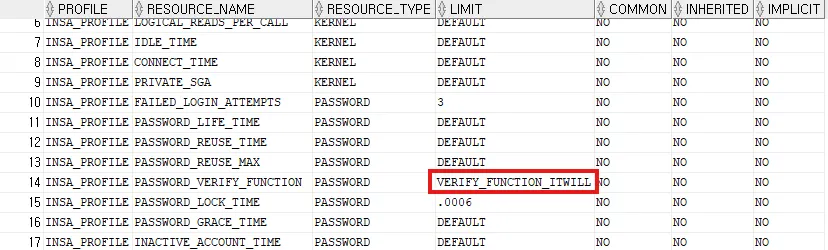
-- 유저 profile 수정
alter user insa profile insa_profile;
-- 유저 비밀번호 만료시킴
alter user insa password expire;
# 비밀번호 재설정 시 유효성 검증 수행
[oracle@ora19c ~]$ sqlplus insa/insa
SQL*Plus: Release 19.0.0.0.0 - Production on Wed Dec 10 10:12:37 2025
Version 19.3.0.0.0
Copyright (c) 1982, 2019, Oracle. All rights reserved.
ERROR:
ORA-28001: the password has expired
# 8글자 이하
Changing password for insa
New password:
Retype new password:
ERROR:
ORA-28003: password verification for the specified password failed
ORA-20001: Password length less than 8
Password unchanged
Enter user-name: insa
Enter password:
ERROR:
ORA-28001: the password has expired
# 대문자 X
Changing password for insa
New password:
Retype new password:
ERROR:
ORA-28003: password verification for the specified password failed
ORA-20010: Password must contain at least one digit, and one character
Password unchanged-- profile 수정 -> 유효성 검증 X
alter profile insa_profile limit
password_verify_function null;
select * from dba_profiles where profile = 'INSA_PROFILE';
-- profile 삭제
drop profile insa_profile;

-- ORA-02382: 프로파일 INSA_PROFILE에 사용자가 할당되어 있어, CASCADE 없이 삭제할 수 없습니다

-- cascade 옵션 사용시 insa_profile을 사용하는 유저의 profile을 default로 바꾸고 삭제해줌
drop profile insa_profile cascade;

select * from dba_users where username = 'INSA';
비밀번호 만료 기간 관리
create profile insa_profile limit
password_life_time 5/1440
password_grace_time 5/1440;

select * from dba_profiles where profile = 'INSA_PROFILE';
alter user insa profile insa_profile;
select * from dba_users where username = 'INSA';
- 5분 후 비밀번호 만료됨

[oracle@ora19c ~]$ sqlplus insa/insa

SQL*Plus: Release 19.0.0.0.0 - Production on Wed Dec 10 10:47:00 2025
Version 19.3.0.0.0

Copyright (c) 1982, 2019, Oracle.  All rights reserved.

ERROR:
ORA-28002: the password will expire within 0 days

Last Successful login time: Wed Dec 10 2025 10:15:45 +09:00

Connected to:
Oracle Database 19c Enterprise Edition Release 19.0.0.0.0 - Production
Version 19.3.0.0.0

INSA@ora19c> exit
Disconnected from Oracle Database 19c Enterprise Edition Release 19.0.0.0.0 - Production
Version 19.3.0.0.0

# 만료 이후 유예 기간 5분 종료 -> 비밀번호 재설정
[oracle@ora19c ~]$ sqlplus insa/insa

SQL*Plus: Release 19.0.0.0.0 - Production on Wed Dec 10 10:52:50 2025
Version 19.3.0.0.0

Copyright (c) 1982, 2019, Oracle.  All rights reserved.

ERROR:
ORA-28001: the password has expired

Changing password for insa
New password:
Retype new password:
Password changed

Connected to:
Oracle Database 19c Enterprise Edition Release 19.0.0.0.0 - Production
Version 19.3.0.0.0
비밀번호 재사용 조건 관리
-- 비밀번호를 변경한지 1분이 지났고, 변경한 횟수가 1번 이상일 경우 이전 비밀번호 재사용 가능
alter profile insa_profile limit
password_life_time unlimited
password_grace_time unlimited
password_reuse_time 1/1440
password_reuse_max 1;

select * from dba_profiles where profile = 'INSA_PROFILE';
select * from dba_users where username = 'INSA';
-- ORA-28007: 비밀번호를 재사용될 수 없습니다
-- 무제한으로 비밀번호 재사용 가능
alter profile insa_profile limit
password_reuse_time unlimited
password_reuse_max unlimited;
select * from dba_profiles where profile = 'INSA_PROFILE';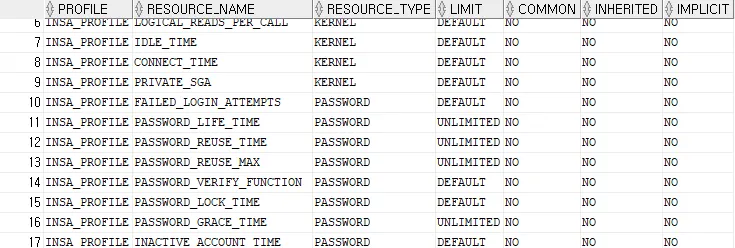
리소스 관리
SYS@ora19c> show parameter resource_limit

NAME                                 TYPE        VALUE
------------------------------------ ----------- ------------------------------
resource_limit boolean TRUE- 리소스 관리는 resouce_limit 파라미터가 true일 경우에만 사용 가능
select * from dba_profiles where profile = 'INSA_PROFILE';
- SESSIONS_PER_USER : 동일한 유저로 허용되는 동시 세션 수
- IDLE_TIME : 분 단위로 측정한 비활성 시간
- CONNECT_TIME : 분 단위로 측정한 연결 경과 시간
- LOGICAL_READS_PER_SESSION : 한 세션에서 읽어 들일 수 있는 블록의 수 제한
- LOGICAL_READS_PER_CALL : 한 문장에서 읽어 들일 수 있는 블록의 수 제한
- CPU_PER_SESSION : 한 세션에서 사용 가능한 CPU 시간, 1/100초 단위로 측정한 총 시간을 설정
- CPU_PER_CALL : 한 문장에서 사용 가능한 CPU 시간, 1/100초 단위로 측정한 총 시간을 설정
- PRIVATE_SGA : 바이트 단위로 측정한 SGA의 전용 공간(shared server 환경)
- COMPOSITE_LIMIT : (CPU_PER_SESSION , CONNECT_TIME , LOGICAL_READS_PER_SESSION , PRIVATE_SGA) 가중치 합계로 자원 비용 계산
유저 당 세션 수 제한
-- 유저 당 세션 수 1개로 제한
alter profile insa_profile limit
sessions_per_user 1;

select * from dba_profiles where profile = 'INSA_PROFILE';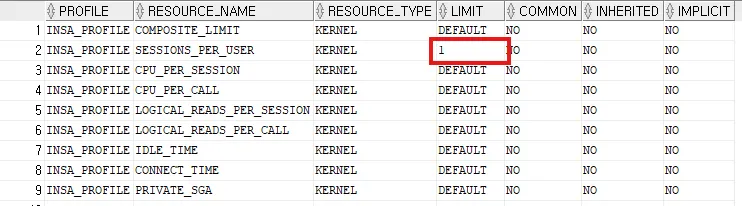
# insa 세션 2개 생성 시 오류 발생
[oracle@ora19c ~]$ sqlplus insa/insa

SQL*Plus: Release 19.0.0.0.0 - Production on Wed Dec 10 11:01:19 2025
Version 19.3.0.0.0

Copyright (c) 1982, 2019, Oracle.  All rights reserved.

ERROR:
ORA-02391: exceeded simultaneous SESSIONS_PER_USER limit
유휴 세션 관리
-- 아무 작업도 하지 않은지 1분이 지난 세션 kill
alter profile insa_profile limit
sessions_per_user default
idle_time 1;

select * from dba_profiles where profile = 'INSA_PROFILE';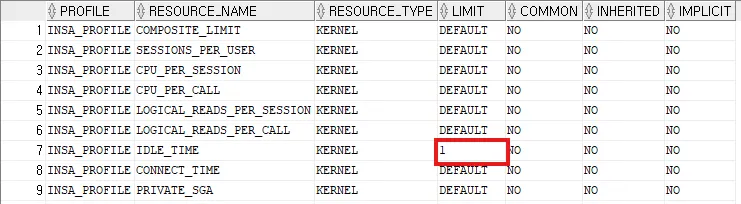
# 접속 후 1분 경과 -> 오류 발생
INSA@ora19c> select * from tab;
select * from tab
*
ERROR at line 1:
ORA-02396: exceeded maximum idle time, please connect again
# alert_ora19c.log
2025-12-10T11:15:32.592415+09:00
KILL SESSION for sid=(35, 22627):
Reason = profile limit idle_time
Mode = KILL SOFT -/-/NO_REPLAY
Requestor = PMON (orapid = 2, ospid = 27599, inst = 1)
Owner = Process: USER (orapid = 36, ospid = 26622)
Result = ORA-0오라클 데이터베이스 인증 방식
CREATE USER 유저이름
IDENTIFIED BY 패스워드
DEFAULT TABLESPACE 테이블스페이스
TEMPORARY TABLESPACE 임시테이블스페이스
QUOTA unlimited oN 테이블스페이스
QUOTA 10m ON 테이블스페이스
ACCOUNT [UNLOCK(기본값)|LOCK]
PROFILE [프로파일 | DEFAULT(기본값)]
PASSWORD EXPIRE;
# 기본적으로 유저명/비밀번호를 통해 접속
[oracle@ora19c ~]$ sqlplus sys/oracle as sysdba
SQL*Plus: Release 19.0.0.0.0 - Production on Wed Dec 10 11:44:50 2025
Version 19.3.0.0.0
Copyright (c) 1982, 2019, Oracle. All rights reserved.
Connected to:
Oracle Database 19c Enterprise Edition Release 19.0.0.0.0 - Production
Version 19.3.0.0.0
SYS@ora19c> exit
Disconnected from Oracle Database 19c Enterprise Edition Release 19.0.0.0.0 - Production
Version 19.3.0.0.0
# OS 인증 방식을 사용하면 유저명/비밀번호를 사용하지 않아도 접속 가능
sql[oracle@ora19c ~]$ sqlplus / as sysdba
SQL*Plus: Release 19.0.0.0.0 - Production on Wed Dec 10 11:44:57 2025
Version 19.3.0.0.0
Copyright (c) 1982, 2019, Oracle. All rights reserved.
Connected to:
Oracle Database 19c Enterprise Edition Release 19.0.0.0.0 - Production
Version 19.3.0.0.0OS 인증 방식
1) OS 계정 생성
# OS 계정 생성
[root@ora19c ~]# useradd jack
[root@ora19c ~]# tail -1 /etc/passwd
jack:x:54322:54331::/home/jack:/bin/bash
[root@ora19c ~]# passwd jack
Changing password for user jack.
New password:
BAD PASSWORD: The password is shorter than 8 characters
Retype new password:
passwd: all authentication tokens updated successfully.

# root에서는 일반 유저로 비밀번호 없이 계정 전환 가능
[root@ora19c ~]# su - jack

# 일반 유저 간에는 비밀번호를 알아야 계정 전환 가능
[jack@ora19c ~]$ su - oracle
Password:
Last login: Wed Dec 10 11:14:36 KST 2025 from 192.168.56.1 on pts/2
2) OS 계정을 오라클 계정으로 생성
SYS@ora19c> show parameter os_authent_prefix

NAME                                 TYPE        VALUE
------------------------------------ ----------- ------------------------------
os_authent_prefix                    string      ops$

-- OS 계정을 오라클 계정으로 생성
create user ops$jack
identified externally
default tablespace users
temporary tablespace temp
quota 1m on users;
-- 시스템 권한 부여
grant create session, select any table to ops$jack;

select * from dba_sys_privs where grantee = 'OPS$JACK';
3) jack 계정으로 오라클 접속
login as: jack
jack@192.168.56.150's password:
Last login: Wed Dec 10 11:49:17 2025

# 접속 불가
[jack@ora19c ~]$ sqlplus /
bash: sqlplus: command not found...

# 환경변수 설정
[jack@ora19c ~]$ vi .bash_profile

# .bash_profile

# Get the aliases and functions
if [ -f ~/.bashrc ]; then
        . ~/.bashrc
fi

# User specific environment and startup programs
PATH=$PATH:$HOME/.local/bin:$HOME/bin

export ORACLE_HOME=/u01/app/oracle/product/19.3.0/dbhome_1
export ORACLE_SID=ora19c
export PATH=$PATH:$HOME/bin:$ORACLE_HOME/bin

export PATH

[jack@ora19c ~]$ source .bash_profile

[jack@ora19c ~]$ echo $ORACLE_HOME
/u01/app/oracle/product/19.3.0/dbhome_1
[jack@ora19c ~]$ echo $ORACLE_SID
ora19c

# 접속 가능
[jack@ora19c ~]$ sqlplus /

SQL*Plus: Release 19.0.0.0.0 - Production on Wed Dec 10 12:00:22 2025
Version 19.3.0.0.0

Copyright (c) 1982, 2019, Oracle.  All rights reserved.

Connected to:
Oracle Database 19c Enterprise Edition Release 19.0.0.0.0 - Production
Version 19.3.0.0.0

OPS$JACK@ora19c> select * from user_sys_privs;

USERNAME                       PRIVILEGE                      ADM COM INH
------------------------------ ------------------------------ --- --- ---
OPS$JACK                       SELECT ANY TABLE               NO  NO  NO
OPS$JACK                       CREATE SESSION                 NO  NO  NO

OPS$JACK@ora19c> select count(*) from hr.employees;

  COUNT(*)
----------
       107
접속 중인 유저 세션 Kill
-- 유저가 접속 중인 경우 삭제 불가
drop user ops$jack cascade;
-- 접속 중인 유저 조회
select * from v$session where username = 'OPS$JACK';
-- 세션 종료 (sid,serial#)
alter system kill session '166,33816' immediate;
-- 세션이 종료되었으므로 쿼리 수행 시 오류 발생
OPS$JACK@ora19c> select count(*) from hr.employees;
select count(*) from hr.employees
*
ERROR at line 1:
ORA-03135: connection lost contact
Process ID: 30268
Session ID: 166 Serial number: 33816-- 유저 삭제 가능
drop user ops$jack cascade;AUDIT(감사)
- 감사는 선택한 유저 데이터베이스 작업을 모니터링하는 것을 의미
- 의심이 가는 데이터베이스 작업을 조사
- 특정 데이터베이스 작업에 대한 정보를 수집할 경우
AUDIT 설정
SYS@ora19c> show parameter audit_trail

NAME                                 TYPE        VALUE
------------------------------------ ----------- ------------------------------
audit_trail                          string      DB
감사 비활성화
alter system set audit_trail = none scope = spfile;감사 활성화
alter system set audit_trail = db scope = spfile;감사 정보가 저장되는 딕셔너리 테이블
select * from aud$;감사 옵션 설정
1. 문장 감사
- SQL문을 선택적으로 감사
- audit table : create table, drop table, truncate table 에 대해서만 수행하는 감사
SYS@ora19c> audit table;

Audit succeeded.
-- 감사 설정을 볼 수 있는 뷰
select * from dba_stmt_audit_opts where audit_option = 'TABLE';
-- insa에서 테이블 생성
create table dept(id number, name varchar2(30));
select * from aud$;
-- 감사 정보를 볼 수 있는 뷰
select * from dba_audit_object;
select username, owner, obj_name, action_name, decode(returncode, 0, 'success', returncode) sess, timestamp from dba_audit_object;
-- insa에서 테이블 삭제
drop table dept purge;
-- hr에서 테이블 생성 -> 감사
create table hr.new_emp as select * from hr.employees;
-- hr에서 테이블 변경 -> 감사 X
alter table hr.new_emp modify last_name varchar2(50);

-- hr에서 테이블 trucnate -> 감사
truncate table hr.new_emp;
-- hr에서 테이블 삭제 -> 감사
drop table hr.new_emp purge;
테이블스페이스 공간 부족 오류
create table insa.dept as select * from hr.departments;

-- ORA-01536: 'INSA_TBS' 테이블스페이스에 영역 할당량이 초과됐습니다
select * from dba_ts_quotas where username = 'INSA';
-- insa 유저가 사용할 수 있는 insa_tbs 테이블스페이스 공간 확장(1M -> 10M)
alter user insa quota 10m on insa_tbs;
select * from dba_ts_quotas where username = 'INSA';
SYS 유저는 감사에서 제외
-- SYS에서 테이블 생성 -> 감사 X
create table insa.dept as select * from hr.departments;
select username, owner, obj_name, action_name, decode(returncode, 0, 'success', returncode) sess, timestamp from dba_audit_object;
- SYS 유저는 감사에서 제외됨
감사 옵션 해제
# 감사 옵션 해제
SYS@ora19c> noaudit table;

Noaudit succeeded.

SYS@ora19c> select * from dba_stmt_audit_opts where audit_option = 'TABLE';

no rows selected- aud$ 딕셔너리 테이블 관리는 sys유저가 직접해야 함
-- 삭제 가능
delete from aud$;
rollback;
select * from aud$;

-- truncate 가능
truncate table aud$;
select * from aud$;
2. Schema(스키마) object audit
- 특정한 유저가 소유한 테이블에 대해서 감사 설정
SYS@ora19c> audit select, insert, update, delete on hr.emp;

Audit succeeded.
select * from dba_obj_audit_opts where owner = 'HR';
select owner, object_name, object_type, sel, ins, upd, del from dba_obj_audit_opts where owner = 'HR';

-- insa 에서 hr.emp 조회
select * from hr.emp;
-- insa_buha 에서 hr.emp 조회
select * from hr.emp;
-- insa
insert into hr.emp(id, name, sal) values (300, 'oracle', 1000);
update hr.emp set sal = sal * 1.1 where id = 200;
delete from hr.emp where id = 300;
commit;
-- insa_buha
insert into hr.emp(id, name, sal) values (300, 'oracle', 1000);
update hr.emp set sal = sal * 1.1 where id = 200;
delete from hr.emp where id = 300;
commit;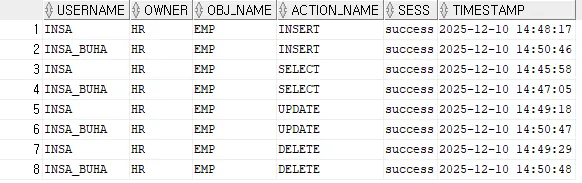
# 감사 옵션 해제
SYS@ora19c> noaudit select, insert, update, delete on hr.emp;

Noaudit succeeded.

SYS@ora19c> select owner, object_name, object_type, sel, ins, upd, del from dba_obj_audit_opts where owner = 'HR';

no rows selected
-- 감사 테이블 truncate
truncate table aud$;Schema(스키마)
- 특정한 유저가 가지는 모든 객체들을 통칭
3. 권한 감사(privilege audit)
- 시스템 권한을 선택적으로 감사
- 특정한 유저에게 권한 감사를 설정, 감사는 그 유저가 새롭게 접속했을 경우부터 활성화됨
# 감사 옵션 설정
audit select any table by insa, insa_buha;

-- Audit succeeded.

select * from dba_stmt_audit_opts where audit_option = 'SELECT ANY TABLE';
select username, owner, obj_name, action_name, decode(returncode, 0, 'success', returncode) sess, timestamp from dba_audit_object;
# 감사 옵션 해제
noaudit select any table by insa, insa_buha;

-- Noaudit succeeded.

truncate table aud$;
# 감사 옵션 설정
audit create table by insa;
select * from dba_stmt_audit_opts where audit_option = 'CREATE TABLE';
# insa 세션 재접속 후 테이블 생성
create table test(id number);- 감사 설정 전 열려있던 세션에서는 감사가 걸리지 않음
select username, owner, obj_name, action_name, decode(returncode, 0, 'success', returncode) sess, timestamp from dba_audit_object;
Extended audit 설정
- audit_trail = db, extended : 유저가 수행한 SQL 텍스트, 변수 값 감사
-- 10g
alter system set audit_trail = db_extended scope = spfile;

-- 11g
alter system set audit_trail = db, extended scope = spfile;

SYS@ora19c> shutdown immediate
Database closed.
Database dismounted.
ORACLE instance shut down.
SYS@ora19c> startup
ORACLE instance started.

Total System Global Area  830469472 bytes
Fixed Size                  8901984 bytes
Variable Size             553648128 bytes
Database Buffers          260046848 bytes
Redo Buffers                7872512 bytes
Database mounted.
Database opened.

SYS@ora19c> show parameter audit_trail

NAME                                 TYPE        VALUE
------------------------------------ ----------- ------------------------------
audit_trail                          string      DB, EXTENDED
audit select, insert, update, delete on hr.emp;
select * from dba_obj_audit_opts where owner = 'HR';
alter session set nls_date_format = 'YYYY-MM-DD HH24:MI:SS';
select username, owner, obj_name, action_name, decode(returncode, 0, 'success', returncode) sess, timestamp, sql_text, sql_bind from dba_audit_object;
- extended 옵션으로 감사 수행할 경우 SQL_TEXT와 SQL_BIND 정보 등 더 많은 감사 정보 조회 가능
'Courses > 아이티윌 오라클 DBA 과정' 카테고리의 다른 글
| 251211 TIL (0) | 2025.12.11 |
|---|---|
| 251209 TIL (0) | 2025.12.09 |
| 251208 TIL (0) | 2025.12.08 |
| 251205 TIL (1) | 2025.12.05 |
| 251203 TIL (0) | 2025.12.05 |