251212 TIL
2025. 12. 12. 21:44ㆍCourses/아이티윌 오라클 DBA 과정
Oracel Net 서비스(Cont.)
Listener
# 서버 프로세스 조회
[oracle@ora19c ~]$ ps -ef | grep oracle
...
oracle   14758 14757  0 19:46 ?        00:00:00 oracleora19c (DESCRIPTION=(LOCAL=YES)(ADDRESS=(PROTOCOL=beq)))
oracle   14828     1  4 19:48 ?        00:00:00 oracleora19c (LOCAL=NO)
# 리스너 중지
[oracle@ora19c ~]$ lsnrctl stop
LSNRCTL for Linux: Version 19.0.0.0.0 - Production on 12-DEC-2025 09:47:33
Copyright (c) 1991, 2019, Oracle. All rights reserved.
Connecting to (DESCRIPTION=(ADDRESS=(PROTOCOL=TCP)(HOST=ora19c)(PORT=1521)))
The command completed successfully# 클라이언트에서 접속 불가
C:\Users\itwill>sqlplus insa/insa@ora19c:1521/ora19c
SQL*Plus: Release 11.2.0.2.0 Production on 금 12월 12 09:50:29 2025
Copyright (c) 1982, 2014, Oracle. All rights reserved.
ERROR:
ORA-12541: TNS:no listener# 리스너 시작되었지만 db가 아직 등록되지 않음
[oracle@ora19c ~]$ lsnrctl start
LSNRCTL for Linux: Version 19.0.0.0.0 - Production on 12-DEC-2025 09:51:06
Copyright (c) 1991, 2019, Oracle. All rights reserved.
Starting /u01/app/oracle/product/19.3.0/dbhome_1/bin/tnslsnr: please wait...
TNSLSNR for Linux: Version 19.0.0.0.0 - Production
System parameter file is /u01/app/oracle/product/19.3.0/dbhome_1/network/admin/listener.ora
Log messages written to /u01/app/oracle/diag/tnslsnr/ora19c/listener/alert/log.xml
Listening on: (DESCRIPTION=(ADDRESS=(PROTOCOL=tcp)(HOST=ora19c)(PORT=1521)))
Listening on: (DESCRIPTION=(ADDRESS=(PROTOCOL=ipc)(KEY=EXTPROC1521)))
Connecting to (DESCRIPTION=(ADDRESS=(PROTOCOL=TCP)(HOST=ora19c)(PORT=1521)))
STATUS of the LISTENER
------------------------
Alias LISTENER
Version TNSLSNR for Linux: Version 19.0.0.0.0 - Production
Start Date 12-DEC-2025 09:51:06
Uptime 0 days 0 hr. 0 min. 0 sec
Trace Level off
Security ON: Local OS Authentication
SNMP OFF
Listener Parameter File /u01/app/oracle/product/19.3.0/dbhome_1/network/admin/listener.ora
Listener Log File /u01/app/oracle/diag/tnslsnr/ora19c/listener/alert/log.xml
Listening Endpoints Summary...
(DESCRIPTION=(ADDRESS=(PROTOCOL=tcp)(HOST=ora19c)(PORT=1521)))
(DESCRIPTION=(ADDRESS=(PROTOCOL=ipc)(KEY=EXTPROC1521)))
The listener supports no services
The command completed successfully# 리스너가 등록되는데 오래 걸리기 때문에 클라이언트에서 바로 접속 불가
C:\Users\itwill>sqlplus insa/insa@ora19c:1521/ora19c
SQL*Plus: Release 11.2.0.2.0 Production on 금 12월 12 09:51:13 2025
Copyright (c) 1982, 2014, Oracle. All rights reserved.
ERROR:
ORA-12514: TNS:listener does not currently know of service requested in connect
descriptor# 리스너를 빠르게 등록
SYS@ora19c> alter system register;
[oracle@ora19c~]$ lsnrctl status
LSNRCTL for Linux: Version 19.0.0.0.0 - Production on 12-DEC-2025 19:52:07
Copyright (c) 1991, 2019, Oracle. All rights reserved.
Connecting to (DESCRIPTION=(ADDRESS=(PROTOCOL=TCP)(HOST=ora19c)(PORT=1521)))
STATUS of the LISTENER
------------------------
Alias LISTENER
Version TNSLSNR for Linux: Version 19.0.0.0.0 - Production
Start Date 12-DEC-2025 19:51:52
Uptime 0 days 0 hr. 0 min. 14 sec
Trace Level off
Security ON: Local OS Authentication
SNMP OFF
Listener Parameter File /u01/app/oracle/product/19.3.0/dbhome_1/network/admin/listener.ora
Listener Log File /u01/app/oracle/diag/tnslsnr/ora19c/listener/alert/log.xml
Listening Endpoints Summary...
(DESCRIPTION=(ADDRESS=(PROTOCOL=tcp)(HOST=ora19c)(PORT=1521)))
(DESCRIPTION=(ADDRESS=(PROTOCOL=ipc)(KEY=EXTPROC1521)))
(DESCRIPTION=(ADDRESS=(PROTOCOL=tcps)(HOST=ora19c)(PORT=5500))(Security=(my_wallet_directory=/u01/app/oracle/admin/ora19c/xdb_wallet))(Presentation=HTTP)(Session=RAW))
Services Summary...
Service "ora19c" has 1 instance(s).
Instance "ora19c", status READY, has 1 handler(s) for this service...
Service "ora19cXDB" has 1 instance(s).
Instance "ora19c", status READY, has 1 handler(s) for this service...
The command completed successfully# 클라이언트 접속 가능
C:\Users\itwill>sqlplus insa/insa@ora19c:1521/ora19c
SQL*Plus: Release 11.2.0.2.0 Production on 금 12월 12 09:51:48 2025
Copyright (c) 1982, 2014, Oracle. All rights reserved.
Connected to:
Oracle Database 19c Enterprise Edition Release 19.0.0.0.0 - Production동적 서비스 등록(Dynamic Service Register)
- 오라클 8i 이상 버전의 오라클 데이터베이스 시작 시 자동으로 기본 리스너에게 데이터베이스 정보가 등록됨
- 11g(PMON), 12c(LREG)
- 기본 리스너에 추가로 데이터베이스 정보를 구성할 필요가 없음
# 리스너 파일에는 DB에 대한 정보가 없음
[oracle@ora19c ~]$ cat $ORACLE_HOME/network/admin/listener.ora
# listener.ora Network Configuration File: /u01/app/oracle/product/19.3.0/dbhome_1/network/admin/listener.ora
# Generated by Oracle configuration tools.

LISTENER =
  (DESCRIPTION_LIST =
    (DESCRIPTION =
      (ADDRESS = (PROTOCOL = TCP)(HOST = ora19c)(PORT = 1521))
      (ADDRESS = (PROTOCOL = IPC)(KEY = EXTPROC1521))
    )
  )

# 동적으로 DB 정보가 등록됨
[oracle@ora19c ~]$ lsnrctl status

LSNRCTL for Linux: Version 19.0.0.0.0 - Production on 12-DEC-2025 11:07:28

Copyright (c) 1991, 2019, Oracle.  All rights reserved.

Connecting to (DESCRIPTION=(ADDRESS=(PROTOCOL=TCP)(HOST=ora19c)(PORT=1521)))
STATUS of the LISTENER
------------------------
Alias                     LISTENER
Version                   TNSLSNR for Linux: Version 19.0.0.0.0 - Production
Start Date                12-DEC-2025 09:51:06
Uptime                    0 days 1 hr. 16 min. 21 sec
Trace Level               off
Security                  ON: Local OS Authentication
SNMP                      OFF
Listener Parameter File   /u01/app/oracle/product/19.3.0/dbhome_1/network/admin/listener.ora
Listener Log File         /u01/app/oracle/diag/tnslsnr/ora19c/listener/alert/log.xml
Listening Endpoints Summary...
  (DESCRIPTION=(ADDRESS=(PROTOCOL=tcp)(HOST=ora19c)(PORT=1521)))
  (DESCRIPTION=(ADDRESS=(PROTOCOL=ipc)(KEY=EXTPROC1521)))
  (DESCRIPTION=(ADDRESS=(PROTOCOL=tcps)(HOST=ora19c)(PORT=5500))(Security=(my_wallet_directory=/u01/app/oracle/admin/ora19c/xdb_wallet))(Presentation=HTTP)(Session=RAW))
Services Summary...
Service "ora19c" has 1 instance(s).
  Instance "ora19c", status READY, has 1 handler(s) for this service...
Service "ora19cXDB" has 1 instance(s).
  Instance "ora19c", status READY, has 1 handler(s) for this service...
The command completed successfully
정적 서비스 등록(Static Service Registration)
- 리스너에게 데이터베이스 정보를 구성해야 함
LISTENER =
  (DESCRIPTION_LIST =
    (DESCRIPTION =
      (ADDRESS = (PROTOCOL = TCP)(HOST = ora19c)(PORT = 1521))
      (ADDRESS = (PROTOCOL = IPC)(KEY = EXTPROC1521))
    )
  )

SID_LIST_LISTENER =
  (SID_LIST =
    (SID_DESC =
      (SID_NAME = ora19c)
      (ORACLE_HOME = /u01/app/oracle/product/19.3.0/dbhome_1)
      (GLOBAL_DBNAME = ora19c)
    )
  )
[oracle@ora19c ~]$ cd $ORACLE_HOME/network/admin
[oracle@ora19c admin]$ ls
listener.ora samples shrept.lst tnsnames.ora
[oracle@ora19c admin]$ cat listener.ora
# listener.ora Network Configuration File: /u01/app/oracle/product/19.3.0/dbhome_1/network/admin/listener.ora
# Generated by Oracle configuration tools.
LISTENER =
(DESCRIPTION_LIST =
(DESCRIPTION =
(ADDRESS = (PROTOCOL = TCP)(HOST = ora19c)(PORT = 1521))
(ADDRESS = (PROTOCOL = IPC)(KEY = EXTPROC1521))
)
)
# 기존 리스너 파일 백업
[oracle@ora19c admin]$ mv listener.ora listener.bak
# 정적 리스너 파일 생성
[oracle@ora19c admin]$ vi listener.ora
[oracle@ora19c admin]$ cat listener.ora
LISTENER =
(DESCRIPTION_LIST =
(DESCRIPTION =
(ADDRESS = (PROTOCOL = TCP)(HOST = ora19c)(PORT = 1521))
(ADDRESS = (PROTOCOL = IPC)(KEY = EXTPROC1521))
)
)
SID_LIST_LISTENER =
(SID_LIST =
(SID_DESC =
(SID_NAME = ora19c)
(ORACLE_HOME = /u01/app/oracle/product/19.3.0/dbhome_1)
(GLOBAL_DBNAME = ora19c)
)
)
[oracle@ora19c admin]$ ls
listener.bak listener.ora samples shrept.lst tnsnames.ora
# 리스너 중지
[oracle@ora19c admin]$ lsnrctl stop
LSNRCTL for Linux: Version 19.0.0.0.0 - Production on 12-DEC-2025 20:15:11
Copyright (c) 1991, 2019, Oracle. All rights reserved.
Connecting to (DESCRIPTION=(ADDRESS=(PROTOCOL=TCP)(HOST=ora19c)(PORT=1521)))
TNS-12545: Connect failed because target host or object does not exist
TNS-12560: TNS:protocol adapter error
TNS-00515: Connect failed because target host or object does not exist
Linux Error: 2: No such file or directory
Connecting to (DESCRIPTION=(ADDRESS=(PROTOCOL=IPC)(KEY=EXTPROC1521)))
The command completed successfully
# 리스너 상태 조회 : 중지
[oracle@ora19c admin]$ lsnrctl status
LSNRCTL for Linux: Version 19.0.0.0.0 - Production on 12-DEC-2025 20:15:18
Copyright (c) 1991, 2019, Oracle. All rights reserved.
Connecting to (DESCRIPTION=(ADDRESS=(PROTOCOL=TCP)(HOST=ora19c)(PORT=1521)))
TNS-12545: Connect failed because target host or object does not exist
TNS-12560: TNS:protocol adapter error
TNS-00515: Connect failed because target host or object does not exist
Linux Error: 2: No such file or directory
Connecting to (DESCRIPTION=(ADDRESS=(PROTOCOL=IPC)(KEY=EXTPROC1521)))
TNS-12541: TNS:no listener
TNS-12560: TNS:protocol adapter error
TNS-00511: No listener
Linux Error: 2: No such file or directory
# 리스너 시작 : DB 바로 등록됨
[oracle@ora19c admin]$ lsnrctl start
LSNRCTL for Linux: Version 19.0.0.0.0 - Production on 12-DEC-2025 20:19:29
Copyright (c) 1991, 2019, Oracle. All rights reserved.
Starting /u01/app/oracle/product/19.3.0/dbhome_1/bin/tnslsnr: please wait...
TNSLSNR for Linux: Version 19.0.0.0.0 - Production
System parameter file is /u01/app/oracle/product/19.3.0/dbhome_1/network/admin/listener.ora
Log messages written to /u01/app/oracle/diag/tnslsnr/ora19c/listener/alert/log.xml
Listening on: (DESCRIPTION=(ADDRESS=(PROTOCOL=tcp)(HOST=ora19c)(PORT=1521)))
Listening on: (DESCRIPTION=(ADDRESS=(PROTOCOL=ipc)(KEY=EXTPROC1521)))
Connecting to (DESCRIPTION=(ADDRESS=(PROTOCOL=TCP)(HOST=ora19c)(PORT=1521)))
STATUS of the LISTENER
------------------------
Alias LISTENER
Version TNSLSNR for Linux: Version 19.0.0.0.0 - Production
Start Date 12-DEC-2025 20:19:29
Uptime 0 days 0 hr. 0 min. 0 sec
Trace Level off
Security ON: Local OS Authentication
SNMP OFF
Listener Parameter File /u01/app/oracle/product/19.3.0/dbhome_1/network/admin/listener.ora
Listener Log File /u01/app/oracle/diag/tnslsnr/ora19c/listener/alert/log.xml
Listening Endpoints Summary...
(DESCRIPTION=(ADDRESS=(PROTOCOL=tcp)(HOST=ora19c)(PORT=1521)))
(DESCRIPTION=(ADDRESS=(PROTOCOL=ipc)(KEY=EXTPROC1521)))
Services Summary...
Service "ora19c" has 1 instance(s).
Instance "ora19c", status UNKNOWN, has 1 handler(s) for this service...
The command completed successfully포트 번호 변경
정적 리스너
# 포트 번호 변경 1521 -> 1522
[oracle@ora19c admin]$ cat listener.ora
LISTENER =
  (DESCRIPTION_LIST =
    (DESCRIPTION =
      (ADDRESS = (PROTOCOL = TCP)(HOST = ora19c)(PORT = 1521))
      (ADDRESS = (PROTOCOL = IPC)(KEY = EXTPROC1521))
    )
  )

SID_LIST_LISTENER =
  (SID_LIST =
    (SID_DESC =
      (SID_NAME = ora19c)
      (ORACLE_HOME = /u01/app/oracle/product/19.3.0/dbhome_1)
      (GLOBAL_DBNAME = ora19c)
    )
  )
[oracle@ora19c admin]$ vi listener.ora
[oracle@ora19c admin]$ cat listener.ora
LISTENER =
  (DESCRIPTION_LIST =
    (DESCRIPTION =
      (ADDRESS = (PROTOCOL = TCP)(HOST = ora19c)(PORT = 1522))
      (ADDRESS = (PROTOCOL = IPC)(KEY = EXTPROC1521))
    )
  )

SID_LIST_LISTENER =
  (SID_LIST =
    (SID_DESC =
      (SID_NAME = ora19c)
      (ORACLE_HOME = /u01/app/oracle/product/19.3.0/dbhome_1)
      (GLOBAL_DBNAME = ora19c)
    )
  )

# 리스너 재시작
[oracle@ora19c admin]$ lsnrctl stop

LSNRCTL for Linux: Version 19.0.0.0.0 - Production on 12-DEC-2025 20:34:00

Copyright (c) 1991, 2019, Oracle.  All rights reserved.

Connecting to (DESCRIPTION=(ADDRESS=(PROTOCOL=TCP)(HOST=ora19c)(PORT=1522)))
TNS-12541: TNS:no listener
 TNS-12560: TNS:protocol adapter error
  TNS-00511: No listener
   Linux Error: 111: Connection refused
Connecting to (DESCRIPTION=(ADDRESS=(PROTOCOL=IPC)(KEY=EXTPROC1521)))
The command completed successfully

[oracle@ora19c admin]$ lsnrctl start

LSNRCTL for Linux: Version 19.0.0.0.0 - Production on 12-DEC-2025 20:34:19

Copyright (c) 1991, 2019, Oracle.  All rights reserved.

Starting /u01/app/oracle/product/19.3.0/dbhome_1/bin/tnslsnr: please wait...

TNSLSNR for Linux: Version 19.0.0.0.0 - Production
System parameter file is /u01/app/oracle/product/19.3.0/dbhome_1/network/admin/listener.ora
Log messages written to /u01/app/oracle/diag/tnslsnr/ora19c/listener/alert/log.xml
Listening on: (DESCRIPTION=(ADDRESS=(PROTOCOL=tcp)(HOST=ora19c)(PORT=1522)))
Listening on: (DESCRIPTION=(ADDRESS=(PROTOCOL=ipc)(KEY=EXTPROC1521)))

Connecting to (DESCRIPTION=(ADDRESS=(PROTOCOL=TCP)(HOST=ora19c)(PORT=1522)))
STATUS of the LISTENER
------------------------
Alias                     LISTENER
Version                   TNSLSNR for Linux: Version 19.0.0.0.0 - Production
Start Date                12-DEC-2025 20:34:19
Uptime                    0 days 0 hr. 0 min. 0 sec
Trace Level               off
Security                  ON: Local OS Authentication
SNMP                      OFF
Listener Parameter File   /u01/app/oracle/product/19.3.0/dbhome_1/network/admin/listener.ora
Listener Log File         /u01/app/oracle/diag/tnslsnr/ora19c/listener/alert/log.xml
Listening Endpoints Summary...
  (DESCRIPTION=(ADDRESS=(PROTOCOL=tcp)(HOST=ora19c)(PORT=1522)))
  (DESCRIPTION=(ADDRESS=(PROTOCOL=ipc)(KEY=EXTPROC1521)))
Services Summary...
Service "ora19c" has 1 instance(s).
  Instance "ora19c", status UNKNOWN, has 1 handler(s) for this service...
The command completed successfully- Easy Connection
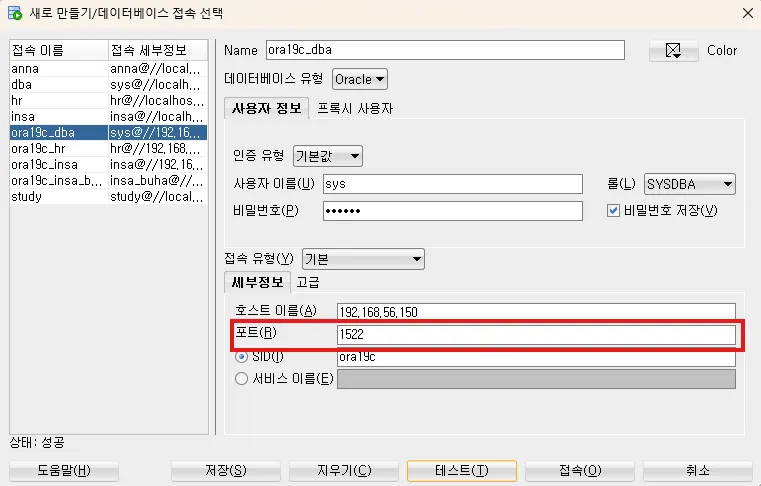
- Local Naming
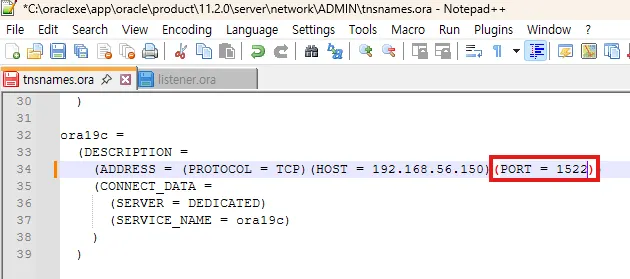
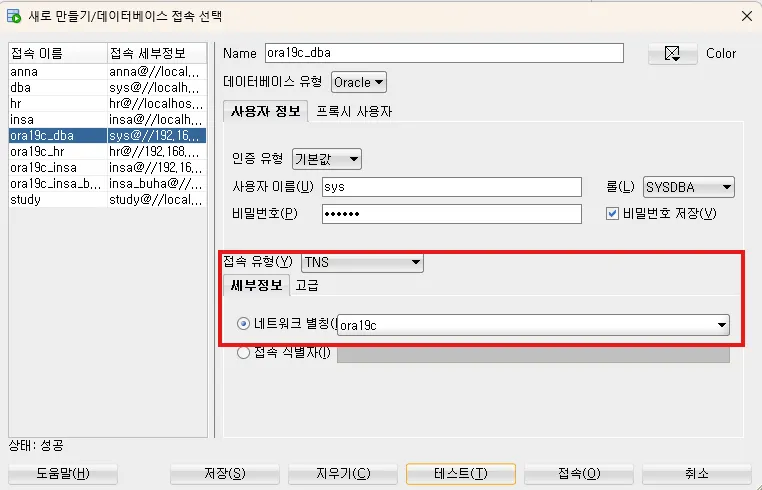
동적 리스너
# 리스너 중지
[oracle@ora19c admin]$ lsnrctl stop

LSNRCTL for Linux: Version 19.0.0.0.0 - Production on 12-DEC-2025 20:47:00

Copyright (c) 1991, 2019, Oracle.  All rights reserved.

Connecting to (DESCRIPTION=(ADDRESS=(PROTOCOL=TCP)(HOST=ora19c)(PORT=1522)))
The command completed successfully

# 동적 리스너로 변경
[oracle@ora19c admin]$ ls
listener.bak  listener.ora  samples  shrept.lst  tnsnames.ora
[oracle@ora19c admin]$ mv listener.ora listener.txt
[oracle@ora19c admin]$ mv listener.bak listener.ora
[oracle@ora19c admin]$ ls
listener.ora  listener.txt  samples  shrept.lst  tnsnames.ora
[oracle@ora19c admin]$ cat listener.ora
# listener.ora Network Configuration File: /u01/app/oracle/product/19.3.0/dbhome_1/network/admin/listener.ora
# Generated by Oracle configuration tools.

LISTENER =
  (DESCRIPTION_LIST =
    (DESCRIPTION =
      (ADDRESS = (PROTOCOL = TCP)(HOST = ora19c)(PORT = 1521))
      (ADDRESS = (PROTOCOL = IPC)(KEY = EXTPROC1521))
    )
  )

# 포트 번호 변경 1521 -> 1522
[oracle@ora19c admin]$ vi listener.ora
[oracle@ora19c admin]$ cat listener.ora
# listener.ora Network Configuration File: /u01/app/oracle/product/19.3.0/dbhome_1/network/admin/listener.ora
# Generated by Oracle configuration tools.

LISTENER =
  (DESCRIPTION_LIST =
    (DESCRIPTION =
      (ADDRESS = (PROTOCOL = TCP)(HOST = ora19c)(PORT = 1522))
      (ADDRESS = (PROTOCOL = IPC)(KEY = EXTPROC1521))
    )
  )

# 리스너 재시작
[oracle@ora19c admin]$ lsnrctl start

LSNRCTL for Linux: Version 19.0.0.0.0 - Production on 12-DEC-2025 20:49:53

Copyright (c) 1991, 2019, Oracle.  All rights reserved.

Starting /u01/app/oracle/product/19.3.0/dbhome_1/bin/tnslsnr: please wait...

TNSLSNR for Linux: Version 19.0.0.0.0 - Production
System parameter file is /u01/app/oracle/product/19.3.0/dbhome_1/network/admin/listener.ora
Log messages written to /u01/app/oracle/diag/tnslsnr/ora19c/listener/alert/log.xml
Listening on: (DESCRIPTION=(ADDRESS=(PROTOCOL=tcp)(HOST=ora19c)(PORT=1522)))
Listening on: (DESCRIPTION=(ADDRESS=(PROTOCOL=ipc)(KEY=EXTPROC1521)))

Connecting to (DESCRIPTION=(ADDRESS=(PROTOCOL=TCP)(HOST=ora19c)(PORT=1522)))
STATUS of the LISTENER
------------------------
Alias                     LISTENER
Version                   TNSLSNR for Linux: Version 19.0.0.0.0 - Production
Start Date                12-DEC-2025 20:49:53
Uptime                    0 days 0 hr. 0 min. 0 sec
Trace Level               off
Security                  ON: Local OS Authentication
SNMP                      OFF
Listener Parameter File   /u01/app/oracle/product/19.3.0/dbhome_1/network/admin/listener.ora
Listener Log File         /u01/app/oracle/diag/tnslsnr/ora19c/listener/alert/log.xml
Listening Endpoints Summary...
  (DESCRIPTION=(ADDRESS=(PROTOCOL=tcp)(HOST=ora19c)(PORT=1522)))
  (DESCRIPTION=(ADDRESS=(PROTOCOL=ipc)(KEY=EXTPROC1521)))
The listener supports no services
The command completed successfully

# 리스너 정보 강제 등록
[oracle@ora19c admin]$ sqlplus / as sysdba

SQL*Plus: Release 19.0.0.0.0 - Production on Fri Dec 12 20:50:10 2025
Version 19.3.0.0.0

Copyright (c) 1982, 2019, Oracle.  All rights reserved.

Connected to:
Oracle Database 19c Enterprise Edition Release 19.0.0.0.0 - Production
Version 19.3.0.0.0

SYS@ora19c> alter system register;

System altered.

SYS@ora19c> exit
Disconnected from Oracle Database 19c Enterprise Edition Release 19.0.0.0.0 - Production
Version 19.3.0.0.0

# 여전히 등록안됨
[oracle@ora19c admin]$ lsnrctl status

LSNRCTL for Linux: Version 19.0.0.0.0 - Production on 12-DEC-2025 20:50:27

Copyright (c) 1991, 2019, Oracle.  All rights reserved.

Connecting to (DESCRIPTION=(ADDRESS=(PROTOCOL=TCP)(HOST=ora19c)(PORT=1522)))
STATUS of the LISTENER
------------------------
Alias                     LISTENER
Version                   TNSLSNR for Linux: Version 19.0.0.0.0 - Production
Start Date                12-DEC-2025 20:49:53
Uptime                    0 days 0 hr. 0 min. 33 sec
Trace Level               off
Security                  ON: Local OS Authentication
SNMP                      OFF
Listener Parameter File   /u01/app/oracle/product/19.3.0/dbhome_1/network/admin/listener.ora
Listener Log File         /u01/app/oracle/diag/tnslsnr/ora19c/listener/alert/log.xml
Listening Endpoints Summary...
  (DESCRIPTION=(ADDRESS=(PROTOCOL=tcp)(HOST=ora19c)(PORT=1522)))
  (DESCRIPTION=(ADDRESS=(PROTOCOL=ipc)(KEY=EXTPROC1521)))
The listener supports no services
The command completed successfully
- 로컬 리스너가 가리키는 tns의 포트 번호도 맞춰서 변경해줘야 함
# local_listener 파라미터 조회
SYS@ora19c> show parameter local_listener

NAME                                 TYPE        VALUE
------------------------------------ ----------- ------------------------------
local_listener                       string      LISTENER_ORA19C

SYS@ora19c> !
[oracle@ora19c ~]$ cd $ORACLE_HOME/network/admin
[oracle@ora19c admin]$ ls
listener.ora  listener.txt  samples  shrept.lst  tnsnames.ora
[oracle@ora19c admin]$ cat tnsnames.ora
# tnsnames.ora Network Configuration File: /u01/app/oracle/product/19.3.0/dbhome_1/network/admin/tnsnames.ora
# Generated by Oracle configuration tools.

ORA19C =
  (DESCRIPTION =
    (ADDRESS = (PROTOCOL = TCP)(HOST = ora19c)(PORT = 1521))
    (CONNECT_DATA =
      (SERVER = DEDICATED)
      (SERVICE_NAME = ora19c)
    )
  )

LISTENER_ORA19C =
  (ADDRESS = (PROTOCOL = TCP)(HOST = ora19c)(PORT = 1521))

# LISTENER_ORA19C 포트번호 1522로 변경
[oracle@ora19c admin]$ vi tnsnames.ora
[oracle@ora19c admin]$ cat tnsnames.ora
# tnsnames.ora Network Configuration File: /u01/app/oracle/product/19.3.0/dbhome_1/network/admin/tnsnames.ora
# Generated by Oracle configuration tools.

ORA19C =
  (DESCRIPTION =
    (ADDRESS = (PROTOCOL = TCP)(HOST = ora19c)(PORT = 1521))
    (CONNECT_DATA =
      (SERVER = DEDICATED)
      (SERVICE_NAME = ora19c)
    )
  )

LISTENER_ORA19C =
  (ADDRESS = (PROTOCOL = TCP)(HOST = ora19c)(PORT = 1522))

[oracle@ora19c admin]$ exit
exit

# local_listener 적용
SYS@ora19c> alter system set local_listener = LISTENER_ORA19C;
# 리스너 재시작
[oracle@ora19c admin]$ lsnrctl stop
LSNRCTL for Linux: Version 19.0.0.0.0 - Production on 12-DEC-2025 20:58:31
Copyright (c) 1991, 2019, Oracle. All rights reserved.
Connecting to (DESCRIPTION=(ADDRESS=(PROTOCOL=TCP)(HOST=ora19c)(PORT=1522)))
The command completed successfully
[oracle@ora19c admin]$ lsnrctl start
LSNRCTL for Linux: Version 19.0.0.0.0 - Production on 12-DEC-2025 20:58:38
Copyright (c) 1991, 2019, Oracle. All rights reserved.
Starting /u01/app/oracle/product/19.3.0/dbhome_1/bin/tnslsnr: please wait...
TNSLSNR for Linux: Version 19.0.0.0.0 - Production
System parameter file is /u01/app/oracle/product/19.3.0/dbhome_1/network/admin/listener.ora
Log messages written to /u01/app/oracle/diag/tnslsnr/ora19c/listener/alert/log.xml
Listening on: (DESCRIPTION=(ADDRESS=(PROTOCOL=tcp)(HOST=ora19c)(PORT=1522)))
Listening on: (DESCRIPTION=(ADDRESS=(PROTOCOL=ipc)(KEY=EXTPROC1521)))
Connecting to (DESCRIPTION=(ADDRESS=(PROTOCOL=TCP)(HOST=ora19c)(PORT=1522)))
STATUS of the LISTENER
------------------------
Alias LISTENER
Version TNSLSNR for Linux: Version 19.0.0.0.0 - Production
Start Date 12-DEC-2025 20:58:38
Uptime 0 days 0 hr. 0 min. 0 sec
Trace Level off
Security ON: Local OS Authentication
SNMP OFF
Listener Parameter File /u01/app/oracle/product/19.3.0/dbhome_1/network/admin/listener.ora
Listener Log File /u01/app/oracle/diag/tnslsnr/ora19c/listener/alert/log.xml
Listening Endpoints Summary...
(DESCRIPTION=(ADDRESS=(PROTOCOL=tcp)(HOST=ora19c)(PORT=1522)))
(DESCRIPTION=(ADDRESS=(PROTOCOL=ipc)(KEY=EXTPROC1521)))
The listener supports no services
The command completed successfully
# 리스너 정보 조회 -> db 정보 등록됨
[oracle@ora19c admin]$ lsnrctl status
LSNRCTL for Linux: Version 19.0.0.0.0 - Production on 12-DEC-2025 13:43:44
Copyright (c) 1991, 2019, Oracle. All rights reserved.
Connecting to (DESCRIPTION=(ADDRESS=(PROTOCOL=TCP)(HOST=ora19c)(PORT=1522)))
STATUS of the LISTENER
------------------------
Alias LISTENER
Version TNSLSNR for Linux: Version 19.0.0.0.0 - Production
Start Date 12-DEC-2025 13:41:19
Uptime 0 days 0 hr. 2 min. 25 sec
Trace Level off
Security ON: Local OS Authentication
SNMP OFF
Listener Parameter File /u01/app/oracle/product/19.3.0/dbhome_1/network/admin/listener.ora
Listener Log File /u01/app/oracle/diag/tnslsnr/ora19c/listener/alert/log.xml
Listening Endpoints Summary...
(DESCRIPTION=(ADDRESS=(PROTOCOL=tcp)(HOST=ora19c)(PORT=1522)))
(DESCRIPTION=(ADDRESS=(PROTOCOL=ipc)(KEY=EXTPROC1521)))
(DESCRIPTION=(ADDRESS=(PROTOCOL=tcps)(HOST=ora19c)(PORT=5500))(Security=(my_wallet_directory=/u01/app/oracle/admin/ora19c/xdb_wallet))(Presentation=HTTP)(Session=RAW))
Services Summary...
Service "ora19c" has 1 instance(s).
Instance "ora19c", status READY, has 1 handler(s) for this service...
Service "ora19cXDB" has 1 instance(s).
Instance "ora19c", status READY, has 1 handler(s) for this service...
The command completed successfully- 로컬 리스너 직접 지정
SYS@ora19c> show parameter local_listener

NAME                                 TYPE        VALUE
------------------------------------ ----------- ------------------------------
local_listener                       string      LISTENER_ORA19C

# local_listener를 tns명으로 지정하지 않고 직접 입력한 값으로 지정할 수 있음
SYS@ora19c> alter system set local_listener = '(ADDRESS = (PROTOCOL = TCP)(HOST = ora19c)(PORT = 1522))';

System altered.

SYS@ora19c> show parameter local_listener

NAME                                 TYPE        VALUE
------------------------------------ ----------- ------------------------------
local_listener                       string      (ADDRESS = (PROTOCOL = TCP)(HO
                                                 ST = ora19c)(PORT = 1522))
방화벽
방화벽 시작 및 활성화
# 방화벽 상태 조회 -> 꺼짐
[root@ora19c ~]# systemctl status firewalld
● firewalld.service - firewalld - dynamic firewall daemon
   Loaded: loaded (/usr/lib/systemd/system/firewalld.service; disabled; vendor preset: enabled)
   Active: inactive (dead)
     Docs: man:firewalld(1)

# 방화벽 시작
[root@ora19c ~]# systemctl start firewalld

# 방화벽 상태 조회 -> 켜졌지만 비활성화 상태
[root@ora19c ~]# systemctl status firewalld
● firewalld.service - firewalld - dynamic firewall daemon
   Loaded: loaded (/usr/lib/systemd/system/firewalld.service; disabled; vendor preset: enabled)
   Active: active (running) since Fri 2025-12-12 14:53:26 KST; 6s ago
     Docs: man:firewalld(1)
 Main PID: 9625 (firewalld)
    Tasks: 2
   CGroup: /system.slice/firewalld.service
           └─9625 /usr/bin/python2 -Es /usr/sbin/firewalld --nofork --nopid

Dec 12 14:53:25 ora19c systemd[1]: Starting firewalld - dynamic firewall daemon...
Dec 12 14:53:26 ora19c systemd[1]: Started firewalld - dynamic firewall daemon.
Dec 12 14:53:26 ora19c firewalld[9625]: WARNING: AllowZoneDrifting is enabled. This is considered an insecure... now.
Hint: Some lines were ellipsized, use -l to show in full.

# 방화벽 활성화
[root@ora19c ~]# systemctl enable firewalld
Created symlink from /etc/systemd/system/dbus-org.fedoraproject.FirewallD1.service to /usr/lib/systemd/system/firewalld.service.
Created symlink from /etc/systemd/system/multi-user.target.wants/firewalld.service to /usr/lib/systemd/system/firewalld.service.

# 방화벽 상태 조회
[root@ora19c ~]# systemctl status firewalld
● firewalld.service - firewalld - dynamic firewall daemon
   Loaded: loaded (/usr/lib/systemd/system/firewalld.service; enabled; vendor preset: enabled)
   Active: active (running) since Fri 2025-12-12 14:53:26 KST; 1min 11s ago
     Docs: man:firewalld(1)
 Main PID: 9625 (firewalld)
   CGroup: /system.slice/firewalld.service
           └─9625 /usr/bin/python2 -Es /usr/sbin/firewalld --nofork --nopid

Dec 12 14:53:25 ora19c systemd[1]: Starting firewalld - dynamic firewall daemon...
Dec 12 14:53:26 ora19c systemd[1]: Started firewalld - dynamic firewall daemon.
Dec 12 14:53:26 ora19c firewalld[9625]: WARNING: AllowZoneDrifting is enabled. This is considered an insecure... now.
Hint: Some lines were ellipsized, use -l to show in full.
특정 포트만 방화벽 열기
# 클라이언트에서 접속 실패(방화벽에 막힘)
C:\Users\itwill>sqlplus insa/insa@ora19c:1521/ora19c

SQL*Plus: Release 11.2.0.2.0 Production on 금 12월 12 14:57:23 2025

Copyright (c) 1982, 2014, Oracle.  All rights reserved.

ERROR:
ORA-12154: TNS:could not resolve the connect identifier specified

Enter user-name:
C:\Users\itwill>sqlplus insa/insa@ora19c

SQL*Plus: Release 11.2.0.2.0 Production on 금 12월 12 14:57:56 2025

Copyright (c) 1982, 2014, Oracle.  All rights reserved.

ERROR:
ORA-12170: TNS:Connect timeout occurred

Enter user-name: ^C
C:\Users\itwill>
# 방화벽에 열려있는 포트 번호 확인
[root@ora19c ~]# firewall-cmd --list-all
public (active)
target: default
icmp-block-inversion: no
interfaces: enp0s3 enp0s8
sources:
services: dhcpv6-client ssh
ports:
protocols:
masquerade: no
forward-ports:
source-ports:
icmp-blocks:
rich rules:
# 방화벽에 등록되어 있는 포트 번호 리스트 확인
[root@ora19c ~]# firewall-cmd --list-ports
# 방화벽에 등록되어 있는 특정 포트 번호 확인
[root@ora19c ~]# firewall-cmd --query-port=1521/tcp
no
# 특정 포트 번호 등록
[root@ora19c ~]# firewall-cmd --add-port=1521/tcp --permanent
success
# 변경 사항 적용 X
[root@ora19c ~]# firewall-cmd --query-port=1521/tcp
no
# reload로 변경 사항 적용
[root@ora19c ~]# firewall-cmd --reload
success
[root@ora19c ~]# firewall-cmd --query-port=1521/tcp
yes# 클라이언트 접속 성공
C:\Users\itwill>sqlplus insa/insa@ora19c
SQL*Plus: Release 11.2.0.2.0 Production on 금 12월 12 15:05:09 2025
Copyright (c) 1982, 2014, Oracle. All rights reserved.
Connected to:
Oracle Database 19c Enterprise Edition Release 19.0.0.0.0 - Production
SQL>방화벽에 등록한 포트 번호 삭제
# 방화벽에 등록한 포트 삭제
[root@ora19c ~]# firewall-cmd --remove-port=1521/tcp --permanent
success

# 변경 사항 적용 X
[root@ora19c ~]# firewall-cmd --query-port=1521/tcp
yes

# reload로 변경 사항 적용
[root@ora19c ~]# firewall-cmd --reload
success

[root@ora19c ~]# firewall-cmd --query-port=1521/tcp
no
방화벽 중지 및 비활성화
# 방화벽 중지
[root@ora19c ~]# systemctl stop firewalld

# 방화벽 비활성화
[root@ora19c ~]# systemctl disable firewalld
Removed symlink /etc/systemd/system/multi-user.target.wants/firewalld.service.
Removed symlink /etc/systemd/system/dbus-org.fedoraproject.FirewallD1.service.

# 방화벽 상태 조회 : 중지 + 비활성화 상태
[root@ora19c ~]# systemctl status firewalld
● firewalld.service - firewalld - dynamic firewall daemon
   Loaded: loaded (/usr/lib/systemd/system/firewalld.service; disabled; vendor preset: enabled)
   Active: inactive (dead)
     Docs: man:firewalld(1)

Dec 12 14:53:25 ora19c systemd[1]: Starting firewalld - dynamic firewall daemon...
Dec 12 14:53:26 ora19c systemd[1]: Started firewalld - dynamic firewall daemon.
Dec 12 14:53:26 ora19c firewalld[9625]: WARNING: AllowZoneDrifting is enabled. This is considered an insecure... now.
Dec 12 15:03:41 ora19c firewalld[9625]: WARNING: AllowZoneDrifting is enabled. This is considered an insecure... now.
Dec 12 15:06:47 ora19c firewalld[9625]: WARNING: AllowZoneDrifting is enabled. This is considered an insecure... now.
Dec 12 15:09:49 ora19c systemd[1]: Stopping firewalld - dynamic firewall daemon...
Dec 12 15:09:49 ora19c systemd[1]: Stopped firewalld - dynamic firewall daemon.
Hint: Some lines were ellipsized, use -l to show in full.
DB Link
- 다른 데이터베이스의 객체에 대해서 액세스할 수 있는 객체
PUBLIC DB LINK
- 모든 유저가 사용할 수 있는 db link
CREATE PUBLIC DATABASE LINK시스템 권한 필요
PUBLIC DB LINK 생성
- 클라이언트 tnsnames.ora에 원격 DB 정보가 구성되어 있어야 함

- db link 생성
-- SYS에서 public db link 생성
create public database link ora19c_insa
connect to insa identified by insa
using 'ora19c';

select * from dba_db_links;
-- 일반 유저에서 사용 가능한 db link 조회(public이므로 모든 유저 사용 가능)
select * from all_db_links;
- db link 사용
-- db link를 통해 원격 DB의 테이블 조회
select *
from insa.emp@ora19c_insa;

select e.employee_id, e.department_id, d.department_name
from insa.emp@ora19c_insa e, hr.departments d
where e.department_id = d.department_id;
PUBLIC DB LINK 삭제
drop public database link ora19c_insa;PRIVATE DB LINK
- 소유자만 사용할 수 있는 db link
CREATE DATABASE LINK권한 필요
PRIVATE DB LINK 생성
-- CREATE DATABASE LINK 권한이 있는지 확인
select * from user_sys_privs;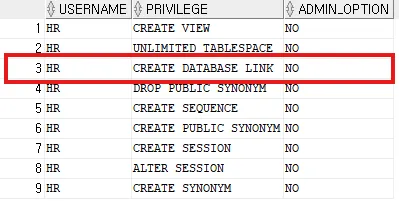
-- private db link 생성
create database link ora19c_insa
connect to insa identified by insa
using 'ora19c';

select * from user_db_links;
PRIVATE DB LINK 삭제
-- private db link 삭제
drop database link ora19c_insa;
ora19c(리눅스 가상 서버) → xe(윈도우 호스트 서버)
# 윈도우 호스트 서버의 ip 주소 조회
C:\Users\itwill>ipconfig

Windows IP 구성

이더넷 어댑터 이더넷:

   연결별 DNS 접미사. . . . :
   링크-로컬 IPv6 주소 . . . . : fe80::97e6:4ac6:9aea:30af%6
   IPv4 주소 . . . . . . . . . : 192.168.22.17
   서브넷 마스크 . . . . . . . : 255.255.0.0
   기본 게이트웨이 . . . . . . : 192.168.0.1
...
# 리눅스 가상 서버 tns에 윈도우 호스트 서버의 XE 정보 등록
[oracle@ora19c admin]$ vi tnsnames.ora
[oracle@ora19c admin]$ cat tnsnames.ora
# tnsnames.ora Network Configuration File: /u01/app/oracle/product/19.3.0/dbhome_1/network/admin/tnsnames.ora
# Generated by Oracle configuration tools.
ORA19C =
(DESCRIPTION =
(ADDRESS = (PROTOCOL = TCP)(HOST = ora19c)(PORT = 1521))
(CONNECT_DATA =
(SERVER = DEDICATED)
(SERVICE_NAME = ora19c)
)
)
XE =
(DESCRIPTION =
(ADDRESS = (PROTOCOL = TCP)(HOST = 192.168.22.17)(PORT = 1521))
(CONNECT_DATA =
(SERVER = DEDICATED)
(SERVICE_NAME = XE)
)
)
# tns를 통해 윈도우 호스트 서버 접속 가능
[oracle@ora19c admin]$ sqlplus hr/hr@XE
SQL*Plus: Release 19.0.0.0.0 - Production on Fri Dec 12 16:45:10 2025
Version 19.3.0.0.0
Copyright (c) 1982, 2019, Oracle. All rights reserved.
Connected to:
Oracle Database 11g Express Edition Release 11.2.0.2.0 - 64bit Production
HR@XE> exit
Disconnected from Oracle Database 11g Express Edition Release 11.2.0.2.0 - 64bit Production# insa로 로그인
[oracle@ora19c admin]$ sqlplus insa/insa
SQL*Plus: Release 19.0.0.0.0 - Production on Fri Dec 12 16:46:08 2025
Version 19.3.0.0.0
Copyright (c) 1982, 2019, Oracle. All rights reserved.
Last Successful login time: Fri Dec 12 2025 16:06:39 +09:00
Connected to:
Oracle Database 19c Enterprise Edition Release 19.0.0.0.0 - Production
Version 19.3.0.0.0
INSA@ora19c> select tname from tab;
TNAME
------------------------------
EMP
# 시스템 권한 조회 -> create database link 권한 없음
INSA@ora19c> select * from user_sys_privs;
USERNAME PRIVILEGE ADM COM INH
------------------------------ ------------------------------ --- --- ---
INSA SELECT ANY TABLE NO NO NO
INSA CREATE TABLE YES NO NO
INSA CREATE SESSION NO NO NO
# sys로 로그인
INSA@ora19c> conn sys/oracle as sysdba
Connected.
# insa에게 create database 권한 부여
SYS@ora19c> grant create database link to insa;
Grant succeeded.
SYS@ora19c> select * from dba_sys_privs where grantee = 'INSA';
GRANTEE PRIVILEGE ADM COM INH
------------------------------ ------------------------------ --- --- ---
INSA CREATE TABLE YES NO NO
INSA CREATE DATABASE LINK NO NO NO
INSA SELECT ANY TABLE NO NO NO
INSA CREATE SESSION NO NO NO
# insa로 재접속
SYS@ora19c> conn insa/insa
Connected.
# private db link 생성
INSA@ora19c> create database link xe_hr connect to hr identified by hr using 'XE';
Database link created.
INSA@ora19c> select * from user_db_links;
DB_LINK USERNAME PASSWORD HOST CREATED HID SHA VAL INT
------------------------------ ------------------------------ ------------------------------ ------------------------------ --------- --- --- --- ---
XE_HR HR XE 12-DEC-25 NO NO YES NO
# db link를 통해 윈도우 호스트 서버의 테이블 조회 가능
INSA@ora19c> select count(*) from hr.employees@xe_hr;
COUNT(*)
----------
107
# 윈도우 -> 리눅스 데이터 이관
INSA@ora19c> select count(*) from emp;
COUNT(*)
----------
107
INSA@ora19c> truncate table emp;
Table truncated.
INSA@ora19c> select count(*) from emp;
COUNT(*)
----------
0
INSA@ora19c> insert into insa.emp select * from hr.employees@xe_hr;
107 rows created.
INSA@ora19c> commit;
Commit complete.
INSA@ora19c> select count(*) from emp;
COUNT(*)
----------
107
# 윈도우 -> 리눅스 데이터 복제
INSA@ora19c> create table insa.loc as select * from hr.locations@xe_hr;
Table created.
INSA@ora19c> select count(*) from insa.loc;
COUNT(*)
----------
23 'Courses > 아이티윌 오라클 DBA 과정' 카테고리의 다른 글
| 251215 TIL (0) | 2025.12.15 |
|---|---|
| 251211 TIL (0) | 2025.12.11 |
| 251210 TIL (1) | 2025.12.11 |
| 251209 TIL (0) | 2025.12.09 |
| 251208 TIL (0) | 2025.12.08 |