[아이티윌 오라클 DBA 과정 91기] 260113 TIL
2026. 1. 13. 18:22ㆍCourses/아이티윌 오라클 DBA 과정
Recovery Catalog(Cont.)
[oracle@ora19c ~]$ . oraenv
ORACLE_SID = [ora19c] ?
The Oracle base remains unchanged with value /u01/app/oracle
[oracle@ora19c ~]$ rman target / catalog rc_user/oracle@rcdb

Recovery Manager: Release 19.0.0.0.0 - Production on Tue Jan 13 09:56:39 2026
Version 19.3.0.0.0

Copyright (c) 1982, 2019, Oracle and/or its affiliates.  All rights reserved.

connected to target database: ORA19C (DBID=1271306228)
connected to recovery catalog database

RMAN> report schema;

Report of database schema for database with db_unique_name ORA19C

List of Permanent Datafiles
===========================
File Size(MB) Tablespace           RB segs Datafile Name
---- -------- -------------------- ------- ------------------------
1    910      SYSTEM               YES     /u01/app/oracle/oradata/ORA19C/system                                     01.dbf
3    720      SYSAUX               NO      /u01/app/oracle/oradata/ORA19C/sysaux                                     01.dbf
4    340      UNDOTBS1             YES     /u01/app/oracle/oradata/ORA19C/undotb                                     s01.dbf
7    88       USERS                NO      /u01/app/oracle/oradata/ORA19C/users0                                     1.dbf

List of Temporary Files
=======================
File Size(MB) Tablespace           Maxsize(MB) Tempfile Name
---- -------- -------------------- ----------- --------------------
1    32       TEMP                 32767       /u01/app/oracle/oradata/ORA19C/te                                     mp01.dbf
[oracle@ora19c ~]$ sqlplus rc_user/oracle

SQL*Plus: Release 19.0.0.0.0 - Production on Tue Jan 13 09:57:13 2026
Version 19.3.0.0.0

Copyright (c) 1982, 2019, Oracle.  All rights reserved.

Last Successful login time: Tue Jan 13 2026 09:56:41 +09:00

Connected to:
Oracle Database 19c Enterprise Edition Release 19.0.0.0.0 - Production
Version 19.3.0.0.0

RC_USER@rcdb> select * from session_roles;

ROLE
------------------------------
CONNECT
RESOURCE
SODA_APP
RECOVERY_CATALOG_OWNER
RMAN Recovery Catalog Views
RC_USER@rcdb> select * from rc_database;

    DB_KEY  DBINC_KEY       DBID NAME                                               RESETLOGS_CHANGE# RESETLOGS FINAL_CHANGE#
---------- ---------- ---------- -------------------------------------------------- ----------------- --------- -------------
         1          2 1271306228 ORA19C                                                       1920977 25-NOV-25


RC_USER@rcdb> select * from rc_backup_set;

    DB_KEY      DB_ID    PDB_KEY     BS_KEY      RECID      STAMP  SET_STAMP  SET_COUNT B INCREMENTAL_LEVEL     PIECES START_TIM COMPLETIO ELAPSED_SECONDS S CONTROL INP KEE KEEP_UNTI KEEP_OPTION
---------- ---------- ---------- ---------- ---------- ---------- ---------- ---------- - ----------------- ---------- --------- --------- --------------- - ------- --- --- --------- -----------
BLOCK_SIZE   SITE_KEY MUL
---------- ---------- ---
         1 1271306228          4        171         32 1222359533 1222359501         45 D                            1 12-JAN-26 12-JAN-26           32 A NONE    NO  NO
      8192          3 NO

         1 1271306228          4        172         33 1222359537 1222359536         46 D                            1 12-JAN-26 12-JAN-26            1 A BACKUP  NO  NO
     16384          3 NO

         1 1271306228          4        173         34 1222359539 1222359538         47 D                            1 12-JAN-26 12-JAN-26            0 A BACKUP  NO  NO
     16384          3 NO
백업
백업 삭제
RMAN> delete backup;

allocated channel: ORA_DISK_1
channel ORA_DISK_1: SID=38 device type=DISK

List of Backup Pieces
BP Key  BS Key  Pc# Cp# Status      Device Type Piece Name
------- ------- --- --- ----------- ----------- ----------
174     171     1   1   AVAILABLE   DISK        /home/oracle/rcdb/1d4dneed_1_1_20260112
175     172     1   1   AVAILABLE   DISK        /home/oracle/rcdb/1e4dnefg_1_1_20260112
176     173     1   1   AVAILABLE   DISK        /u01/app/oracle/fast_recovery_area/ORA19C/autobackup/2026_01_12/o1_mf_s_1222359538_np9832yw_.bkp

Do you really want to delete the above objects (enter YES or NO)? yes
deleted backup piece
backup piece handle=/home/oracle/rcdb/1d4dneed_1_1_20260112 RECID=32 STAMP=1222359501
deleted backup piece
backup piece handle=/home/oracle/rcdb/1e4dnefg_1_1_20260112 RECID=33 STAMP=1222359537
deleted backup piece
backup piece handle=/u01/app/oracle/fast_recovery_area/ORA19C/autobackup/2026_01_12/o1_mf_s_1222359538_np9832yw_.bkp RECID=34 STAMP=1222359538
Deleted 3 objects

RMAN> list backup;

specification does not match any backup in the repository
tuesday 태그로 압축해서 백업
RMAN> backup as compressed backupset database tag='tuesday';

Starting backup at 13-JAN-26
using channel ORA_DISK_1
channel ORA_DISK_1: starting compressed full datafile backup set
channel ORA_DISK_1: specifying datafile(s) in backup set
input datafile file number=00001 name=/u01/app/oracle/oradata/ORA19C/system01.dbf
input datafile file number=00003 name=/u01/app/oracle/oradata/ORA19C/sysaux01.dbf
input datafile file number=00004 name=/u01/app/oracle/oradata/ORA19C/undotbs01.dbf
input datafile file number=00007 name=/u01/app/oracle/oradata/ORA19C/users01.dbf
channel ORA_DISK_1: starting piece 1 at 13-JAN-26
channel ORA_DISK_1: finished piece 1 at 13-JAN-26
piece handle=/u01/app/oracle/fast_recovery_area/ORA19C/backupset/2026_01_13/o1_mf_nnndf_TUESDAY_npc6k537_.bkp tag=TUESDAY comment=NONE
channel ORA_DISK_1: backup set complete, elapsed time: 00:00:45
Finished backup at 13-JAN-26

Starting Control File and SPFILE Autobackup at 13-JAN-26
piece handle=/u01/app/oracle/fast_recovery_area/ORA19C/autobackup/2026_01_13/o1_mf_s_1222423523_npc6lm9k_.bkp comment=NONE
Finished Control File and SPFILE Autobackup at 13-JAN-26

RMAN> list backup tag='tuesday';

List of Backup Sets
===================

BS Key  Type LV Size       Device Type Elapsed Time Completion Time
------- ---- -- ---------- ----------- ------------ ---------------
197     Full    311.02M    DISK        00:00:36     13-JAN-26
        BP Key: 198   Status: AVAILABLE  Compressed: YES  Tag: TUESDAY
        Piece Name: /u01/app/oracle/fast_recovery_area/ORA19C/backupset/2026_01_13/o1_mf_nnndf_TUESDAY_npc6k537_.bkp
  List of Datafiles in backup set 197
  File LV Type Ckp SCN    Ckp Time  Abs Fuz SCN Sparse Name
  ---- -- ---- ---------- --------- ----------- ------ ----
  1       Full 2893345    13-JAN-26              NO    /u01/app/oracle/oradata/ORA19C/system01.dbf
  3       Full 2893345    13-JAN-26              NO    /u01/app/oracle/oradata/ORA19C/sysaux01.dbf
  4       Full 2893345    13-JAN-26              NO    /u01/app/oracle/oradata/ORA19C/undotbs01.dbf
  7       Full 2893345    13-JAN-26              NO    /u01/app/oracle/oradata/ORA19C/users01.dbf

RMAN> shutdown immediate

database closed
database dismounted
Oracle instance shut down
장애 유발 : control file 삭제
[oracle@ora19c ~]$ cd $ORACLE_BASE/oradata/ORA19C
[oracle@ora19c ORA19C]$ ls
control01.ctl  redo02.log  sysaux01.dbf  temp01.dbf     users01.dbf
redo01.log     redo03.log  system01.dbf  undotbs01.dbf
[oracle@ora19c ORA19C]$ rm control01.ctl
RMAN> startup
connected to target database (not started)
Oracle instance started
RMAN-00571: ===========================================================
RMAN-00569: =============== ERROR MESSAGE STACK FOLLOWS ===============
RMAN-00571: ===========================================================
RMAN-03002: failure of startup command at 01/13/2026 10:10:18
ORA-00205: error in identifying control file, check alert log for more info
RMAN> list failure;
List of Database Failures
=========================
Failure ID Priority Status Time Detected Summary
---------- -------- --------- ------------- -------
12942 CRITICAL OPEN 13-JAN-26 Control file /u01/app/oracle/oradata/ORA19C/control01.ctl is missing
11042 CRITICAL OPEN 08-JAN-26 Control file needs media recovery
11428 HIGH OPEN 09-JAN-26 Tablespace 12: 'INSA_TBS' is offline
288 HIGH OPEN 07-JAN-26 One or more non-system datafiles need media recovery
4048 UNKNOWN OPEN 09-JAN-26 One or more non-system datafiles are corrupt
RMAN> list backup;
List of Backup Sets
===================
BS Key Type LV Size Device Type Elapsed Time Completion Time
------- ---- -- ---------- ----------- ------------ ---------------
197 Full 311.02M DISK 00:00:36 13-JAN-26
BP Key: 198 Status: AVAILABLE Compressed: YES Tag: TUESDAY
Piece Name: /u01/app/oracle/fast_recovery_area/ORA19C/backupset/2026_01_13/o1_mf_nnndf_TUESDAY_npc6k537_.bkp
List of Datafiles in backup set 197
File LV Type Ckp SCN Ckp Time Abs Fuz SCN Sparse Name
---- -- ---- ---------- --------- ----------- ------ ----
1 Full 2893345 13-JAN-26 NO /u01/app/oracle/oradata/ORA19C/system01.dbf
3 Full 2893345 13-JAN-26 NO /u01/app/oracle/oradata/ORA19C/sysaux01.dbf
4 Full 2893345 13-JAN-26 NO /u01/app/oracle/oradata/ORA19C/undotbs01.dbf
7 Full 2893345 13-JAN-26 NO /u01/app/oracle/oradata/ORA19C/users01.dbf
BS Key Type LV Size Device Type Elapsed Time Completion Time
------- ---- -- ---------- ----------- ------------ ---------------
210 Full 10.20M DISK 00:00:00 13-JAN-26
BP Key: 215 Status: AVAILABLE Compressed: NO Tag: TAG20260113T100523
Piece Name: /u01/app/oracle/fast_recovery_area/ORA19C/autobackup/2026_01_13/o1_mf_s_1222423523_npc6lm9k_.bkp
SPFILE Included: Modification time: 12-JAN-26
SPFILE db_unique_name: ORA19C
Control File Included: Ckp SCN: 2893375 Ckp time: 13-JAN-26복구 수행
기존 controlfile restore
restore controlfile from '/u01/app/oracle/fast_recovery_area/ORA19C/autobackup/2026_01_13/o1_mf_s_1222423523_npc6lm9k_.bkp';
# 또는
restore controlfile from autobackup;
catalog가 존재할 때 controlfile restore
RMAN> restore controlfile;

Starting restore at 13-JAN-26
allocated channel: ORA_DISK_1
channel ORA_DISK_1: SID=145 device type=DISK

channel ORA_DISK_1: starting datafile backup set restore
channel ORA_DISK_1: restoring control file
channel ORA_DISK_1: reading from backup piece /u01/app/oracle/fast_recovery_area/ORA19C/autobackup/2026_01_13/o1_mf_s_1222423523_npc6lm9k_.bkp
channel ORA_DISK_1: piece handle=/u01/app/oracle/fast_recovery_area/ORA19C/autobackup/2026_01_13/o1_mf_s_1222423523_npc6lm9k_.bkp tag=TAG20260113T100523
channel ORA_DISK_1: restored backup piece 1
channel ORA_DISK_1: restore complete, elapsed time: 00:00:01
output file name=/u01/app/oracle/oradata/ORA19C/control01.ctl
Finished restore at 13-JAN-26
데이터베이스 mount
RMAN> alter database mount;

released channel: ORA_DISK_1
Statement processed
백업 이후 리두 적용
RMAN> recover database;

Starting recover at 13-JAN-26
Starting implicit crosscheck backup at 13-JAN-26
allocated channel: ORA_DISK_1
channel ORA_DISK_1: SID=145 device type=DISK
Crosschecked 1 objects
Finished implicit crosscheck backup at 13-JAN-26

Starting implicit crosscheck copy at 13-JAN-26
using channel ORA_DISK_1
Finished implicit crosscheck copy at 13-JAN-26

searching for all files in the recovery area
cataloging files...
cataloging done

List of Cataloged Files
=======================
File Name: /u01/app/oracle/fast_recovery_area/ORA19C/autobackup/2026_01_13/o1_mf_s_1222423523_npc6lm9k_.bkp

using channel ORA_DISK_1

starting media recovery

archived log for thread 1 with sequence 35 is already on disk as file /u01/app/oracle/oradata/ORA19C/redo01.log
archived log file name=/u01/app/oracle/oradata/ORA19C/redo01.log thread=1 sequence=35
media recovery complete, elapsed time: 00:00:00
Finished recover at 13-JAN-26
resetlogs로 데이터베이스 open
RMAN> alter database open resetlogs;

Statement processed
new incarnation of database registered in recovery catalog
starting full resync of recovery catalog
full resync complete

RMAN> list incarnation;

List of Database Incarnations
DB Key  Inc Key DB Name  DB ID            STATUS  Reset SCN  Reset Time
------- ------- -------- ---------------- --- ---------- ----------
1       16      ORA19C   1271306228       PARENT  1          17-APR-19
1       2       ORA19C   1271306228       PARENT  1920977    25-NOV-25
1       255     ORA19C   1271306228       CURRENT 2894595    13-JAN-26
resetlogs로 open 했으므로 백업 수행
RMAN> backup as compressed backupset database tag='tuesday';

Starting backup at 13-JAN-26
using channel ORA_DISK_1
channel ORA_DISK_1: starting compressed full datafile backup set
channel ORA_DISK_1: specifying datafile(s) in backup set
input datafile file number=00001 name=/u01/app/oracle/oradata/ORA19C/system01.dbf
input datafile file number=00003 name=/u01/app/oracle/oradata/ORA19C/sysaux01.dbf
input datafile file number=00004 name=/u01/app/oracle/oradata/ORA19C/undotbs01.dbf
input datafile file number=00007 name=/u01/app/oracle/oradata/ORA19C/users01.dbf
channel ORA_DISK_1: starting piece 1 at 13-JAN-26
channel ORA_DISK_1: finished piece 1 at 13-JAN-26
piece handle=/u01/app/oracle/fast_recovery_area/ORA19C/backupset/2026_01_13/o1_mf_nnndf_TUESDAY_npc7dw1c_.bkp tag=TUESDAY comment=NONE
channel ORA_DISK_1: backup set complete, elapsed time: 00:00:35
Finished backup at 13-JAN-26

Starting Control File and SPFILE Autobackup at 13-JAN-26
piece handle=/u01/app/oracle/fast_recovery_area/ORA19C/autobackup/2026_01_13/o1_mf_s_1222424399_npc7g017_.bkp comment=NONE
Finished Control File and SPFILE Autobackup at 13-JAN-26

RMAN> list backup tag='tuesday';

List of Backup Sets
===================

BS Key  Type LV Size       Device Type Elapsed Time Completion Time
------- ---- -- ---------- ----------- ------------ ---------------
197     Full    311.02M    DISK        00:00:36     13-JAN-26
        BP Key: 198   Status: AVAILABLE  Compressed: YES  Tag: TUESDAY
        Piece Name: /u01/app/oracle/fast_recovery_area/ORA19C/backupset/2026_01_13/o1_mf_nnndf_TUESDAY_npc6k537_.bkp
  List of Datafiles in backup set 197
  File LV Type Ckp SCN    Ckp Time  Abs Fuz SCN Sparse Name
  ---- -- ---- ---------- --------- ----------- ------ ----
  1       Full 2893345    13-JAN-26              NO    /u01/app/oracle/oradata/ORA19C/system01.dbf
  3       Full 2893345    13-JAN-26              NO    /u01/app/oracle/oradata/ORA19C/sysaux01.dbf
  4       Full 2893345    13-JAN-26              NO    /u01/app/oracle/oradata/ORA19C/undotbs01.dbf
  7       Full 2893345    13-JAN-26              NO    /u01/app/oracle/oradata/ORA19C/users01.dbf

BS Key  Type LV Size       Device Type Elapsed Time Completion Time
------- ---- -- ---------- ----------- ------------ ---------------
328     Full    313.85M    DISK        00:00:34     13-JAN-26
        BP Key: 331   Status: AVAILABLE  Compressed: YES  Tag: TUESDAY
        Piece Name: /u01/app/oracle/fast_recovery_area/ORA19C/backupset/2026_01_13/o1_mf_nnndf_TUESDAY_npc7dw1c_.bkp
  List of Datafiles in backup set 328
  File LV Type Ckp SCN    Ckp Time  Abs Fuz SCN Sparse Name
  ---- -- ---- ---------- --------- ----------- ------ ----
  1       Full 2895525    13-JAN-26              NO    /u01/app/oracle/oradata/ORA19C/system01.dbf
  3       Full 2895525    13-JAN-26              NO    /u01/app/oracle/oradata/ORA19C/sysaux01.dbf
  4       Full 2895525    13-JAN-26              NO    /u01/app/oracle/oradata/ORA19C/undotbs01.dbf
  7       Full 2895525    13-JAN-26              NO    /u01/app/oracle/oradata/ORA19C/users01.dbf
필요 없는 백업 삭제
RMAN> report obsolete;

RMAN retention policy will be applied to the command
RMAN retention policy is set to redundancy 1
Report of obsolete backups and copies
Type                 Key    Completion Time    Filename/Handle
-------------------- ------ ------------------ --------------------
Backup Set           197    13-JAN-26
  Backup Piece       198    13-JAN-26          /u01/app/oracle/fast_recovery_area/ORA19C/backupset/2026_01_13/o1_mf_nnndf_TUESDAY_npc6k537_.bkp
Archive Log          305    13-JAN-26          /home/oracle/arch1/arch_1_35_1218118200.arc
Backup Set           210    13-JAN-26
  Backup Piece       215    13-JAN-26          /u01/app/oracle/fast_recovery_area/ORA19C/autobackup/2026_01_13/o1_mf_s_1222423523_npc6lm9k_.bkp
Archive Log          306    13-JAN-26          /home/oracle/arch2/arch_1_35_1218118200.arc
Archive Log          307    13-JAN-26          /home/oracle/arch1/arch_1_33_1218118200.arc
Archive Log          308    13-JAN-26          /home/oracle/arch2/arch_1_33_1218118200.arc
Archive Log          309    13-JAN-26          /home/oracle/arch1/arch_1_34_1218118200.arc
Archive Log          310    13-JAN-26          /home/oracle/arch2/arch_1_34_1218118200.arc
Backup Set           312    13-JAN-26
  Backup Piece       313    13-JAN-26          /u01/app/oracle/fast_recovery_area/ORA19C/autobackup/2026_01_13/o1_mf_s_1222424259_npc79mcf_.bkp

RMAN> delete obsolete;

RMAN retention policy will be applied to the command
RMAN retention policy is set to redundancy 1
using channel ORA_DISK_1
Deleting the following obsolete backups and copies:
Type                 Key    Completion Time    Filename/Handle
-------------------- ------ ------------------ --------------------
Backup Set           197    13-JAN-26
  Backup Piece       198    13-JAN-26          /u01/app/oracle/fast_recovery_area/ORA19C/backupset/2026_01_13/o1_mf_nnndf_TUESDAY_npc6k537_.bkp
Archive Log          305    13-JAN-26          /home/oracle/arch1/arch_1_35_1218118200.arc
Backup Set           210    13-JAN-26
  Backup Piece       215    13-JAN-26          /u01/app/oracle/fast_recovery_area/ORA19C/autobackup/2026_01_13/o1_mf_s_1222423523_npc6lm9k_.bkp
Archive Log          306    13-JAN-26          /home/oracle/arch2/arch_1_35_1218118200.arc
Archive Log          307    13-JAN-26          /home/oracle/arch1/arch_1_33_1218118200.arc
Archive Log          308    13-JAN-26          /home/oracle/arch2/arch_1_33_1218118200.arc
Archive Log          309    13-JAN-26          /home/oracle/arch1/arch_1_34_1218118200.arc
Archive Log          310    13-JAN-26          /home/oracle/arch2/arch_1_34_1218118200.arc
Backup Set           312    13-JAN-26
  Backup Piece       313    13-JAN-26          /u01/app/oracle/fast_recovery_area/ORA19C/autobackup/2026_01_13/o1_mf_s_1222424259_npc79mcf_.bkp

Do you really want to delete the above objects (enter YES or NO)? yes
deleted backup piece
backup piece handle=/u01/app/oracle/fast_recovery_area/ORA19C/backupset/2026_01_13/o1_mf_nnndf_TUESDAY_npc6k537_.bkp RECID=35 STAMP=1222423477
deleted archived log
archived log file name=/home/oracle/arch1/arch_1_35_1218118200.arc RECID=16 STAMP=1222424252
deleted backup piece
backup piece handle=/u01/app/oracle/fast_recovery_area/ORA19C/autobackup/2026_01_13/o1_mf_s_1222423523_npc6lm9k_.bkp RECID=36 STAMP=1222424121
deleted archived log
archived log file name=/home/oracle/arch2/arch_1_35_1218118200.arc RECID=17 STAMP=1222424252
deleted archived log
archived log file name=/home/oracle/arch1/arch_1_33_1218118200.arc RECID=18 STAMP=1222424252
deleted archived log
archived log file name=/home/oracle/arch2/arch_1_33_1218118200.arc RECID=19 STAMP=1222424252
deleted archived log
archived log file name=/home/oracle/arch1/arch_1_34_1218118200.arc RECID=20 STAMP=1222424253
deleted archived log
archived log file name=/home/oracle/arch2/arch_1_34_1218118200.arc RECID=21 STAMP=1222424253
deleted backup piece
backup piece handle=/u01/app/oracle/fast_recovery_area/ORA19C/autobackup/2026_01_13/o1_mf_s_1222424259_npc79mcf_.bkp RECID=37 STAMP=1222424259
Deleted 9 objects
archive
RMAN> list archivelog all;

specification does not match any archived log in the repository

RMAN> alter system archive log current;

Statement processed

RMAN> list archivelog all;

List of Archived Log Copies for database with db_unique_name ORA19C
=====================================================================

Key     Thrd Seq     S Low Time
------- ---- ------- - ---------
388     1    1       A 13-JAN-26
        Name: /home/oracle/arch2/arch_1_1_1222424252.arc

387     1    1       A 13-JAN-26
        Name: /home/oracle/arch1/arch_1_1_1222424252.arc
backup script 생성
스크립트 생성
RMAN> create script incr_0_backup{
        backup as compressed backupset incremental level 0 database include current controlfile;
        sql 'alter system archive log current';}2> 3>

created script incr_0_backup
스크립트 목록 조회
RMAN> list script names;

List of Stored Scripts in Recovery Catalog

    Scripts of Target Database ORA19C

       Script Name
       Description
       -----------------------------------------------------------------------
       incr_0_backup
스크립트 소스 코드 조회
RMAN> print script incr_0_backup;

printing stored script: incr_0_backup
{
        backup as compressed backupset incremental level 0 database include current controlfile;
        sql 'alter system archive log current';}
카탈로그 DB에서 스크립트 조회
RC_USER@rcdb> select * from rc_stored_script;

    DB_KEY DB_NAME  SCRIPT_NAME
---------- -------- ----------------------------------------------------------------------------------------------------
SCRIPT_COMMENT
--------------------------------------------------------------------------------------------------------------------------------------------------------------------------------------------------------
         1 ORA19C   incr_0_backup
스크립트 수정
RMAN> replace script incr_0_backup{
        backup as compressed backupset incremental level 0 database include current controlfile;
  alter system archive log current;}2> 3>

replaced script incr_0_backup

RMAN> print script incr_0_backup;

printing stored script: incr_0_backup
{
        backup as compressed backupset incremental level 0 database include current controlfile;
  alter system archive log current;}
스크립트 실행
RMAN> run {execute script incr_0_backup;}

executing script: incr_0_backup

Starting backup at 13-JAN-26
using channel ORA_DISK_1
channel ORA_DISK_1: starting compressed incremental level 0 datafile backup set
channel ORA_DISK_1: specifying datafile(s) in backup set
input datafile file number=00001 name=/u01/app/oracle/oradata/ORA19C/system01.dbf
input datafile file number=00003 name=/u01/app/oracle/oradata/ORA19C/sysaux01.dbf
input datafile file number=00004 name=/u01/app/oracle/oradata/ORA19C/undotbs01.dbf
input datafile file number=00007 name=/u01/app/oracle/oradata/ORA19C/users01.dbf
channel ORA_DISK_1: starting piece 1 at 13-JAN-26
스크립트 삭제
RMAN> delete script incr_0_backup;

deleted script: incr_0_backup

RMAN> list script names;

List of Stored Scripts in Recovery Catalog

        No scripts in recovery catalog
RC_USER@rcdb> select * from rc_stored_script;
no rows selected현재 데이터 파일 정보 찾기
RC_USER@rcdb> select db_name, dbinc_key, tablespace_name, name from rc_datafile;

DB_NAME   DBINC_KEY TABLESPACE_NAME                NAME
-------- ---------- ------------------------------ --------------------------------------------------
ORA19C          255 SYSTEM                         /u01/app/oracle/oradata/ORA19C/system01.dbf
ORA19C          255 SYSAUX                         /u01/app/oracle/oradata/ORA19C/sysaux01.dbf
ORA19C          255 UNDOTBS1                       /u01/app/oracle/oradata/ORA19C/undotbs01.dbf
ORA19C          255 USERS                          /u01/app/oracle/oradata/ORA19C/users01.dbf
ORA19C            2 SYSTEM                         /u01/app/oracle/oradata/ORA19C/system01.dbf
ORA19C            2 SYSAUX                         /u01/app/oracle/oradata/ORA19C/sysaux01.dbf
ORA19C            2 UNDOTBS1                       /u01/app/oracle/oradata/ORA19C/undotbs01.dbf
ORA19C            2 USERS                          /u01/app/oracle/oradata/ORA19C/users01.dbf
RMAN> list incarnation;
List of Database Incarnations
DB Key Inc Key DB Name DB ID STATUS Reset SCN Reset Time
------- ------- -------- ---------------- --- ---------- ----------
1 16 ORA19C 1271306228 PARENT 1 17-APR-19
1 2 ORA19C 1271306228 PARENT 1920977 25-NOV-25
1 255 ORA19C 1271306228 CURRENT 2894595 13-JAN-26- Incarnation Key = 255가 현재 데이터 파일 정보임
재동기화(resynchronize)
- 테이블스페이스를 추가, 삭제하는 경우
- 데이터파일 추가, 삭제하는 경우
- 데이터파일 재배치하는 경우
테이블스페이스 생성
RMAN> create tablespace insa_tbs datafile '/u01/app/oracle/oradata/ORA19C/insa_tbs01.dbf' size 10m;

Statement processed
starting full resync of recovery catalog
full resync complete

RC_USER@rcdb> select db_name, dbinc_key, tablespace_name, name from rc_datafile;

DB_NAME   DBINC_KEY TABLESPACE_NAME                NAME
-------- ---------- ------------------------------ --------------------------------------------------
ORA19C          255 SYSTEM                         /u01/app/oracle/oradata/ORA19C/system01.dbf
ORA19C          255 SYSAUX                         /u01/app/oracle/oradata/ORA19C/sysaux01.dbf
ORA19C          255 UNDOTBS1                       /u01/app/oracle/oradata/ORA19C/undotbs01.dbf
ORA19C          255 USERS                          /u01/app/oracle/oradata/ORA19C/users01.dbf
ORA19C          255 INSA_TBS                       /u01/app/oracle/oradata/ORA19C/insa_tbs01.dbf
ORA19C            2 SYSTEM                         /u01/app/oracle/oradata/ORA19C/system01.dbf
ORA19C            2 SYSAUX                         /u01/app/oracle/oradata/ORA19C/sysaux01.dbf
ORA19C            2 UNDOTBS1                       /u01/app/oracle/oradata/ORA19C/undotbs01.dbf
ORA19C            2 USERS                          /u01/app/oracle/oradata/ORA19C/users01.dbf

9 rows selected.
데이터 파일 추가
RMAN> alter tablespace insa_tbs add datafile '/u01/app/oracle/oradata/ORA19C/insa_tbs02.dbf' size 5m;

Statement processed
starting full resync of recovery catalog
full resync complete

RC_USER@rcdb> select db_name, dbinc_key, tablespace_name, name from rc_datafile;

DB_NAME   DBINC_KEY TABLESPACE_NAME                NAME
-------- ---------- ------------------------------ --------------------------------------------------
ORA19C          255 SYSTEM                         /u01/app/oracle/oradata/ORA19C/system01.dbf
ORA19C          255 SYSAUX                         /u01/app/oracle/oradata/ORA19C/sysaux01.dbf
ORA19C          255 UNDOTBS1                       /u01/app/oracle/oradata/ORA19C/undotbs01.dbf
ORA19C          255 USERS                          /u01/app/oracle/oradata/ORA19C/users01.dbf
ORA19C          255 INSA_TBS                       /u01/app/oracle/oradata/ORA19C/insa_tbs01.dbf
ORA19C          255 INSA_TBS                       /u01/app/oracle/oradata/ORA19C/insa_tbs02.dbf
ORA19C            2 SYSTEM                         /u01/app/oracle/oradata/ORA19C/system01.dbf
ORA19C            2 SYSAUX                         /u01/app/oracle/oradata/ORA19C/sysaux01.dbf
ORA19C            2 UNDOTBS1                       /u01/app/oracle/oradata/ORA19C/undotbs01.dbf
ORA19C            2 USERS                          /u01/app/oracle/oradata/ORA19C/users01.dbf

10 rows selected.
테이블스페이스 삭제
RMAN> drop tablespace insa_tbs including contents and datafiles;

Statement processed
starting full resync of recovery catalog
full resync complete

RC_USER@rcdb> select db_name, dbinc_key, tablespace_name, name from rc_datafile;

DB_NAME   DBINC_KEY TABLESPACE_NAME                NAME
-------- ---------- ------------------------------ --------------------------------------------------
ORA19C          255 SYSTEM                         /u01/app/oracle/oradata/ORA19C/system01.dbf
ORA19C          255 SYSAUX                         /u01/app/oracle/oradata/ORA19C/sysaux01.dbf
ORA19C          255 UNDOTBS1                       /u01/app/oracle/oradata/ORA19C/undotbs01.dbf
ORA19C          255 USERS                          /u01/app/oracle/oradata/ORA19C/users01.dbf
ORA19C          255 INSA_TBS                       /u01/app/oracle/oradata/ORA19C/insa_tbs01.dbf
ORA19C          255 INSA_TBS                       /u01/app/oracle/oradata/ORA19C/insa_tbs02.dbf
ORA19C            2 SYSTEM                         /u01/app/oracle/oradata/ORA19C/system01.dbf
ORA19C            2 SYSAUX                         /u01/app/oracle/oradata/ORA19C/sysaux01.dbf
ORA19C            2 UNDOTBS1                       /u01/app/oracle/oradata/ORA19C/undotbs01.dbf
ORA19C            2 USERS                          /u01/app/oracle/oradata/ORA19C/users01.dbf

10 rows selected.
재동기화
RMAN> resync catalog;

starting full resync of recovery catalog
full resync complete
catalog 삭제
RMAN> drop catalog;control_file_record_keep_time
SYS@ora19c> show parameter control_file_record_keep_time

NAME                                 TYPE        VALUE
------------------------------------ ----------- ------------------------------
control_file_record_keep_time integer 7- 컨트롤 파일 백업 정보가 겹쳐 쓰이기 전까지 저장되는 최소 날짜 수를 결정하는 파라미터
- 이 설정에 의해 정해진 기간이 지나면 백업 정보가 겹쳐 쓰여져서 RMAN이 자동으로 해당 백업을 찾지 못함
- catalog db는 이 설정 상관 없이 백업 정보를 지우기 전까지 가지고 있기 때문에 문제가 발생하지 않음
블록 손상(Block Corruption)
- 블록을 읽거나 쓸 때마다 다음에 대한 일관성 검사 수행
- 블록 버전
- 블록 버퍼의 DBA(Data Block Address) 값과 비교되는 캐시의 DBA 값
- 블록 체크섬(Checksum) → 데이터에 대한 몸무게와 같음
- 손상된 블록
- 미디어 손상
- 논리적, 소프트웨어 손상
SYS@ora19c> select file_id, block_id from dba_extents where segment_name = 'EMPLOYEES' and owner = 'HR';

   FILE_ID   BLOCK_ID
---------- ----------
         3      31272

SYS@ora19c> select f.file_name
from dba_extents e, dba_data_files f
where e.file_id = f.file_id
and e.segment_name = 'EMPLOYEES'
and owner = 'HR';  2    3    4    5

FILE_NAME
--------------------------------------------------
/u01/app/oracle/oradata/ORA19C/sysaux01.dbf

SYS@ora19c> select employee_id, rowid, dbms_rowid.rowid_block_number(rowid) from hr.employees;

EMPLOYEE_ID ROWID              DBMS_ROWID.ROWID_BLOCK_NUMBER(ROWID)
----------- ------------------ ------------------------------------
        100 AAAR0RAADAAAHorAAA                                31275
        101 AAAR0RAADAAAHorAAB                                31275
        102 AAAR0RAADAAAHorAAC                                31275
        103 AAAR0RAADAAAHorAAD                                31275
        104 AAAR0RAADAAAHorAAE                                31275
        105 AAAR0RAADAAAHorAAF                                31275
       			...
        198 AAAR0RAADAAAHosAAA                                31276
        199 AAAR0RAADAAAHovAAA                                31279
        200 AAAR0RAADAAAHovAAB                                31279
        201 AAAR0RAADAAAHovAAC                                31279
        202 AAAR0RAADAAAHovAAD                                31279
        203 AAAR0RAADAAAHovAAE                                31279
        204 AAAR0RAADAAAHovAAF                                31279
        205 AAAR0RAADAAAHovAAG                                31279
        206 AAAR0RAADAAAHovAAH                                31279

107 rows selected.- AAAR0RAADAAAHorAAA : objectid(5) + fileid(3) + blockid(6) + row slot number(3)
SYS@ora19c> SELECT
  DBMS_ROWID.ROWID_OBJECT('AAAR0RAADAAAHorAAA')       AS obj#,
  DBMS_ROWID.ROWID_RELATIVE_FNO('AAAR0RAADAAAHorAAA') AS file#,
  DBMS_ROWID.ROWID_BLOCK_NUMBER('AAAR0RAADAAAHorAAA') AS block#,
  DBMS_ROWID.ROWID_ROW_NUMBER('AAAR0RAADAAAHorAAA')   AS row#
FROM dual;

      OBJ#      FILE#     BLOCK#       ROW#
---------- ---------- ---------- ----------
     72977          3      31275          0
[oracle@ora19c ~]$ vi a.txt
[oracle@ora19c ~]$ cat a.txt
oracle engineer
#
[oracle@ora19c ~]$ dd if=a.txt of=b.txt
0+1 records in
0+1 records out
16 bytes (16 B) copied, 0.000236156 s, 67.8 kB/s
[oracle@ora19c ~]$ ls
arch1 arch2 a.txt backup b.txt data_pump rcdb
[oracle@ora19c ~]$ cat a.txt
oracle engineer
[oracle@ora19c ~]$ cat b.txt
oracle engineer인위적으로 block corruption 발생
[oracle@ora19c ~]$ dd if=/dev/zero of=/u01/app/oracle/oradata/ORA19C/sysaux01.dbf bs=8192 seek=31279 count=2 conv=notrunc
2+0 records in
2+0 records out
16384 bytes (16 kB) copied, 0.000713058 s, 23.0 MB/s
버퍼 캐시 메모리 flush
SYS@ora19c> alter system flush buffer_cache;

System altered.
# block corruption 오류 발생
select * from hr.employees;
...
ERROR:
ORA-01578: ORACLE data block corrupted (file # 3, block # 31279)
ORA-01110: data file 3: '/u01/app/oracle/oradata/ORA19C/sysaux01.dbf'
# alert log
2026-01-13T12:07:44.325658+09:00
Corrupt block relative dba: 0x00c07a2f (file 3, block 31279)
Completely zero block found during validation
Reread of blocknum=31279, file=/u01/app/oracle/oradata/ORA19C/sysaux01.dbf. found same corrupt data
Reread of blocknum=31279, file=/u01/app/oracle/oradata/ORA19C/sysaux01.dbf. found same corrupt data
Reread of blocknum=31279, file=/u01/app/oracle/oradata/ORA19C/sysaux01.dbf. found same corrupt data
Reread of blocknum=31279, file=/u01/app/oracle/oradata/ORA19C/sysaux01.dbf. found same corrupt data
Reread of blocknum=31279, file=/u01/app/oracle/oradata/ORA19C/sysaux01.dbf. found same corrupt data
2026-01-13T12:07:45.598668+09:00
Corrupt block relative dba: 0x00c07a30 (file 3, block 31280)
Completely zero block found during validation
Reread of blocknum=31280, file=/u01/app/oracle/oradata/ORA19C/sysaux01.dbf. found same corrupt data
Reread of blocknum=31280, file=/u01/app/oracle/oradata/ORA19C/sysaux01.dbf. found same corrupt data
Reread of blocknum=31280, file=/u01/app/oracle/oradata/ORA19C/sysaux01.dbf. found same corrupt data
Reread of blocknum=31280, file=/u01/app/oracle/oradata/ORA19C/sysaux01.dbf. found same corrupt data
Reread of blocknum=31280, file=/u01/app/oracle/oradata/ORA19C/sysaux01.dbf. found same corrupt data
2026-01-13T12:07:47.160976+09:00
Checker run found 2 new persistent data failuresdeverify utillity
- 오라클 7
- 데이터파일블록을 점검해주는 유틸리티
SYS@ora19c> dbv userid=system/oracle file=/u01/app/oracle/oradata/ORA19C/sysaux01.dbf blocksize=8192
SP2-0734: unknown command beginning "dbv userid..." - rest of line ignored.
SYS@ora19c> 1
  1* select * from hr.employees
SYS@ora19c> !
[oracle@ora19c ~]$ dbv userid=system/oracle file=/u01/app/oracle/oradata/ORA19C/sysaux01.dbf blocksize=8192

DBVERIFY: Release 19.0.0.0.0 - Production on Tue Jan 13 12:12:23 2026

Copyright (c) 1982, 2019, Oracle and/or its affiliates.  All rights reserved.

DBVERIFY - Verification starting : FILE = /u01/app/oracle/oradata/ORA19C/sysaux01.dbf
Page 31279 is marked corrupt
Corrupt block relative dba: 0x00c07a2f (file 3, block 31279)
Completely zero block found during dbv:

Page 31280 is marked corrupt
Corrupt block relative dba: 0x00c07a30 (file 3, block 31280)
Completely zero block found during dbv:

DBVERIFY - Verification complete

Total Pages Examined         : 92160
Total Pages Processed (Data) : 12749
Total Pages Failing   (Data) : 0
Total Pages Processed (Index): 10778
Total Pages Failing   (Index): 0
Total Pages Processed (Lob)  : 28328
Total Pages Failing   (Lob)  : 0
Total Pages Processed (Other): 12909
Total Pages Processed (Seg)  : 2974
Total Pages Failing   (Seg)  : 0
Total Pages Empty            : 24420
Total Pages Marked Corrupt   : 2
Total Pages Influx           : 0
Total Pages Encrypted        : 0
Highest block SCN            : 2905784 (0.2905784)
Total Pages Examined: 검사 대상 파일에서 스캔한 전체 블록 수Total Pages Processed (Data): 테이블 세그먼트에 속한 데이터 블록 수Total Pages Failing (Data): 데이터 블록 중 물리적/논리적 오류가 발견된 블록 수Total Pages Processed (Index): 인덱스 세그먼트에 속한 블록 수Total Pages Failing (Index): 인덱스 블록 중 오류 발생 블록 수Total Pages Processed (Lob): LOB 세그먼트에 속한 블록 수Total Pages Failing (Lob): LOB 관련 블록 중 오류 발생 블록 수Total Pages Processed (Other): Data/Index/LOB 세그먼트로 분류되지 않는 블록 수Total Pages Processed (Seg): 세그먼트 헤더 블록 수Total Pages Failing (Seg): 세그먼트 헤더 블록 중 오류 발생 블록 수Total Pages Empty: 비어있는 블록 수Total Pages Marked Corrupt: 손상된 블록 수Total Pages Influx: 온라인 재정렬/이동 중인 블록 수Total Pages Encrypted: 암호화된 블록 수Highest block SCN: 검사된 블록 중 가장 최근에 변경된 블록의 SCN
세그먼트에 대해서 검사
# 블록 헤더 정보 조회
SYS@ora19c> select t.ts#, s.header_file, s.header_block
from v$tablespace t, dba_segments s
where t.name = s.tablespace_name
and s.segment_name = 'EMPLOYEES'
and s.owner = 'HR';  2    3    4    5

       TS# HEADER_FILE HEADER_BLOCK
---------- ----------- ------------
         1           3        31274
[oracle@ora19c ~]$ dbv userid=system/oracle segment_id=1.3.31274
DBVERIFY: Release 19.0.0.0.0 - Production on Tue Jan 13 12:21:25 2026
Copyright (c) 1982, 2019, Oracle and/or its affiliates. All rights reserved.
DBVERIFY - Verification starting : SEGMENT_ID = 1.3.31274
Page 31279 is marked corrupt
Corrupt block relative dba: 0x00c07a2f (file 3, block 31279)
Completely zero block found during dbv:
DBVERIFY - Verification complete
Total Pages Examined : 8
Total Pages Processed (Data) : 4
Total Pages Failing (Data) : 0
Total Pages Processed (Index): 0
Total Pages Failing (Index): 0
Total Pages Processed (Other): 2
Total Pages Processed (Seg) : 1
Total Pages Failing (Seg) : 0
Total Pages Empty : 0
Total Pages Marked Corrupt : 1
Total Pages Influx : 0
Total Pages Encrypted : 0
Highest block SCN : 2651253 (0.2651253)데이터베이스 검증(validate database)
[oracle@ora19c ~]$ rman target / catalog rc_user/oracle@rcdb

Recovery Manager: Release 19.0.0.0.0 - Production on Tue Jan 13 13:48:14 2026
Version 19.3.0.0.0

Copyright (c) 1982, 2019, Oracle and/or its affiliates.  All rights reserved.

connected to target database: ORA19C (DBID=1271306228)
connected to recovery catalog database

RMAN> validate database;

Starting validate at 13-JAN-26
allocated channel: ORA_DISK_1
channel ORA_DISK_1: SID=165 device type=DISK
channel ORA_DISK_1: starting validation of datafile
channel ORA_DISK_1: specifying datafile(s) for validation
input datafile file number=00001 name=/u01/app/oracle/oradata/ORA19C/system01.dbf
input datafile file number=00003 name=/u01/app/oracle/oradata/ORA19C/sysaux01.dbf
input datafile file number=00004 name=/u01/app/oracle/oradata/ORA19C/undotbs01.dbf
input datafile file number=00007 name=/u01/app/oracle/oradata/ORA19C/users01.dbf
channel ORA_DISK_1: validation complete, elapsed time: 00:00:08
List of Datafiles
=================
File Status Marked Corrupt Empty Blocks Blocks Examined High SCN
---- ------ -------------- ------------ --------------- ----------
1    OK     0              16891        116489          2913050
  File Name: /u01/app/oracle/oradata/ORA19C/system01.dbf
  Block Type Blocks Failing Blocks Processed
  ---------- -------------- ----------------
  Data       0              81274
  Index      0              13227
  Other      0              5088

File Status Marked Corrupt Empty Blocks Blocks Examined High SCN
---- ------ -------------- ------------ --------------- ----------
3    FAILED 0              24416        92160           2913175
  File Name: /u01/app/oracle/oradata/ORA19C/sysaux01.dbf
  Block Type Blocks Failing Blocks Processed
  ---------- -------------- ----------------
  Data       0              12708
  Index      0              10852
  Other      2              44184

File Status Marked Corrupt Empty Blocks Blocks Examined High SCN
---- ------ -------------- ------------ --------------- ----------
4    OK     0              325          43520           2913175
  File Name: /u01/app/oracle/oradata/ORA19C/undotbs01.dbf
  Block Type Blocks Failing Blocks Processed
  ---------- -------------- ----------------
  Data       0              0
  Index      0              0
  Other      0              43195

File Status Marked Corrupt Empty Blocks Blocks Examined High SCN
---- ------ -------------- ------------ --------------- ----------
7    OK     0              61           11362           2885153
  File Name: /u01/app/oracle/oradata/ORA19C/users01.dbf
  Block Type Blocks Failing Blocks Processed
  ---------- -------------- ----------------
  Data       0              1259
  Index      0              15
  Other      0              10025

validate found one or more corrupt blocks
See trace file /u01/app/oracle/diag/rdbms/ora19c/ora19c/trace/ora19c_ora_29585.trc for details
channel ORA_DISK_1: starting validation of datafile
channel ORA_DISK_1: specifying datafile(s) for validation
including current control file for validation
including current SPFILE in backup set
channel ORA_DISK_1: validation complete, elapsed time: 00:00:01
List of Control File and SPFILE
===============================
File Type    Status Blocks Failing Blocks Examined
------------ ------ -------------- ---------------
SPFILE       OK     0              2
Control File OK     0              658
Finished validate at 13-JAN-26
특정한 데이터파일에 대해서만 검증
RMAN> validate datafile 3;

Starting validate at 13-JAN-26
using channel ORA_DISK_1
channel ORA_DISK_1: starting validation of datafile
channel ORA_DISK_1: specifying datafile(s) for validation
input datafile file number=00003 name=/u01/app/oracle/oradata/ORA19C/sysaux01.dbf
channel ORA_DISK_1: validation complete, elapsed time: 00:00:07
List of Datafiles
=================
File Status Marked Corrupt Empty Blocks Blocks Examined High SCN
---- ------ -------------- ------------ --------------- ----------
3    FAILED 0              24416        92160           2916086
  File Name: /u01/app/oracle/oradata/ORA19C/sysaux01.dbf
  Block Type Blocks Failing Blocks Processed
  ---------- -------------- ----------------
  Data       0              12708
  Index      0              10852
  Other      2              44184

validate found one or more corrupt blocks
See trace file /u01/app/oracle/diag/rdbms/ora19c/ora19c/trace/ora19c_ora_29585.trc for details
Finished validate at 13-JAN-26
RMAN> list failure;
Database Role: PRIMARY
List of Database Failures
=========================
Failure ID Priority Status Time Detected Summary
---------- -------- --------- ------------- -------
13122 HIGH OPEN 13-JAN-26 Datafile 3: '/u01/app/oracle/oradata/ORA19C/sysaux01.dbf' contains one or more corrupt blocks
RMAN> list failure 13122 detail;
Database Role: PRIMARY
List of Database Failures
=========================
Failure ID Priority Status Time Detected Summary
---------- -------- --------- ------------- -------
13122 HIGH OPEN 13-JAN-26 Datafile 3: '/u01/app/oracle/oradata/ORA19C/sysaux01.dbf' contains one or more corrupt blocks
Impact: Some objects in tablespace SYSAUX might be unavailable
List of child failures for parent failure ID 13122
Failure ID Priority Status Time Detected Summary
---------- -------- --------- ------------- -------
13131 HIGH OPEN 13-JAN-26 Block 31280 in datafile 3: '/u01/app/oracle/oradata/ORA19C/sysaux01.dbf' is media corrupt
Impact: Object EMP_EMP_ID_PK owned by HR might be unavailable
13125 HIGH OPEN 13-JAN-26 Block 31279 in datafile 3: '/u01/app/oracle/oradata/ORA19C/sysaux01.dbf' is media corrupt
Impact: Object EMPLOYEES owned by HR might be unavailable권장 복구 옵션 표시
RMAN> advise failure;

Database Role: PRIMARY

List of Database Failures
=========================

Failure ID Priority Status    Time Detected Summary
---------- -------- --------- ------------- -------
13122      HIGH     OPEN      13-JAN-26     Datafile 3: '/u01/app/oracle/oradata/ORA19C/sysaux01.dbf' contains one or more corrupt blocks
  Impact: Some objects in tablespace SYSAUX might be unavailable
  List of child failures for parent failure ID 13122
  Failure ID Priority Status    Time Detected Summary
  ---------- -------- --------- ------------- -------
  13131      HIGH     OPEN      13-JAN-26     Block 31280 in datafile 3: '/u01/app/oracle/oradata/ORA19C/sysaux01.dbf' is media corrupt
    Impact: Object EMP_EMP_ID_PK owned by HR might be unavailable
  13125      HIGH     OPEN      13-JAN-26     Block 31279 in datafile 3: '/u01/app/oracle/oradata/ORA19C/sysaux01.dbf' is media corrupt
    Impact: Object EMPLOYEES owned by HR might be unavailable

analyzing automatic repair options; this may take some time
using channel ORA_DISK_1
analyzing automatic repair options complete

Mandatory Manual Actions
========================
no manual actions available

Optional Manual Actions
=======================
no manual actions available

Automated Repair Options
========================
Option Repair Description
------ ------------------
1      Recover multiple corrupt blocks in datafile 3
  Strategy: The repair includes complete media recovery with no data loss
  Repair script: /u01/app/oracle/diag/rdbms/ora19c/ora19c/hm/reco_1271805671.hm
제공된 복구 방법 조회
RMAN> repair failure preview;

Strategy: The repair includes complete media recovery with no data loss
Repair script: /u01/app/oracle/diag/rdbms/ora19c/ora19c/hm/reco_1271805671.hm

contents of repair script:
   # block media recovery for multiple blocks
   recover datafile 3 block 31279 to 31280;

SYS@ora19c> ! cat /u01/app/oracle/diag/rdbms/ora19c/ora19c/hm/reco_1271805671.hm
   # block media recovery for multiple blocks
   recover datafile 3 block 31279 to 31280;
데이터파일 블록 복구
recover datafile 3 block 31279;
recover datafile 3 block 31280;

# 또는
recover datafile 3 blcok 31279
                datafile 3 blcok 31280;
# rman이 자동으로 수행해줌
RMAN> repair failure;
Strategy: The repair includes complete media recovery with no data loss
Repair script: /u01/app/oracle/diag/rdbms/ora19c/ora19c/hm/reco_1271805671.hm
contents of repair script:
# block media recovery for multiple blocks
recover datafile 3 block 31279 to 31280;
Do you really want to execute the above repair (enter YES or NO)? yes
executing repair script
Starting recover at 13-JAN-26
using channel ORA_DISK_1
channel ORA_DISK_1: restoring block(s)
channel ORA_DISK_1: specifying block(s) to restore from backup set
restoring blocks of datafile 00003
channel ORA_DISK_1: reading from backup piece /u01/app/oracle/fast_recovery_area/ORA19C/backupset/2026_01_13/o1_mf_nnnd0_TAG20260113T102942_npc806mv_.bkp
channel ORA_DISK_1: piece handle=/u01/app/oracle/fast_recovery_area/ORA19C/backupset/2026_01_13/o1_mf_nnnd0_TAG20260113T102942_npc806mv_.bkp tag=TAG20260113T102942
channel ORA_DISK_1: restored block(s) from backup piece 1
channel ORA_DISK_1: block restore complete, elapsed time: 00:00:35
starting media recovery
media recovery complete, elapsed time: 00:00:07
Finished recover at 13-JAN-26
repair failure complete특정 데이터 파일 손상
장애 유발
SYS@ora19c> ! rm /u01/app/oracle/oradata/ORA19C/sysaux01.dbf

SYS@ora19c> shutdown immediate
ORA-03113: end-of-file on communication channel
Process ID: 30211
Session ID: 44 Serial number: 17082
RMAN> startup
Oracle instance started
database mounted
RMAN-00571: ===========================================================
RMAN-00569: =============== ERROR MESSAGE STACK FOLLOWS ===============
RMAN-00571: ===========================================================
RMAN-03002: failure of startup command at 01/13/2026 14:13:20
ORA-01157: cannot identify/lock data file 3 - see DBWR trace file
ORA-01110: data file 3: '/u01/app/oracle/oradata/ORA19C/sysaux01.dbf'복구 방법
1. alter database datafile 3 offline;
2. alter database;
3. restore datafile 3;
4. recover datafile 3;
5. alter database datafile 3 online;
rman 자동 복구 수행
RMAN> list failure;

Database Role: PRIMARY

List of Database Failures
=========================

Failure ID Priority Status    Time Detected Summary
---------- -------- --------- ------------- -------
122        HIGH     OPEN      13-JAN-26     One or more non-system datafiles are missing

RMAN> advise failure;

Database Role: PRIMARY

List of Database Failures
=========================

Failure ID Priority Status    Time Detected Summary
---------- -------- --------- ------------- -------
122        HIGH     OPEN      13-JAN-26     One or more non-system datafiles are missing

analyzing automatic repair options; this may take some time
allocated channel: ORA_DISK_1
channel ORA_DISK_1: SID=148 device type=DISK
analyzing automatic repair options complete

Mandatory Manual Actions
========================
no manual actions available

Optional Manual Actions
=======================
1. If file /u01/app/oracle/oradata/ORA19C/sysaux01.dbf was unintentionally renamed or moved, restore it

Automated Repair Options
========================
Option Repair Description
------ ------------------
1      Restore and recover datafile 3
  Strategy: The repair includes complete media recovery with no data loss
  Repair script: /u01/app/oracle/diag/rdbms/ora19c/ora19c/hm/reco_2991767677.hm

RMAN> repaire failure preview;

RMAN-00571: ===========================================================
RMAN-00569: =============== ERROR MESSAGE STACK FOLLOWS ===============
RMAN-00571: ===========================================================
RMAN-00558: error encountered while parsing input commands
RMAN-01009: syntax error: found "identifier": expecting one of: "advise, allocate, alter, analyze, associate statistics, audit, backup, begin, @, call, catalog, change, comment, commit, configure, connect, convert, copy, create, create catalog, create global, create or replace global, create or replace script, create script, crosscheck, declare, delete, delete from, describe, describe catalog, disassociate statistics, drop, drop catalog, drop database, duplicate, exit, explain plan, flashback, flashback table, grant, grant catalog, grant register, host, import, insert, list, lock, merge, mount, noaudit, open, print, purge, quit, recover, register, release"
RMAN-01008: the bad identifier was: repaire
RMAN-01007: at line 1 column 1 file: standard input

RMAN> repair failure preview;

Strategy: The repair includes complete media recovery with no data loss
Repair script: /u01/app/oracle/diag/rdbms/ora19c/ora19c/hm/reco_2991767677.hm

contents of repair script:
   # restore and recover datafile
   restore ( datafile 3 );
   recover datafile 3;
   sql 'alter database datafile 3 online';

RMAN> repair failure;

Strategy: The repair includes complete media recovery with no data loss
Repair script: /u01/app/oracle/diag/rdbms/ora19c/ora19c/hm/reco_2991767677.hm

contents of repair script:
   # restore and recover datafile
   restore ( datafile 3 );
   recover datafile 3;
   sql 'alter database datafile 3 online';

Do you really want to execute the above repair (enter YES or NO)? yes
executing repair script

Starting restore at 13-JAN-26
using channel ORA_DISK_1

channel ORA_DISK_1: starting datafile backup set restore
channel ORA_DISK_1: specifying datafile(s) to restore from backup set
channel ORA_DISK_1: restoring datafile 00003 to /u01/app/oracle/oradata/ORA19C/sysaux01.dbf
channel ORA_DISK_1: reading from backup piece /u01/app/oracle/fast_recovery_area/ORA19C/backupset/2026_01_13/o1_mf_nnnd0_TAG20260113T102942_npc806mv_.bkp
channel ORA_DISK_1: piece handle=/u01/app/oracle/fast_recovery_area/ORA19C/backupset/2026_01_13/o1_mf_nnnd0_TAG20260113T102942_npc806mv_.bkp tag=TAG20260113T102942
channel ORA_DISK_1: restored backup piece 1
channel ORA_DISK_1: restore complete, elapsed time: 00:00:35
Finished restore at 13-JAN-26

Starting recover at 13-JAN-26
using channel ORA_DISK_1

starting media recovery
media recovery complete, elapsed time: 00:00:02

Finished recover at 13-JAN-26

sql statement: alter database datafile 3 online
repair failure complete

Do you want to open the database (enter YES or NO)? yes
database opened
컨트롤 파일 손상
SYS@ora19c> conn / as sysdba
Connected.
SYS@ora19c> select name from v$controlfile;

NAME
--------------------------------------------------
/u01/app/oracle/oradata/ORA19C/control01.ctl

SYS@ora19c> shutdown immediate
Database closed.
Database dismounted.
ORACLE instance shut down.
SYS@ora19c> ! rm /u01/app/oracle/oradata/ORA19C/control01.ctl
컨트롤 파일 restore 후 데이터베이스 mount
RMAN> startup

Oracle instance started
RMAN-00571: ===========================================================
RMAN-00569: =============== ERROR MESSAGE STACK FOLLOWS ===============
RMAN-00571: ===========================================================
RMAN-03002: failure of startup command at 01/13/2026 14:42:54
ORA-00205: error in identifying control file, check alert log for more info

RMAN> list failure;

List of Database Failures
=========================

Failure ID Priority Status    Time Detected Summary
---------- -------- --------- ------------- -------
13479      CRITICAL OPEN      13-JAN-26     Control file /u01/app/oracle/oradata/ORA19C/control01.ctl is missing
13382      CRITICAL OPEN      13-JAN-26     System datafile 1: '/u01/app/oracle/oradata/ORA19C/system01.dbf' needs media recovery
13379      CRITICAL OPEN      13-JAN-26     Control file needs media recovery
288        HIGH     OPEN      13-JAN-26     One or more non-system datafiles need media recovery

RMAN> advise failure;

List of Database Failures
=========================

Failure ID Priority Status    Time Detected Summary
---------- -------- --------- ------------- -------
13479      CRITICAL OPEN      13-JAN-26     Control file /u01/app/oracle/oradata/ORA19C/control01.ctl is missing
13382      CRITICAL OPEN      13-JAN-26     System datafile 1: '/u01/app/oracle/oradata/ORA19C/system01.dbf' needs media recovery
13379      CRITICAL OPEN      13-JAN-26     Control file needs media recovery
288        HIGH     OPEN      13-JAN-26     One or more non-system datafiles need media recovery

analyzing automatic repair options; this may take some time
allocated channel: ORA_DISK_1
channel ORA_DISK_1: SID=145 device type=DISK
analyzing automatic repair options complete

Not all specified failures can currently be repaired.
The following failures must be repaired before advise for others can be given.

Failure ID Priority Status    Time Detected Summary
---------- -------- --------- ------------- -------
13479      CRITICAL OPEN      13-JAN-26     Control file /u01/app/oracle/oradata/ORA19C/control01.ctl is missing

Mandatory Manual Actions
========================
no manual actions available

Optional Manual Actions
=======================
1. If file /u01/app/oracle/oradata/ORA19C/control01.ctl was unintentionally renamed or moved, restore it
2. If this is a standby database, restore the controlfile for a standby database using RESTORE STANDBY CONTROLFILE FROM AUTOBACKUP command
3. If this is a primary database and a standby database is available, then perform a Data Guard failover initiated from the standby

Automated Repair Options
========================
Option Repair Description
------ ------------------
1      Restore a backup control file
  Strategy: The repair includes complete media recovery with no data loss
  Repair script: /u01/app/oracle/diag/rdbms/ora19c/ora19c/hm/reco_1355012263.hm

RMAN> repair failure preview;

Strategy: The repair includes complete media recovery with no data loss
Repair script: /u01/app/oracle/diag/rdbms/ora19c/ora19c/hm/reco_1355012263.hm

contents of repair script:
   # restore control file
   restore controlfile from autobackup;
   sql 'alter database mount';

RMAN> repair failure;

Strategy: The repair includes complete media recovery with no data loss
Repair script: /u01/app/oracle/diag/rdbms/ora19c/ora19c/hm/reco_1355012263.hm

contents of repair script:
   # restore control file
   restore controlfile from autobackup;
   sql 'alter database mount';

Do you really want to execute the above repair (enter YES or NO)? yes
executing repair script

Starting restore at 13-JAN-26
using channel ORA_DISK_1

recovery area destination: /u01/app/oracle/fast_recovery_area
database name (or database unique name) used for search: ORA19C
channel ORA_DISK_1: AUTOBACKUP /u01/app/oracle/fast_recovery_area/ORA19C/autobackup/2026_01_13/o1_mf_s_1222439261_npcoyflc_.bkp found in the recovery area
AUTOBACKUP search with format "%F" not attempted because DBID was not set
channel ORA_DISK_1: restoring control file from AUTOBACKUP /u01/app/oracle/fast_recovery_area/ORA19C/autobackup/2026_01_13/o1_mf_s_1222439261_npcoyflc_.bkp
channel ORA_DISK_1: control file restore from AUTOBACKUP complete
output file name=/u01/app/oracle/oradata/ORA19C/control01.ctl
Finished restore at 13-JAN-26

sql statement: alter database mount
released channel: ORA_DISK_1
repair failure complete
백업 이후 리두 적용 후 데이터베이스 open
RMAN> advise failure;

Starting implicit crosscheck backup at 13-JAN-26
allocated channel: ORA_DISK_1
channel ORA_DISK_1: SID=145 device type=DISK
Crosschecked 6 objects
Finished implicit crosscheck backup at 13-JAN-26

Starting implicit crosscheck copy at 13-JAN-26
using channel ORA_DISK_1
Finished implicit crosscheck copy at 13-JAN-26

searching for all files in the recovery area
cataloging files...
cataloging done

List of Cataloged Files
=======================
File Name: /u01/app/oracle/fast_recovery_area/ORA19C/autobackup/2026_01_13/o1_mf_s_1222439261_npcoyflc_.bkp

Database Role: PRIMARY

List of Database Failures
=========================

Failure ID Priority Status    Time Detected Summary
---------- -------- --------- ------------- -------
13382      CRITICAL OPEN      13-JAN-26     System datafile 1: '/u01/app/oracle/oradata/ORA19C/system01.dbf' needs media recovery
13379      CRITICAL OPEN      13-JAN-26     Control file needs media recovery
288        HIGH     OPEN      13-JAN-26     One or more non-system datafiles need media recovery

analyzing automatic repair options; this may take some time
using channel ORA_DISK_1
analyzing automatic repair options complete

Mandatory Manual Actions
========================
no manual actions available

Optional Manual Actions
=======================
1. If you have the correct version of the control file, then shutdown the database and replace the old control file
2. If you restored the wrong version of data file /u01/app/oracle/oradata/ORA19C/system01.dbf, then replace it with the correct one
3. If you restored the wrong version of data file /u01/app/oracle/oradata/ORA19C/sysaux01.dbf, then replace it with the correct one
4. If you restored the wrong version of data file /u01/app/oracle/oradata/ORA19C/undotbs01.dbf, then replace it with the correct one
5. If you restored the wrong version of data file /u01/app/oracle/oradata/ORA19C/users01.dbf, then replace it with the correct one

Automated Repair Options
========================
Option Repair Description
------ ------------------
1      Recover database
  Strategy: The repair includes complete media recovery with no data loss
  Repair script: /u01/app/oracle/diag/rdbms/ora19c/ora19c/hm/reco_1214505060.hm

RMAN> repair failure preview;

Strategy: The repair includes complete media recovery with no data loss
Repair script: /u01/app/oracle/diag/rdbms/ora19c/ora19c/hm/reco_1214505060.hm

contents of repair script:
   # recover database
   recover database;
   alter database open resetlogs;

RMAN> repair failure;

Strategy: The repair includes complete media recovery with no data loss
Repair script: /u01/app/oracle/diag/rdbms/ora19c/ora19c/hm/reco_1214505060.hm

contents of repair script:
   # recover database
   recover database;
   alter database open resetlogs;

Do you really want to execute the above repair (enter YES or NO)? yes
executing repair script

Starting recover at 13-JAN-26
using channel ORA_DISK_1

starting media recovery

archived log for thread 1 with sequence 1 is already on disk as file /u01/app/oracle/oradata/ORA19C/redo01.log
archived log file name=/u01/app/oracle/oradata/ORA19C/redo01.log thread=1 sequence=1
media recovery complete, elapsed time: 00:00:01
Finished recover at 13-JAN-26

Statement processed
repair failure complete
백업 압축
RMAN> show all;

RMAN configuration parameters for database with db_unique_name ORA19C are:
CONFIGURE RETENTION POLICY TO REDUNDANCY 1; # default
CONFIGURE BACKUP OPTIMIZATION OFF; # default
CONFIGURE DEFAULT DEVICE TYPE TO DISK; # default
CONFIGURE CONTROLFILE AUTOBACKUP ON; # default
CONFIGURE CONTROLFILE AUTOBACKUP FORMAT FOR DEVICE TYPE DISK TO '%F'; # default
CONFIGURE DEVICE TYPE DISK PARALLELISM 1 BACKUP TYPE TO BACKUPSET; # default
CONFIGURE DATAFILE BACKUP COPIES FOR DEVICE TYPE DISK TO 1; # default
CONFIGURE ARCHIVELOG BACKUP COPIES FOR DEVICE TYPE DISK TO 1; # default
CONFIGURE MAXSETSIZE TO UNLIMITED; # default
CONFIGURE ENCRYPTION FOR DATABASE OFF; # default
CONFIGURE ENCRYPTION ALGORITHM 'AES128'; # default
CONFIGURE COMPRESSION ALGORITHM 'BASIC' AS OF RELEASE 'DEFAULT' OPTIMIZE FOR LOAD TRUE ; # default
CONFIGURE RMAN OUTPUT TO KEEP FOR 7 DAYS; # default
CONFIGURE ARCHIVELOG DELETION POLICY TO NONE; # default
CONFIGURE SNAPSHOT CONTROLFILE NAME TO '/u01/app/oracle/product/19.3.0/dbhome_1/dbs/snapcf_ora19c.f'; # default
CONFIGURE COMPRESSION ALGORITHM 'BASIC' AS OF RELEASE 'DEFAULT' OPTIMIZE FOR LOAD TRUE ;- 특정 유형의 백업을 수행할 때 RMAN은 일부 블록을 건너뛸 수 있음
- HWM 이후 할당되지(사용하지) 않은 블록은 건너 뛸 수 있음
- RMAN은 생성되는 모든 백업셋에 대해 이진 압축 수행 가능
- 압축된 백업본을 이용해서 복원하기 위해 추가 작업 수행할 필요 없음
- basic 압축 알고리즘을 제외한 모든 알고리즘은
oracle advanced compression database옵션을 사용해야 함
select * from v$rman_compression_algorithm;
select * from v$option;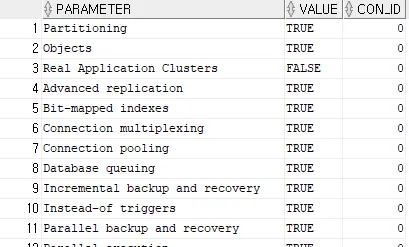
- TRUE는 별도의 설치는 필요 없지만 구매해야 함
- FALSE는 별도 설치 필요
RMAN 암호화된 백업
- RMAN은 필요한 키 관리를 사용할 수 있는 경우 테이프 또는 디스크에 암호화된 백업을 생성할 수 있음
- RMAN 암호화에서는 Oracle Wallet에 보유된 암호 기반 키나 생성된 키를 사용 가능
- RMAN 백업 암호화는 Enterprise Edition의 데이터베이스에서만 사용 가능, compatible parameter를 10.2.0 이상으로 설정해야 함
- oracle advanced security 옵션이 필요(디스크에 암호화)
- OSB(Oracle Secure Backup) 를 사용하여 암호화 제공(테이프에 암호화)
CONFIGURE ENCRYPTION FOR DATABASE OFF; # default
CONFIGURE ENCRYPTION ALGORITHM 'AES128'; # default
select * from v$rman_encryption_algorithms;
패스워드 모드의 백업 암호화(password encrypted backup)
MAN> list backup;

specification does not match any backup in the repository
암호화 설정
RMAN> set encryption on identified by oracle only;

executing command: SET encryption
백업
RMAN> backup as compressed backupset database;

Starting backup at 13-JAN-26
using channel ORA_DISK_1
channel ORA_DISK_1: starting compressed full datafile backup set
channel ORA_DISK_1: specifying datafile(s) in backup set
input datafile file number=00001 name=/u01/app/oracle/oradata/ORA19C/system01.dbf
input datafile file number=00003 name=/u01/app/oracle/oradata/ORA19C/sysaux01.dbf
input datafile file number=00004 name=/u01/app/oracle/oradata/ORA19C/undotbs01.dbf
input datafile file number=00007 name=/u01/app/oracle/oradata/ORA19C/users01.dbf
channel ORA_DISK_1: starting piece 1 at 13-JAN-26
channel ORA_DISK_1: finished piece 1 at 13-JAN-26
piece handle=/u01/app/oracle/fast_recovery_area/ORA19C/backupset/2026_01_13/o1_mf_nnndf_TAG20260113T155026_npctsl6t_.bkp tag=TAG20260113T155026 comment=NONE
channel ORA_DISK_1: backup set complete, elapsed time: 00:00:45
Finished backup at 13-JAN-26

Starting Control File and SPFILE Autobackup at 13-JAN-26
piece handle=/u01/app/oracle/fast_recovery_area/ORA19C/autobackup/2026_01_13/o1_mf_s_1222444271_npcttzh8_.bkp comment=NONE
Finished Control File and SPFILE Autobackup at 13-JAN-26
RMAN> list backup;

List of Backup Sets
===================

BS Key  Type LV Size       Device Type Elapsed Time Completion Time
------- ---- -- ---------- ----------- ------------ ---------------
46      Full    310.07M    DISK        00:00:35     13-JAN-26
        BP Key: 46   Status: AVAILABLE  Compressed: YES  Tag: TAG20260113T155026
        Piece Name: /u01/app/oracle/fast_recovery_area/ORA19C/backupset/2026_01_13/o1_mf_nnndf_TAG20260113T155026_npctsl6t_.bkp
  List of Datafiles in backup set 46
  File LV Type Ckp SCN    Ckp Time  Abs Fuz SCN Sparse Name
  ---- -- ---- ---------- --------- ----------- ------ ----
  1       Full 3129221    13-JAN-26              NO    /u01/app/oracle/oradata/ORA19C/system01.dbf
  3       Full 3129221    13-JAN-26              NO    /u01/app/oracle/oradata/ORA19C/sysaux01.dbf
  4       Full 3129221    13-JAN-26              NO    /u01/app/oracle/oradata/ORA19C/undotbs01.dbf
  7       Full 3129221    13-JAN-26              NO    /u01/app/oracle/oradata/ORA19C/users01.dbf

BS Key  Type LV Size       Device Type Elapsed Time Completion Time
------- ---- -- ---------- ----------- ------------ ---------------
47      Full    10.55M     DISK        00:00:00     13-JAN-26
        BP Key: 47   Status: AVAILABLE  Compressed: NO  Tag: TAG20260113T155111
        Piece Name: /u01/app/oracle/fast_recovery_area/ORA19C/autobackup/2026_01_13/o1_mf_s_1222444271_npcttzh8_.bkp
  SPFILE Included: Modification time: 13-JAN-26
  SPFILE db_unique_name: ORA19C
  Control File Included: Ckp SCN: 3129258      Ckp time: 13-JAN-26
SYS@ora19c> select handle, tag, encrypted from v$backup_piece;
HANDLE TAG ENC
------------------------------ -------------------------------- ---
...
TAG20260113T111035 NO
TAG20260113T142741 NO
TAG20260113T144509 NO
/u01/app/oracle/fast_recovery_ TAG20260113T155026 YES
area/ORA19C/backupset/2026_01_
13/o1_mf_nnndf_TAG20260113T155
026_npctsl6t_.bkp
/u01/app/oracle/fast_recovery_ TAG20260113T155111 YES
area/ORA19C/autobackup/2026_01
_13/o1_mf_s_1222444271_npcttzh
8_.bkp
47 rows selected.
- encrypted가 YES이면 암호화된 백업본
장애 유발
RMAN> shutdown immediate

database closed
database dismounted
Oracle instance shut down
RMAN> exit

Recovery Manager complete.
[oracle@ora19c ~]$ rm /u01/app/oracle/oradata/ORA19C/users01.dbf
[oracle@ora19c ~]$ sqlplus / as sysdba

SQL*Plus: Release 19.0.0.0.0 - Production on Tue Jan 13 15:55:36 2026
Version 19.3.0.0.0

Copyright (c) 1982, 2019, Oracle.  All rights reserved.

Connected to an idle instance.

SYS@ora19c> startup
ORACLE instance started.

Total System Global Area  830469472 bytes
Fixed Size                  8901984 bytes
Variable Size             662700032 bytes
Database Buffers          150994944 bytes
Redo Buffers                7872512 bytes
Database mounted.
ORA-01157: cannot identify/lock data file 7 - see DBWR trace file
ORA-01110: data file 7: '/u01/app/oracle/oradata/ORA19C/users01.dbf'
손상된 데이터파일 offline 후 데이터베이스 open
SYS@ora19c> alter database datafile 7 offline;

Database altered.

SYS@ora19c> alter database open;

Database altered.
RMAN 접속
[oracle@ora19c ~]$ rman target /

Recovery Manager: Release 19.0.0.0.0 - Production on Tue Jan 13 15:56:52 2026
Version 19.3.0.0.0

Copyright (c) 1982, 2019, Oracle and/or its affiliates.  All rights reserved.

connected to target database: ORA19C (DBID=1271306228)

RMAN> list failure;

using target database control file instead of recovery catalog
Database Role: PRIMARY

List of Database Failures
=========================

Failure ID Priority Status    Time Detected Summary
---------- -------- --------- ------------- -------
122        HIGH     OPEN      13-JAN-26     One or more non-system datafiles are missing
restore 수행 시 암호화로 인한 오류 발생
RMAN> restore datafile 7;

Starting restore at 13-JAN-26
allocated channel: ORA_DISK_1
channel ORA_DISK_1: SID=32 device type=DISK

channel ORA_DISK_1: starting datafile backup set restore
channel ORA_DISK_1: specifying datafile(s) to restore from backup set
channel ORA_DISK_1: restoring datafile 00007 to /u01/app/oracle/oradata/ORA19C/users01.dbf
channel ORA_DISK_1: reading from backup piece /u01/app/oracle/fast_recovery_area/ORA19C/backupset/2026_01_13/o1_mf_nnndf_TAG20260113T155026_npctsl6t_.bkp                                                                                RMAN-00571: ===========================================================
RMAN-00569: =============== ERROR MESSAGE STACK FOLLOWS ===============
RMAN-00571: ===========================================================
RMAN-03002: failure of restore command at 01/13/2026 15:57:29
ORA-19870: error while restoring backup piece /u01/app/oracle/fast_recovery_area/ORA19C/backupset/2026_01_13/o1_mf_nnndf_TAG20260113T155026_npctsl6t_.bkp
ORA-19913: unable to decrypt backup
ORA-28365: wallet is not open
복호화
RMAN> set decryption identified by oracle;

executing command: SET decryption
복구 수행
RMAN> recover datafile 7;

Starting recover at 13-JAN-26
using channel ORA_DISK_1

starting media recovery
media recovery complete, elapsed time: 00:00:01

Finished recover at 13-JAN-26

RMAN> alter database datafile 7 online;

Statement processed
Password File
SYS@ora19c> show parameter remote_login_passwordfile

NAME                                 TYPE        VALUE
------------------------------------ ----------- ------------------------------
remote_login_passwordfile string EXCLUSIVE- sysdba role을 이용해서 오라클에 접속할 때 인증 체크는
- OS 인증 방식
- 패스워드 인증 방식
Password File 삭제
[oracle@ora19c dbs]$ pwd
/u01/app/oracle/product/19.3.0/dbhome_1/dbs
[oracle@ora19c dbs]$ ls
c-2078830292-20260112-00  hc_ora19c.dat  initora19c.ora  lkORA19C     snapcf_ora19c.f   spfileora19c.ora
c-2078830292-20260112-01  hc_rcdb.dat    initrcdb.ora    lkRCDB       snapcf_rcdb.f
hc_clone.dat              init.ora       lkCLONE         orapwora19c  spfileora19c.bak
[oracle@ora19c dbs]$ ll orapwora19c
-rw-r-----. 1 oracle oinstall 2048 Nov 25 14:10 orapwora19c
[oracle@ora19c dbs]$ rm orapwora19c
sqldeveloper 접속 시 오류 발생
요청한 작업을 수행하는 중 오류 발생:

ORA-01017: invalid username/password; logon denied
01017. 00000 -  "invalid username/password; logon denied"
*Cause:
*Action:
업체 코드 1017
Password File 생성
- sysdba 롤을 받은 사용자에 대한 인증 체크
orapw<sid>
# 패스워드 복잡도가 너무 낮아서(길이가 짧음) 오류 발생
[oracle@ora19c dbs]$ orapwd file=$ORACLE_HOME/dbs/orapwora19c password=oracle

OPW-00029: Password complexity failed for SYS user : Password must contain at least 8 characters.

# format 지정
[oracle@ora19c dbs]$ orapwd file=$ORACLE_HOME/dbs/orapwora19c format=12 password=oracle

[oracle@ora19c dbs]$ ll orapwora19c
-rw-r-----. 1 oracle oinstall 2048 Jan 13 16:42 orapwora19c
sysdba 롤 부여
SYS@ora19c> grant sysdba to hr;

Grant succeeded.
[oracle@ora19c ~]$ sqlplus hr/hr as sysdba
SQL*Plus: Release 19.0.0.0.0 - Production on Tue Jan 13 16:47:46 2026
Version 19.3.0.0.0
Copyright (c) 1982, 2019, Oracle. All rights reserved.
Connected to:
Oracle Database 19c Enterprise Edition Release 19.0.0.0.0 - Production
Version 19.3.0.0.0
SYS@ora19c> show user
USER is "SYS"- 일반 유저에 sysdba 롤을 부여하면 hr로 접속하더라도 내부적으로는 sys 유저로 접속함
패스워드 대소문자 구분(11g)
SYS@ora19c> show parameter sec_case_sensitive_logon

NAME                                 TYPE        VALUE
------------------------------------ ----------- ------------------------------
sec_case_sensitive_logon boolean TRUE'Courses > 아이티윌 오라클 DBA 과정' 카테고리의 다른 글
| [아이티윌 오라클 DBA 과정 91기] 260115 TIL (0) | 2026.01.15 |
|---|---|
| [아이티윌 오라클 DBA 과정 91기] 260114 TIL (1) | 2026.01.14 |
| [아이티윌 오라클 DBA 과정 91기] 260112 TIL (0) | 2026.01.13 |
| [아이티윌 오라클 DBA 과정 91기] 260109 TIL (0) | 2026.01.11 |
| [아이티윌 오라클 DBA 과정 91기] 260108 TIL (0) | 2026.01.08 |