[아이티윌 오라클 DBA 과정 91기] 260116 TIL
2026. 1. 20. 18:06ㆍCourses/아이티윌 오라클 DBA 과정
SQL*Loader(Cont.)
conventional path load
준비
drop table hr.test purge;

create table hr.test(
    id number constraint test_id_pk primary key,
    name varchar2(30) not null,
    phone varchar2(15) constraint test_phone_unique unique,
    sal number constraint test_sal_ck check(sal > 1000),
    mgr number constraint test_mgr_fk references hr.test(id)) tablespace users;

select * from dba_constraints where owner = 'HR' and table_name = 'TEST';
select index_name, uniqueness, status from dba_indexes where owner = 'HR' and table_name = 'TEST';
[oracle@ora19c data]$ vi insa.ctl
[oracle@ora19c data]$ cat insa.ctl
load data
infile insa.dat
truncate
into table hr.test
fields terminated by ',' optionally enclosed by '"'
(id,name,phone,sal,mgr)
[oracle@ora19c data]$ vi insa.dat
[oracle@ora19c data]$ cat insa.dat
1,"james","010-9999-0000",2000, -- 입력
2,"grace","010-7777-7777",500,1 -- bad, sal < 1000
3,"scott","010-7777-7777",3000,1 -- 입력
3,"lucas","010-1004-1004",4000,2 -- bad, 2번이 입력되지 않으므로 fk 위반
4,,"010-1234-1004",5000,1 -- bad, name은 not null
5,"oracle","010-0001-0001",6000,6 --bad, mgr에 해당하는 id가 없으므로 fk 위반
[oracle@ora19c data]$ ls
insa.ctl insa.dat데이터 로드
[oracle@ora19c data]$ sqlldr hr/hr control=insa.ctl

SQL*Loader: Release 19.0.0.0.0 - Production on Fri Jan 16 10:05:29 2026
Version 19.3.0.0.0

Copyright (c) 1982, 2019, Oracle and/or its affiliates.  All rights reserved.

Path used:      Conventional
Commit point reached - logical record count 6

Table HR.TEST:
  0 Rows successfully loaded.

Check the log file:
  insa.log
for more information about the load.
[oracle@ora19c data]$ ls
insa.bad insa.ctl insa.dat insa.log- 1번 데이터의 mgr이 null로 인식이 안돼서 입력되지 않음에 따라 연쇄적으로 정상 데이터들이 입력되지 못함
[oracle@ora19c data]$ cat insa.log
...
   Column Name                  Position   Len  Term Encl Datatype
------------------------------ ---------- ----- ---- ---- ---------------------
ID                                  FIRST     *   ,  O(") CHARACTER
NAME                                 NEXT     *   ,  O(") CHARACTER
PHONE                                NEXT     *   ,  O(") CHARACTER
SAL                                  NEXT     *   ,  O(") CHARACTER
MGR                                  NEXT     *   ,  O(") CHARACTER

Record 1: Rejected - Error on table HR.TEST, column MGR.
Column not found before end of logical record (use TRAILING NULLCOLS)
Record 2: Rejected - Error on table HR.TEST.
ORA-02290: check constraint (HR.TEST_SAL_CK) violated

Record 3: Rejected - Error on table HR.TEST.
ORA-02291: integrity constraint (HR.TEST_MGR_FK) violated - parent key not found

Record 4: Rejected - Error on table HR.TEST.
ORA-02291: integrity constraint (HR.TEST_MGR_FK) violated - parent key not found

Record 5: Rejected - Error on table HR.TEST, column NAME.
ORA-01400: cannot insert NULL into ("HR"."TEST"."NAME")

Record 6: Rejected - Error on table HR.TEST.
ORA-02291: integrity constraint (HR.TEST_MGR_FK) violated - parent key not found
...
trailing nullcols추가
[oracle@ora19c data]$ vi insa.ctl
[oracle@ora19c data]$ cat insa.ctl
load data
infile insa.dat
truncate
into table hr.test
fields terminated by ',' optionally enclosed by '"'
trailing nullcols
(id,name,phone,sal,mgr)
[oracle@ora19c data]$ sqlldr hr/hr control=insa.ctl
SQL*Loader: Release 19.0.0.0.0 - Production on Fri Jan 16 10:13:46 2026
Version 19.3.0.0.0
Copyright (c) 1982, 2019, Oracle and/or its affiliates. All rights reserved.
Path used: Conventional
Commit point reached - logical record count 6
Table HR.TEST:
2 Rows successfully loaded.
Check the log file:
insa.log
for more information about the load.SYS@ora19c> select * from hr.test;
ID NAME PHONE SAL MGR
---------- -------------------------------------------------- --------------- ---------- ----------
1 james 010-9999-0000 2000
3 scott 010-7777-7777 3000 1direct path load
준비
[oracle@ora19c data]$ vi insa.ctl
[oracle@ora19c data]$ cat insa.ctl
unrecoverable load data
infile insa.dat
truncate
into table hr.test
fields terminated by ',' optionally enclosed by '"'
trailing nullcols
(id,name,phone,sal,mgr)
데이터 로드
[oracle@ora19c data]$ sqlldr hr/hr control=insa.ctl direct=true

SQL*Loader: Release 19.0.0.0.0 - Production on Fri Jan 16 10:22:33 2026
Version 19.3.0.0.0

Copyright (c) 1982, 2019, Oracle and/or its affiliates.  All rights reserved.

Path used:      Direct

Load completed - logical record count 6.

Table HR.TEST:
  5 Rows successfully loaded.

Check the log file:
  insa.log
for more information about the load.- not null 위반하는 4번 데이터를 제외하고 제약 조건 위반하는 데이터들이 모두 들어감
SYS@ora19c> select * from hr.test;

        ID NAME                                               PHONE                  SAL        MGR
---------- -------------------------------------------------- --------------- ---------- ----------
         1 james                                              010-9999-0000         2000
         2 grace                                              010-7777-7777          500          1
         3 scott                                              010-7777-7777         3000          1
         3 lucas                                              010-1004-1004         4000          2
5 oracle 010-0001-0001 6000 6- not null 빼고 나머지 제약조건은 disable novalidate로 바뀜
- 유니크 인덱스도 unusable로 바뀜
SYS@ora19c> select constraint_name, status, validated, deferrable,deferred from dba_constraints where owner = 'HR' and table_name = 'TEST';

CONSTRAINT_NAME                STATUS                         VALIDATED     DEFERRABLE     DEFERRED
------------------------------ ------------------------------ ------------- -------------- ----------
SYS_C007728                    ENABLED                        VALIDATED     NOT DEFERRABLE IMMEDIATE
TEST_MGR_FK                    DISABLED                       NOT VALIDATED NOT DEFERRABLE IMMEDIATE
TEST_SAL_CK                    DISABLED                       NOT VALIDATED NOT DEFERRABLE IMMEDIATE
TEST_ID_PK                     DISABLED                       NOT VALIDATED NOT DEFERRABLE IMMEDIATE
TEST_PHONE_UNIQUE              DISABLED                       NOT VALIDATED NOT DEFERRABLE IMMEDIATE

SYS@ora19c> select index_name, uniqueness, status from dba_indexes where owner = 'HR' and table_name = 'TEST';

INDEX_NAME                     UNIQUENES STATUS
------------------------------ --------- ----------
TEST_ID_PK                     UNIQUE    UNUSABLE
TEST_PHONE_UNIQUE              UNIQUE    UNUSABLE
SPOOL
- SQL Developer가 없는 경우 spool을 통해 데이터 추출 가능
[oracle@ora19c data]$ vi emp.sql
[oracle@ora19c data]$ cat emp.sql
set pagesize 0
set linesize 200
set termout off
set feedback off
set echo off
set trimspool on

spool emp.dat
select * from hr.employees;
spool off

set pagesize 1000
set termout on
set feedback on
set echo off

[oracle@ora19c data]$ ls
emp.sql  insa.bad  insa.ctl  insa.dat  insa.log
set termout off: 결과물을 화면에 출력하지 않도록 설정set feedback off: 107 rows selected 같이 쿼리 수행 결과를 출력하지 않도록 설정set echo off: sql이 출력되지 않도록 설정set trimspool on: 데이터 사이 공백 제거
SQL*Plus 에서 emp.sql 실행
[oracle@ora19c data]$ sqlplus / as sysdba

SQL*Plus: Release 19.0.0.0.0 - Production on Fri Jan 16 11:15:08 2026
Version 19.3.0.0.0

Copyright (c) 1982, 2019, Oracle.  All rights reserved.

Connected to:
Oracle Database 19c Enterprise Edition Release 19.0.0.0.0 - Production
Version 19.3.0.0.0

SYS@ora19c> @emp.sql
SYS@ora19c> !

[oracle@ora19c data]$ ls
emp.dat  emp.sql  insa.bad  insa.ctl  insa.dat  insa.log

[oracle@ora19c data]$ tail emp.dat
        197 Kevin                Feeney                    KFEENEY                   650.507.9822         23-MAY-06 SH_CLERK         3000                       124            50
        198 Donald               OConnell                  DOCONNEL                  650.507.9833         21-JUN-07 SH_CLERK         2600                       124            50
        199 Douglas              Grant                     DGRANT                    650.507.9844         13-JAN-08 SH_CLERK         2600                       124            50
        200 Jennifer             Whalen                    JWHALEN                   515.123.4444         17-SEP-03 AD_ASST          4400                       101            10
        201 Michael              Hartstein                 MHARTSTE                  515.123.5555         17-FEB-04 MK_MAN          13000                       100            20
        202 Pat                  Fay                       PFAY                      603.123.6666         17-AUG-05 MK_REP           6000                       201            20
        203 Susan                Mavris                    SMAVRIS                   515.123.7777         07-JUN-02 HR_REP           6500                       101            40
        204 Hermann              Baer                      HBAER                     515.123.8888         07-JUN-02 PR_REP          10000                       101            70
        205 Shelley              Higgins                   SHIGGINS                  515.123.8080         07-JUN-02 AC_MGR          12008                       101           110
        206 William              Gietz                     WGIETZ                    515.123.8181         07-JUN-02 AC_ACCOUNT       8300                       205           110
CSV 형식으로 spool
[oracle@ora19c data]$ vi emp.sql
[oracle@ora19c data]$ cat emp.sql
set pagesize 0
set linesize 200
set termout off
set feedback off
set echo off
set trimspool on

spool emp.dat
select employee_id||','||last_name||','||salary||','||to_char(hire_date,'yyyy-mm-dd hh24:mi:ss')||','||department_id from hr.employees;
spool off

set pagesize 1000
set termout on
set feedback on
set echo on
[oracle@ora19c data]$ sqlplus hr/hr
SQL*Plus: Release 19.0.0.0.0 - Production on Fri Jan 16 11:32:25 2026
Version 19.3.0.0.0
Copyright (c) 1982, 2019, Oracle. All rights reserved.
Last Successful login time: Fri Jan 16 2026 11:28:11 +09:00
Connected to:
Oracle Database 19c Enterprise Edition Release 19.0.0.0.0 - Production
Version 19.3.0.0.0
HR@ora19c> @emp.sql
HR@ora19c> exit
Disconnected from Oracle Database 19c Enterprise Edition Release 19.0.0.0.0 - Production
Version 19.3.0.0.0
[oracle@ora19c data]$ ls
emp.dat emp.sql insa.bad insa.ctl insa.dat insa.log
[oracle@ora19c data]$ head emp.dat
100,King,24000,2003-06-17 00:00:00,90
101,Kochhar,17000,2005-09-21 00:00:00,90
102,De Haan,17000,2001-01-13 00:00:00,90
103,Hunold,9000,2006-01-03 00:00:00,60
104,Ernst,6000,2007-05-21 00:00:00,60
105,Austin,4800,2005-06-25 00:00:00,60
106,Pataballa,4800,2006-02-05 00:00:00,60
107,Lorentz,4200,2007-02-07 00:00:00,60
108,Greenberg,12008,2002-08-17 00:00:00,100
109,Faviet,9000,2002-08-16 00:00:00,100spool 로 받은 데이터를 sql*loader로 로드
테이블 준비
[oracle@ora19c data]$ sqlplus hr/hr

SQL*Plus: Release 19.0.0.0.0 - Production on Fri Jan 16 11:28:11 2026
Version 19.3.0.0.0

Copyright (c) 1982, 2019, Oracle.  All rights reserved.

Last Successful login time: Fri Jan 16 2026 11:00:30 +09:00

Connected to:
Oracle Database 19c Enterprise Edition Release 19.0.0.0.0 - Production
Version 19.3.0.0.0

HR@ora19c> drop table hr.emp purge;
drop table hr.emp purge
              *
ERROR at line 1:
ORA-55610: Invalid DDL statement on history-tracked table

HR@ora19c> conn / as sysdba
Connected.
SYS@ora19c> alter table hr.emp no flashback archive;

Table altered.

SYS@ora19c> drop table hr.emp purge;

Table dropped.

SYS@ora19c> create table hr.emp tablespace users as select employee_id, last_name, salary, hire_date, department_id from hr.employees where 1 = 2;

Table created.
데이터 로드
[oracle@ora19c data]$ vi emp.ctl
[oracle@ora19c data]$ cat emp.ctl
unrecoverable load data
infile emp.dat
insert
into table hr.emp
fields terminated by ',' optionally enclosed by '"'
trailing nullcols
(employee_id, last_name, salary, hire_date date 'yyyy-mm-dd hh24:mi:ss', department_id)

[oracle@ora19c data]$ sqlldr hr/hr control=emp.ctl direct=true

SQL*Loader: Release 19.0.0.0.0 - Production on Fri Jan 16 12:04:25 2026
Version 19.3.0.0.0

Copyright (c) 1982, 2019, Oracle and/or its affiliates.  All rights reserved.

Path used:      Direct

Load completed - logical record count 107.

Table HR.EMP:
  107 Rows successfully loaded.

Check the log file:
  emp.log
for more information about the load.- date 자료형은 데이터 파일에 저장된 형식에 맞춰 형식 지정해줘야 함
EXTERNAL TABLE(9i)
- 데이터는 데이터베이스 바깥쪽(OS)에 두고 마치 데이터베이스에 저장된 데이터처럼 다루는 것이 필요할 때 사용
- read만 가능
논리적인 디렉터리 생성
SYS@ora19c> create directory emp_dir as '/home/oracle/data';

Directory created.

SYS@ora19c> col directory_name format a30
SYS@ora19c> col directory_path format a30
SYS@ora19c> select * from dba_directories where directory_name = 'EMP_DIR';

OWNER                          DIRECTORY_NAME                 DIRECTORY_PATH                 ORIGIN_CON_ID
------------------------------ ------------------------------ ------------------------------ -------------
SYS                            EMP_DIR                        /home/oracle/data                          0
논리적 디렉터리를 사용할 수 있는 객체 권한 부여
SYS@ora19c> grant read, write on directory emp_dir to hr;

Grant succeeded.

SYS@ora19c> select * from dba_tab_privs where grantee = 'HR';

GRANTEE                        OWNER                          TABLE_NAME                     GRANTOR                    PRIVILEGE                       GRA HIE COM TYPE                     INH
------------------------------ ------------------------------ ------------------------------ ------------------------------ ------------------------------ --- --- --- ------------------------ ---
HR                             SYS                            DBMS_STATS                     SYS                        EXECUTE                         NO  NO  NO  PACKAGE                  NO
HR                             SYS                            PRIV_MGR                       SYS                        EXECUTE                         NO  NO  NO  PROCEDURE                NO
HR                             SYS                            EMP_DIR                        SYS                        READ                    NO  NO  NO  DIRECTORY                NO
HR                             SYS                            EMP_DIR                        SYS                        WRITE                           NO  NO  NO  DIRECTORY                NO
external table 생성
SYS@ora19c> drop table hr.emp purge;

Table dropped.

SYS@ora19c> create table hr.emp (
    id number(4),
    name varchar2(30),
    sal number,
    hire date,
    dept_id number(4) )
    organization external (
        type oracle_loader
        default directory emp_dir
        access parameters (
            records delimited by newline
            badfile 'emp.bad'
            logfile 'emp.log'
            fields terminated by ','
            missing field values are null
            ( id, name, sal, hire char date_format date mask "yyyy-mm-dd hh24:mi:ss", dept_id )
        )
        location ('emp.dat', 'emp_new.dat')
    );
select * from hr.emp;
select * from dba_objects where object_name = 'EMP' and owner = 'HR';
select * from dba_tables where table_name = 'EMP' and owner = 'HR';
external table 조회
select * from dba_external_tables;
external table 위치 조회
select * from dba_external_locations;
external table 을 사용하여 데이터 이관
create table hr.insa tablespace users as select * from hr.emp;
select * from hr.insa;
select * from dba_tables where table_name = 'INSA' and owner = 'HR';
덤프를 받으면서 external table로 사용하기
create table hr.emp_ext
(id, name, sal, hire, deptno)
organization external
(
    type oracle_datapump
    default directory emp_dir
    location('emp.dump')
)
as
select employee_id, last_name, salary, to_char(hire_date, 'yyyy-mm-dd'), department_id
from hr.employees;- 덤프는 바이너리 형식이기 때문에 파일 내용을 직접 볼 수 없음
CTAS 또는 insert 서브쿼리로 데이터 로드
create table hr.emp2026
as
select * from hr.emp_ext;

truncate table hr.emp2026;

insert into hr.emp2026 select * from hr.emp_ext;
Table Reorganization(REORG)
1. Data Pump
테이블 생성 및 데이터 입력
# 테이블 생성
create table hr.reorg_test(id number, name varchar2(100)) tablespace users;

# 데이터 10000건 입력
begin
    for i in 1..10000 loop
        insert into hr.reorg_test(id, name) values(i, 'table/index reorganization example');
    end loop;
end;
/

select count(*) from hr.reorg_test; -- 10000

# 테이블 세그먼트가 사용 중인 익스텐트 및 블록 수
select extents, blocks, bytes from dba_segments where segment_name = 'REORG_TEST';
select tablespace_name, extent_id, bytes from dba_extents where segment_name = 'REORG_TEST';

제약 조건 추가
alter table hr.reorg_test add constraint reort_id_pk primary key(id);

select * from dba_constraints where table_name = 'REORG_TEST';
select * from dba_indexes where table_name = 'REORG_TEST';

# 인덱스 세그먼트가 사용 중인 익스텐트 및 블록 수
select extents, blocks, bytes from dba_segments where segment_name = 'REORT_ID_PK';
select tablespace_name, extent_id, bytes from dba_extents where segment_name = 'REORT_ID_PK';


테이블 정보 조회
select num_rows, blocks, avg_row_len from dba_tables where table_name = 'REORG_TEST';

-- 통계 정보 수집
exec dbms_stats.gather_table_stats('hr', 'reorg_test')

select num_rows, blocks, avg_row_len, to_char(last_analyzed, 'yyyy-mm-dd hh24:mi:ss') last_analyzed from dba_tables where table_name = 'REORG_TEST';

-- 실행 계획 확인
select * from hr.reorg_test where id = 100;


데이터 삭제
delete from hr.reorg_test where id > 100;
commit;

select count(*) from hr.reorg_test; -- 100
select extents, blocks, bytes from dba_segments where segment_name = 'REORG_TEST';
select tablespace_name, extent_id, bytes from dba_extents where segment_name = 'REORG_TEST';
select extents, blocks, bytes from dba_segments where segment_name = 'REORT_ID_PK';

select num_rows, blocks, avg_row_len from dba_tables where table_name = 'REORG_TEST';

-- 실행 계획 확인
select * from hr.reorg_test where id = 100;
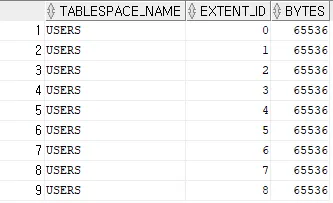

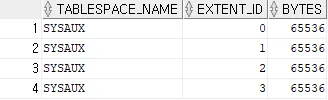


- 데이터 수가 변했더라도 마지막 수집한 통계 정보를 기반으로 나옴
- 통계 정보가 그대로이기 때문에 실행 계획도 바뀌지 않음
# row수 * row 평균 길이 / 블록 크기
select 10000 * 39 / 8192 from dual; -- 47.607421875
export
[oracle@ora19c data]$ expdp system/oracle directory=emp_dir dumpfile=reorg_test.dmp tables=hr.reorg_test

Export: Release 19.0.0.0.0 - Production on Fri Jan 16 17:02:09 2026
Version 19.3.0.0.0

Copyright (c) 1982, 2019, Oracle and/or its affiliates.  All rights reserved.

Connected to: Oracle Database 19c Enterprise Edition Release 19.0.0.0.0 - Production
Starting "SYSTEM"."SYS_EXPORT_TABLE_01":  system/******** directory=emp_dir dumpfile=reorg_test.dmp tables=hr.reorg_test
Processing object type TABLE_EXPORT/TABLE/TABLE_DATA
Processing object type TABLE_EXPORT/TABLE/INDEX/STATISTICS/INDEX_STATISTICS
Processing object type TABLE_EXPORT/TABLE/STATISTICS/TABLE_STATISTICS
Processing object type TABLE_EXPORT/TABLE/STATISTICS/MARKER
Processing object type TABLE_EXPORT/TABLE/TABLE
Processing object type TABLE_EXPORT/TABLE/CONSTRAINT/CONSTRAINT
. . exported "HR"."REORG_TEST"                           9.570 KB     100 rows
Master table "SYSTEM"."SYS_EXPORT_TABLE_01" successfully loaded/unloaded
******************************************************************************
Dump file set for SYSTEM.SYS_EXPORT_TABLE_01 is:
  /home/oracle/data/reorg_test.dmp
Job "SYSTEM"."SYS_EXPORT_TABLE_01" successfully completed at Fri Jan 16 17:02:29 2026 elapsed 0 00:00:19

[oracle@ora19c data]$ ls reorg_test.dmp
reorg_test.dmp
truncate
truncate table hr.reorg_test;import
[oracle@ora19c data]$ impdp system/oracle directory=emp_dir dumpfile=reorg_test.dmp tables=hr.reorg_test content=data_only

Import: Release 19.0.0.0.0 - Production on Fri Jan 16 17:03:45 2026
Version 19.3.0.0.0

Copyright (c) 1982, 2019, Oracle and/or its affiliates.  All rights reserved.

Connected to: Oracle Database 19c Enterprise Edition Release 19.0.0.0.0 - Production
Master table "SYSTEM"."SYS_IMPORT_TABLE_01" successfully loaded/unloaded
Starting "SYSTEM"."SYS_IMPORT_TABLE_01":  system/******** directory=emp_dir dumpfile=reorg_test.dmp tables=hr.reorg_test content=data_only
Processing object type TABLE_EXPORT/TABLE/TABLE_DATA
. . imported "HR"."REORG_TEST"                           9.570 KB     100 rows
Job "SYSTEM"."SYS_IMPORT_TABLE_01" successfully completed at Fri Jan 16 17:03:51 2026 elapsed 0 00:00:05
select count(*) from hr.reorg_test; -- 100
select extents, blocks, bytes from dba_segments where segment_name = 'REORG_TEST';
select tablespace_name, extent_id, bytes from dba_extents where segment_name = 'REORG_TEST';
select extents, blocks, bytes from dba_segments where segment_name = 'REORT_ID_PK';
select tablespace_name, extent_id, bytes from dba_extents where segment_name = 'REORT_ID_PK';
# 통계 정보 수집
exec dbms_stats.gather_table_stats('hr', 'reorg_test')
select num_rows, blocks, avg_row_len, to_char(last_analyzed, 'yyyy-mm-dd hh24:mi:ss') last_analyzed from dba_tables where table_name = 'REORG_TEST';




'Courses > 아이티윌 오라클 DBA 과정' 카테고리의 다른 글
| [아이티윌 오라클 DBA 과정 91기] 260120 TIL (1) | 2026.01.20 |
|---|---|
| [아이티윌 오라클 DBA 과정 91기] 260119 TIL (0) | 2026.01.20 |
| [아이티윌 오라클 DBA 과정 91기] 260115 TIL (0) | 2026.01.15 |
| [아이티윌 오라클 DBA 과정 91기] 260114 TIL (1) | 2026.01.14 |
| [아이티윌 오라클 DBA 과정 91기] 260113 TIL (0) | 2026.01.13 |